ok, I confused the white theme screen shot with the account log-in, doh! I have now found the “Restore a backup” link, my goodness that’s easy to miss.
Indeed it is.
I’m sure I’m stating the obvious here, but there are at least two issues with this.
The official container is not fully compatible with the container structure that @mackid1993 uses. The “database“ folder is one issue. The capitalization of the music folder may be another.
The second issue is maintenance. If @mackid1993 isn’t going to be actively maintaining things, what happens if there’s an issue in the future or need for a change?
I’m interested in the approach here because there are similar questions about the TrueNAS app catalogue.
I mean in all fairness the container is on autopilot. I haven’t had to maintain it.
It just kind of rebuilds on its own every month. So far it hasn’t broken yet. Although I wouldn’t know because I stopped using Roon because I feel like the software quality has declined.
what is the purpose of mentioning this in every recent post you make?
I don’t know. I’m just stating that I don’t use the software anymore so I don’t want to maintain the container but I’m trying to do a service to the community by providing some sort of continuity for the users of the container I built.
I spent $700.00 on software and I would have expected better support and quality honestly. So I think I have a right to be miffed.
I see that you’ve posted your feedback in Feedback - thank you for that. However, I don’t see any support requests from you. I would have thought that would be your best route for getting your issues addressed.
I don’t have any interest in getting anything addressed. I was looking to see how to best move forward with this container I built. Given the comments here I think my best course of action is deprecating it and removing it from Unraid CA. I also have no interest in obtaining support. I’m a sysadmin MS in Cyber Security. I work in IT. I don’t need support from Roon. I’d like ARC to work reliably in my car. The container is no longer available and users should use the instructions from Roon Labs to install on Unraid.
@Stephen give me sign when i can test the hotfix
still standing by on 2.64 
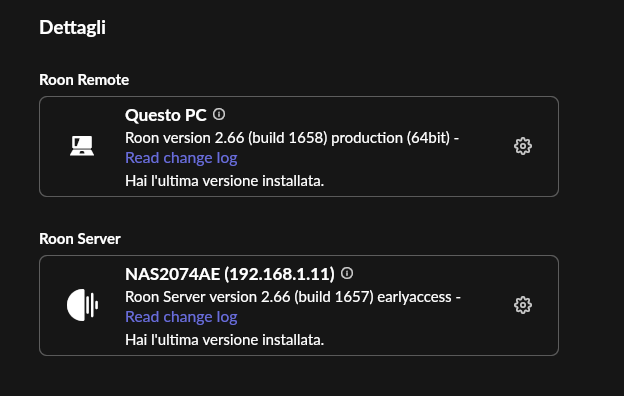
Update 2.65 –> 2.66 succeeded 
On QNAP I can confirm the update to 2.66 now works from a remote.
@Stephen there is an error message though. It does not affect the update:


The same error message in my case also.
Yes
Working here as well
Just upgraded automatic from 2.64 on qnap docker to 2.66!
I think I finally understood what was going on with my QNAP Docker installation, so I’m posting this in case it helps someone else.
I’m running Roon Server in Docker on a QNAP TS-453Be. The server was working fine on Roon Server 2.64, but every attempt to update to 2.65 failed. Roon could see the update, download it, start the installation, and then fail.
At first I suspected almost everything: permissions, read-only mounts, Docker Compose, QNAP Container Station, backup paths, etc.
My old /Roon folder was mounted like this:
/share/Multimedia/RoonOnNAS:/Roon
That folder already contained the previous Roon installation, database, settings and application state.
In the end, the fix was not to keep trying to update that existing installation. I created a completely new folder and used it as /Roon:
/share/Multimedia/RoonFresh:/Roon
My compose file is now:
services:
  roonserver:
    image: ghcr.io/roonlabs/roonserver:latest
    container_name: roonserver
    network_mode: host
    environment:
      - ROON_INSTALL_BRANCH=earlyaccess
      - TZ=Europe/Rome
    volumes:
      - /share/Multimedia/RoonFresh:/Roon
      - /share/Musica:/Music
      - /share/Multimedia/RoonBackups:/RoonBackups
    restart: unless-stopped
    logging:
      driver: local
After starting from the clean /Roon folder, Roon installed correctly. I then restored my library from a valid backup.
The key point for me was this: in Docker, /Roon is not just the database folder. It also contains the Roon installation state. So if something inside that folder becomes inconsistent after a failed update, recreating the container or pulling the image may not be enough, because the problematic state is still inside the mounted /Roon volume.
Once I moved to a fresh /Roon folder, everything behaved normally again.
Interestingly, after that clean installation, even in-app updates started working correctly again. Note the YAML text: I temporarily switched to Early Access and the server updated successfully from within Roon itself.
My practical recommendation for QNAP Docker users with failed updates would be:
-
Don’t keep retrying the same failed update.
-
Create a new clean
/Roonfolder. -
Recreate the container using that new folder.
-
Restore from a proper Roon backup.
-
Keep backups outside the
/Roonfolder.
This solved the issue completely for me.
Actually they made a hotfix for the rights problem in 2.66
There were right issues inside the tar procedure of the update.
It couldn’t update from 2.64 to 2.65
They fixed that in 2.66
There was a workaround by recreating the docker in ea then again switch to production
I have followed the docker install instruction, but it seems the install is in a loop. I the logs it tells me on every line in the log that: “Cannot write: No space left on device.“
See a couple of these lines below:
oonServer/RoonDotnet/shared/Microsoft.NETCore.App/10.0.7/System.Xml.Serialization.dll: Cannot write: No space left on device
tar: RoonServer/RoonDotnet/shared/Microsoft.NETCore.App/10.0.7/System.Xml.XDocument.dll: Cannot write: No space left on device
tar: RoonServer/RoonDotnet/shared/Microsoft.NETCore.App/10.0.7/System.Xml.XPath.XDocument.dll: Cannot write: No space left on device
tar: RoonServer/RoonDotnet/shared/Microsoft.NETCore.App/10.0.7/System.Xml.XPath.dll: Cannot write: No space left on device
tar: RoonServer/RoonDotnet/shared/Microsoft.NETCore.App/10.0.7/System.Xml.XmlDocument.dll: Cannot write: No space left on device
tar: RoonServer/RoonDotnet/shared/Microsoft.NETCore.App/10.0.7/System.Xml.XmlSerializer.dll: Cannot write: No space left on device
tar: RoonServer/RoonDotnet/shared/Microsoft.NETCore.App/10.0.7/System.Xml.dll: Cannot write: No space left on device
tar: RoonServer/RoonDotnet/shared/Microsoft.NETCore.App/10.0.7/System.dll: Cannot write: No space left on device
tar: RoonServer/RoonDotnet/shared/Microsoft.NETCore.App/10.0.7/WindowsBase.dll: Cannot write: No space left on device
tar: RoonServer/RoonDotnet/shared/Microsoft.NETCore.App/10.0.7/createdump: Cannot write: No space left on device
tar: RoonServer/RoonDotnet/shared/Microsoft.NETCore.App/10.0.7/libSystem.Globalization.Native.so: Cannot write: No space left on device
tar: RoonServer/RoonDotnet/shared/Microsoft.NETCore.App/10.0.7/libSystem.IO.Compression.Native.so: Cannot write: No space left on device
tar: RoonServer/RoonDotnet/shared/Microsoft.NETCore.App/10.0.7/libSystem.Native.so: Cannot write: No space left on device
tar: RoonServer/RoonDotnet/shared/Microsoft.NETCore.App/10.0.7/libSystem.Net.Security.Native.so: Cannot write: No space left on device
tar: RoonServer/RoonDotnet/shared/Microsoft.NETCore.App/10.0.7/libSystem.Security.Cryptography.Native.OpenSsl.so: Cannot write: No space left on device
tar: RoonServer/RoonDotnet/shared/Microsoft.NETCore.App/10.0.7/libclrjit.so: Cannot write: No space left on device
tar: RoonServer/RoonDotnet/shared/Microsoft.NETCore.App/10.0.7/libcoreclr.so: Cannot write: No space left on device
tar: RoonServer/RoonDotnet/shared/Microsoft.NETCore.App/10.0.7/libcoreclrtraceptprovider.so: Cannot write: No space left on device
tar: RoonServer/RoonDotnet/shared/Microsoft.NETCore.App/10.0.7/libhostpolicy.so: Cannot write: No space left on device
tar: RoonServer/RoonDotnet/shared/Microsoft.NETCore.App/10.0.7/libmscordaccore.so: Cannot write: No space left on device
tar: RoonServer/RoonDotnet/shared/Microsoft.NETCore.App/10.0.7/libmscordbi.so: Cannot write: No space left on device
tar: RoonServer/RoonDotnet/shared/Microsoft.NETCore.App/10.0.7/mscorlib.dll: Cannot write: No space left on device
tar: RoonServer/RoonDotnet/shared/Microsoft.NETCore.App/10.0.7/netstandard.dll: Cannot write: No space left on device
tar: RoonServer/Server/Base.dll: Cannot write: No space left on device
tar: RoonServer/Server/Broker.Messages.Core.dll: Cannot write: No space left on device
tar: RoonServer/Server/DnsClient.dll: Cannot write: No space left on device
tar: RoonServer/Server/ICSharpCode.SharpZipLib.dll: Cannot write: No space left on device
tar: RoonServer/Server/JetBrains.FormatRipper.dll: Cannot write: No space left on device
tar: RoonServer/Server/JetBrains.HabitatDetector.dll: Cannot write: No space left on device
tar: RoonServer/Server/JetBrains.Profiler.Api.dll: Cannot write: No space left on device
tar: RoonServer/Server/LevelDb.Database.dll: Cannot write: No space left on device
tar: RoonServer/Server/MessagePack.dll: Cannot write: No space left on device
tar: RoonServer/Server/Messaging.dll: Cannot write: No space left on device
tar: RoonServer/Server/Metadata.Messages.dll: Cannot write: No space left on device
tar: RoonServer/Server/Roon.Messages.dll: Cannot write: No space left on device
tar: RoonServer/Server/Roon.ServiceProxy.Base.dll: Cannot write: No space left on device
tar: RoonServer/Server/Roon.ServiceProxy.DeviceMapService.dll: Cannot write: No space left on device
Does anybody have an idea what the problem is and how to resolve this?
Had the same issue in the first place with my QNAP (assuming you are installing on QNAP machine?). Cannot tell you the exact way to solve things in your case, but these error messages like ´No space left on device´ had to do with a wrong share path for the container (the first path in the container script), or insufficient permission to write into it (not with actual lack of space). Wrong names for volumes as part of the share path (like ´DataVol1´ which is just an alias/logical name, not working in a share path).
I had a similar issue. Clear your log files (which caused the device to fill up).
Uninstall and re-install, ensuring that your YAML text is generated using QNAP as the first option. I had ‘unix’ and it was creating the wrong folder paths causing the loop in the log file.
I guess I am confused about the volumes and shares.
My volume name is DataVol1 and after that are my shares. So for the file locations in the yaml script, do I start with the volume or with mu share?
So in my case:
Do I need this:
/M_Media/Container/roon
Or this:
/DataVol1//M_Media/Container/roon