Just got back from Mong Kok in Hong Kong and scored a stainless steel FiiO M23. Have only listened thus far using it as a USB DAC fed from ARC on my iPhone because I couldn’t log into the play store from there, but it reads as Roon Ready and it’s Android 13 so hoping that it plays nice with bit perfect ARC. In any case I can put my entire FLAC library on a MicroSD.
Aesthetically it is a gorgeous stainless monolith that can’t quite fit in a pocket comfortably but is bag portable, carry able around the house, and I think will work well bedside, desk, coffee shop, airplane & the rest.
Sonically I’ve only listened to it for an hour with my Thieaudio Monarch MkII’s and 64audio u4s in a noisy audio store - the Monarch’s via 4.4 balanced and the u4s via 3.5 SE. Based on that very challenging environment, it’s glorious. Rivals my favorite desktop solid state rig. The DAC is remarkable at mid-bass detail retrieval which is my test. How they will sound in a better environment, I’ll tell you soon!
And yes, I’m taking a gamble that Roon and ARC will work as desired. It’s a new model, I’m buying it in HK before there’s a lot of info / reviews for our use case. But I got a great deal, and a close friend swore the retailer is legit. I’ll let you know when I get home in a few days!
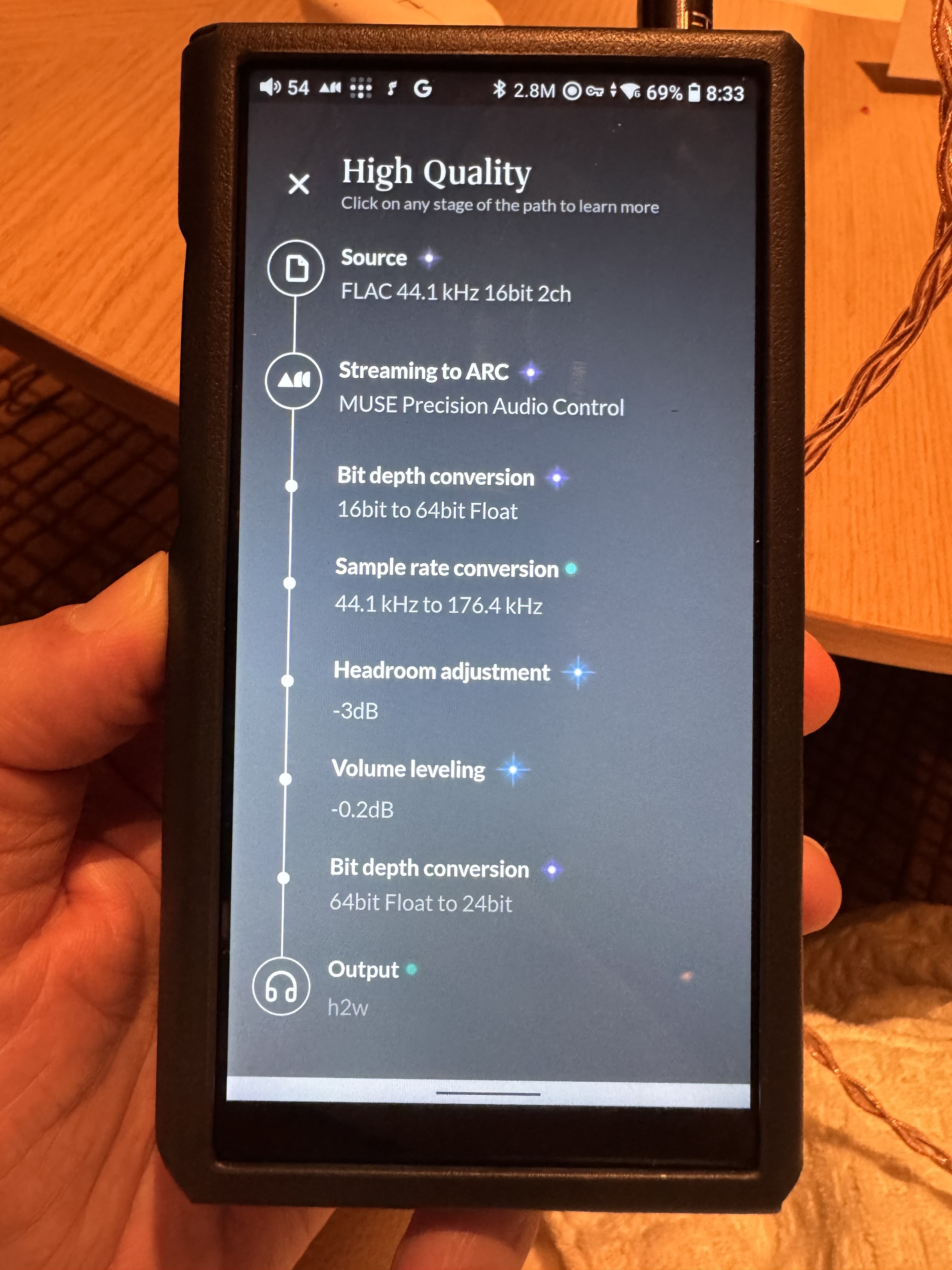
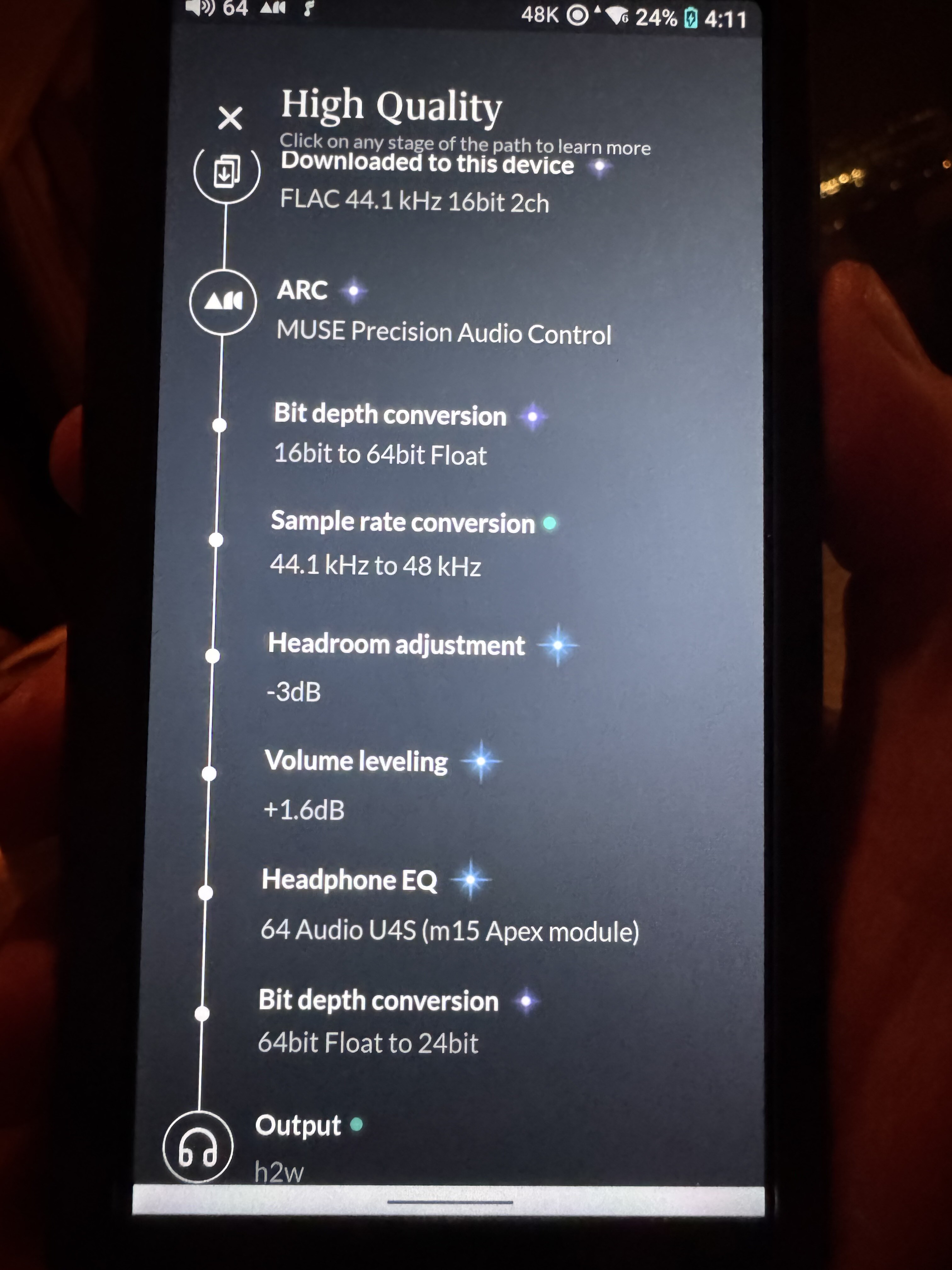
ARC installs flawlessly, and is working great delivering at hi-res (see signal path below), and downloads smart and otherwise are working great
Tailscale installed and is working great, so didn’t have to open any ports back up. It took a bit of finger mashing - the “log in” button on the opening screen of the Tailscale app didn’t work but then I went into settings and the rest was easy
sounds glorious; I do prefer the balanced out to the SE thus far but it’s early days… and let’s be honest, the phones I prefer I have balanced cables for
On ARC there is a slight crackle when I start play on a new album - nearly inaudible
You won’t and can’t get but perfect via ARC on it. As you can see Arc upsamples. It will be bit perfect for Roon Ready and other apps just not ARC as ARC isn’t capable of it on Android using the inbuilt DAC of the DAP.
Arc will also likely change what rate it upsamples to based on what the last rate that was played on the dac. This is what I noticed with my M11 plus. That the rate ARC decides the device can handle changes based on the rate of what was played previously not in arc. At a reboot it would default to highest rate supported over network being 384/24. For all input to be upsampled to this in ARC is undesirable as it will have high battery drain.
Also the DAPS sample rate clearly shows DSD 2.8 mHz do you have AllToDSD turned on?
Good catch! Yes, that was completely unnecessary - I think the guy who was demoing it for me in the shop turned it on. Turned that off. Many thanks!
Interesting. As you can see, now that I turned all-to-DSD off, it’s going to 48k instead of 176k. Are you saying that this is a bug that Roon needs to fix?
Hope the doesn’t dampen your enthusiasm but this device has been out since last March. We even have a thread on it
Even though it’s not brand new, it’s a great device.
It’s not an Android bug. This has been discussed quite a bit over the past few years. I can’t find the thread now but I tested a number of music playing apps on Android including Qobuz and others and they explicitly set the sample rate correctly based on the track that’s playing. They adjust on a track-by-track basis. ARC doesn’t.
I created a suite of files that can help with this. I’ll share the archive. I’ve shared it on previous threads on this topic, but I’m not having any luck finding them with search. It’s been a couple of years since I posted it, I think.
One folder has minute-long samples, the other has 1-second long samples. They’re silence. You won’t hear them. To use them, you need to fully quit ARC, then play one of the samples in a music player that correctly sets the device’s sample rate. On the M23, the easiest app to use is the FiiO Music app. So just load, for example, the 1-second samples into that app, then play the one you want. Once you’ve done that, you can launch ARC and it will use the sample rate that you played in the FiiO Music app.
Google Drive is treating the sharing link a little strangely. When you click this, it’ll show you the contents of the archive. You can use the controls at the top of the window to download the entire archive.
Here’s the link:
This is the only solution I’ve been able to come up with.
Thanks for the clarification. I can’t use ARC due to the size of my music library (a little fact, i.e. that ARC does NOT work with large libraries, that Team Roon won’t own up to) so I don’t have any experience with any mobile device and ARC.
I thought you had one or another of these things. I must have misremembered. This topic is a bit of a sore spot for me. Other Android players don’t have the issue and it seems very fixable.
I didn’t know that ARC didn’t work for some people because of large libraries. I’m sure that’s at least as annoying as this issue
Wow. My library is 15K + albums and over 1/2 million tracks. I have no problem w/Rock server on Intel mini w/Syno NAS and successfully run ARC in the car.
How large is your library?
Ok, @gTunes I’m still going to say that these are not in wide supply in the US… that thread doesn’t really have many folks who have one… but all that said, you’re right it’s been a while! I stand, well, if not corrected at least a little bit wiser so thank you!
Now I read through a lot of the threads on DAPs. I have a couple questions…
To the best of your understanding, why is it harder for Roon to bypass the Android h2w audio system than it is for Qobuz, Tidal, UAPP, etc? Is it because Roon can do so much with resampling etc so it has to take sole input on what the capability of the device is? It’s just confusing to me why Qobuz, for instance, can simply play 44. 48, 96, 192, whatever the source is. And it seems like they aren’t doing custom dev work for every single DAP. Maybe I misunderstand.
So my M23 seems to present as “h2w” and has a native resolution of 48khz, and so no matter what track I play prior, everything gets resampled to 48 - whether 44, 96, 192, whatever source material. Everything goes to 48, no matter what I play prior. Any thoughts on why be? Your truck doesn’t seem to be fooling ARC in this case.
No its ARC it just sets it at what the system tells it. As these DAPS bypass Android SRC this rate chnages dependant on whats played. ARC assusmes its a standard Android device and has no idea about the SRC bypass or the DAC and is coded to only play at the rate the Android System reports back. As I said this rate will chnage based on what was last played to the DAC. If you play 192/24 vis Roon Ready for instance it will play bit perfect at that rate. If you then open ARC and start to play on my M11 Plus ARC sees it as only supporting 192/24 and all is resampled to that rate.
ARC is hard coded on Android to resample for compatability it doesn’t use the OS to route it so even if the OS has been modified to bypass SRC as these DAP’s do ARC wont bypass. Apps like Qobuz etc just pass the audio as it is and let the underlying architecture deal with it. If its capable of bitperfect it will pass bitperfect. ARC was written for phone/tablet compatability not DAP’s. The former are stuck with Android SRC which is generally 48/24, but can change dependant on the device. Roon think they can do a better job of this resampling themselves rather than rely on the architecture of the device so its coded to do it regardless of hardware specs. This is a conscious decision of Roons ARC development. Its the same on every single Android device. On my M11 Plus the precursor to the M23 as I said above the rate that ARC seems to see as the base system sample rate chaages based on what the DAC was switched to by apps that let the OS do the audio. If you use the Roon remote apps audio output on the device you get the same issues as ARC. Use its Roon Ready input and it works bit perfect up to DSD256.
All Roon need to do is let the sytem deal with the audio liek other apps and it would likley work. However in the past when Roon did this, it had all sorts of playback issues due to the complexity of their player architecture, I rememebr it back then it was dire and drop out all the time, so they made the decision to just hard manage the audio processng to the rate the device reports.
All this ARC stuff is way off topic so I really don’t want to keep on beating a dead horse, however here are the details about my setup. If anyone still feel the need to discuss this further then please send me a PM. Thanks!
To put it plainly: ARC not working is completely due to Roon and not my setup, as you will plainly see:
Network/IPS: Verizon Fios fiber optic with Fios router and Ethernet to Roon Core.
Roon Core: running in Docker on a Unraid server. Intel® Core™ i9-9900X CPU @ 3.50GHz, 64GB RAM, Nvidia GeForce GTX 1650 GPU . Core is installed on an SSD.
Media library: stored on a RAID array on the server.
Library details: 1.1 million tracks, 78K albums, with 61K local albums and 17K albums as Qobuz/Tidal favorites.
ARC will sometimes work while at home and on my local network (and what’s the use of ARC there when I can just use Roon Remote as a player?) but ARC NEVER works when away from home and on a 5G cell network or other WiFi network - NEVER works!!!
Argh. Similar to everyone else’s experience, I bought this device because I was sure I was going to listen to ARC more… but instead it’s pretty clear I will end up listening to pure audio mode and Qobuz native app, and maybe some Roon Ready. Not what I wanted! But…, it’s a lovely sounding device.
As always, @anon77144803 is the definitive source on this stuff.
I haven’t used my M11 much in recent months. I resuscitated it this morning to make sure I remember all of this correctly.
The TL;DR on this is that if you’re on the same network as your Roon server, you should run the Roon Ready app and use the Roon app to control playback to your device. There’s no point to ARC in this scenario - it’s just an exercise in frustration. Among other things, Roon Ready will deal with sample rates correctly.
I set up a Tasker task that runs at startup - it runs Roon Ready then Roon.
If you still want to get ARC working correctly…
The trick with my test tracks still works for me. I wonder if the step you missed is force quitting ARC before you use another app to set the devices sample rate.
The M11 is stuck on an ancient version of Android. I think 10. They commented a year or so ago that they would upgrade it to 11, but that never happened. The current version of Android is 15.
On the version that’s on the M11, force quit is a swipe up to bring up the app carousel, then right or left to get to ARC, then swipe it away. If you don’t do this, all bets are off because ARC will play at whatever the sample rate was set at when you launched it.
So force quit ARC, use some other app to set the sample rate by playing something at the rate you want, then run ARC and give it a shot. I tried it this morning with a variety of sample rates and they all work. I’m playing a track now whose native rate is 96/24 and ARC shows a sample rate conversion to 384/24 which is what I “set” it to using my silence track at that rate.
I used mine purely for Roon Ready, when I used Roon for my bedroom listening or in any room of the house. Now I use it with LMS instead but it gets same use cases, I just tend to use PlexAmp on my phone for out of house, always works.
Thanks but I would not go as far as definitive, only from my experience with the M11 plus, some DAPs ARC sticks at 48/24 all the time, it seems FiiO do something different that fools ARC.
Well, I’ll say I still love my M23. It’s built like a brick s—thouse, I have the stainless steel model.
Having 1TB of my music for flying is magic. Plus Qobuz downloads. It sounds lovely with Redbook - full and powerful, with Sony IER-M9’s, Monarch MkII’s, Andromeda 2020’s, 64audio U4s. All wonderful and authoritative. But fed DSD256 by Roon is phenomenal. These DAC chips are really great, and this machine has oomph.
 )
)