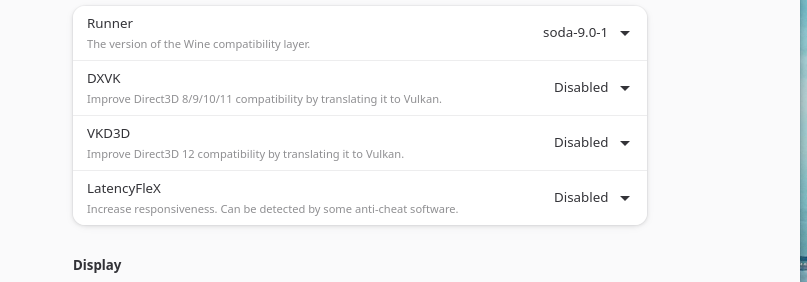
So I looked for the lock files and deleted them after stopping roonbridge service. Then i restarted the pc to be sure. The lock-files are recreated in ./tmp, but the warning also re-appeared. The endpoint is seen (outside wine, just as linux endpoint), I can select it and even start music but no sound, and playing stops after a few seconds. The journalctl still gives the warning arn: get lock file path: /tmp/.rnbhgem0- but this file does exist. So it appears to be something with permissions for accessing the dac, but before it just worked so no idea what has changed on the fedora/bazzite side. Thx anyway for thinking along!
Well, after a lot of searching and trying, the solution in my case resulted to be: in bottles I had to enforce alsa as standard audio output for all bottles. And I have music playing through roon in bottles on bazzite again.
Hi all, has anyone managed to get Roon running on bottles 63.2? I am on a Ubuntu fork and install the Roon app from within Bottles. It installs fine, but when I want to start it, nothing happens…
I had it working before, but that was on a Fedora 43 system if I recall correctly…
Roon works for me with 63.2 on Ubuntu. If you used the built-in recipe to install Roon you may want to remove the start entry for Roon from the list though IIRC (should reveal another shortcut for Roon that works).
PS: This is not a fresh install but one that already worked before and kept working through various component (Wine, Bottles, Runners, etc. and Roon) updates.
I did a fresh bottle and now it works flawlessly again. Not sure why, I didn’t touch anything.
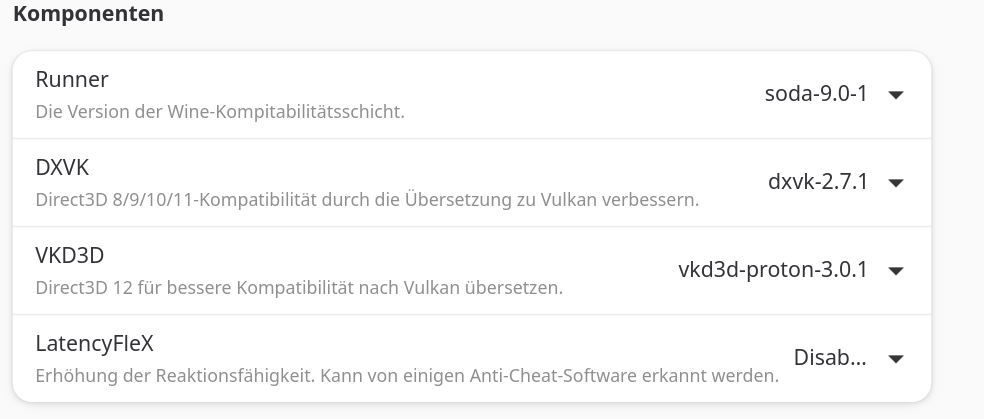
On TuxedoOS I have it running Bottles 64.1 fine with these now:
I post here the results of some investigations and fixes I made on the current state of Roon on Wine using the wayland driver (v. 11.13) without using bottles. This has been tested on the latest Arch (7.1.4-arch1-1).
Problem 1 – Roon crashes at startup
Roon calls the Windows API wminet_utils.GetErrorInfo()which is only a stub in Wine. This causes Wine to abort the application during startup.
Fix: Implement the missing API by forwarding the call to Wine’s existing OLE implementation (oleaut32.GetErrorInfo()). See (patch attached): Making sure you're not a bot!
Problem 2 – White window on startup (Wayland)
Roon may display a blank white window because Wine notifies the application that the Wayland window was ready before the compositor has fully finished configuring it.
Fix: Delay the notification by about 10 ms, allowing the compositor to complete the window setup before Roon starts rendering. See (patch attached): Making sure you're not a bot!
mjw
(You want nice, supportive? Call a damn helpline.)
139
I found it easier to run Wine 10.0 (on Ubuntu 24.04), and hold back updates causing the crash. However, on Ubuntu 26.04, Wine 10.0 is shipped, so no extra work to do.
Whatever works for you. I like a clean system with only one version of Wine installed. It also diminishes the risk of Wine 10 getting obsolete with new Roon releases.
mjw
(You want nice, supportive? Call a damn helpline.)
141
Ditto. I’ll take Wine 11.0 when I don’t need to patch, or if Roon breaks under 10.0. I don’t think there is much appetite to build from source here. But I appreciate your efforts, and hope WineHQ recognise the bugs.
Of course this requires some skills, I agree. Just adding that wine (from 11.10) has moved part of its audio processing to native Unix threads which is much more stable. I had random pops in DSD with my DAC that are now solved thank to this patch. Being up to date has its perks
mjw
(You want nice, supportive? Call a damn helpline.)
143
As I mentioned in the other thread, you should use the native Roon server or Roon bridge binaries on Linux, and Wine Bottles solely for control.