I switched servers to a new MacBook Air but most of my library did not migrate. The library in the previous server has also dropped most of the library.
I have located my library music in a number of music files including ITunes.
How do I retrieve my library music on my MacBook Air server and get them back in my Roon Library?
Thanks
Hello @Tim_deCocq
Thanks for reaching out! To better understand what happened, could you clarify how you migrated your Roon database to the new MacBook Air? Specifically:
- Did you restore a Roon backup onto the new server, or did you start with a fresh installation?
- In Settings → Storage, do the folder paths to your music match the ones you had before the migration? If the paths are different, Roon may not automatically recognize the files even though they’re present on disk.
Once we know how the migration was done and whether the storage paths align, we’ll be able to advise on the best way to get your full library back into Roon.
Hi @Tim_deCocq,
Please let us know if you have any questions. This thread will automatically close due to inactivity after a certain number of days without a response from the original poster.
We’ll watch for a response in the meantime. Thanks!
This topic was automatically closed after 16 hours. New replies are no longer allowed.
I have already asked this question and received a reply from “Connor”, but I did not receive this reply until my question expired.
Here I go again: A number of weeks ago. I changed servers from an old MacBook Pro to a new Mac Air Book. Ronn was backed up in my Mac ‘Time Machine’ but it was already backed up to a few music files in both the old (MacBook Pro) and new server. (MacBook Air). Including a “Music” File and an Itunes file. When I switched servers, only a fraction of my Library transfered over to my Roon Library. I believe that I did restore backup onto my new sever. Your technical support guy, Connor, asked if I started with a fresh installation. I don’t think I did as I do not know what a “fresh installation” means or how to do that. I am unaware if the “folder paths” to my music matched the ones I had prior to switching the server, but probably not. Can you please advise me further as to how to get my full library back on Roon. AND, please don’t notify me after my thread has been closed! Thanks
I’ve merged your post into the original request and re-opened the topic for you.
Okay, thanks for reopening my question. I await a solution
Good day @Tim_deCocq !
I hope you’re doing well.
As far as we understand you had a time machine backup that was restored from an older macbook to a newer one.
Therefore we have a few questions:
- Is all your music library stored on the same macbook or some of the music files are stored on some other device within local network ?
- After you have restored a time machine copy did Roon started from where it was left on the old macbook or it has started as a new installation (without your data) ?
- How did you transfer your music files from the Old Mac to a new one (in case you had all the music on local machine) ? Did you keep storing all the music with the same folders structures ?
- Could you please send us a screenshot from Roon’s settings from Storage section ?
Looking forward to your reply!
Regards.
All my music library seems to be stored in 2 “music” folders oe of which is an Itunes folder. Knowing next to nothing about computers and storing files, my Roon Library was simply discovered in these 2 files in my new MacBook Air which is now my new Roon server. My library was also on an old Ipad which I used as a Roon remote. I did not try to restore the library from the Time Machine backup because my new server contained contained the whole library when I switched over to the new server (MacBook) As I said, I never stored my music library anywhere, the old server just picked its own music folders. I will try to send a screen shot of from my Roon’s Storage section as requested but, it will likey be sent to you on a separate response as I don’t know how to attach a screen shot to this message. Thanks, Tim
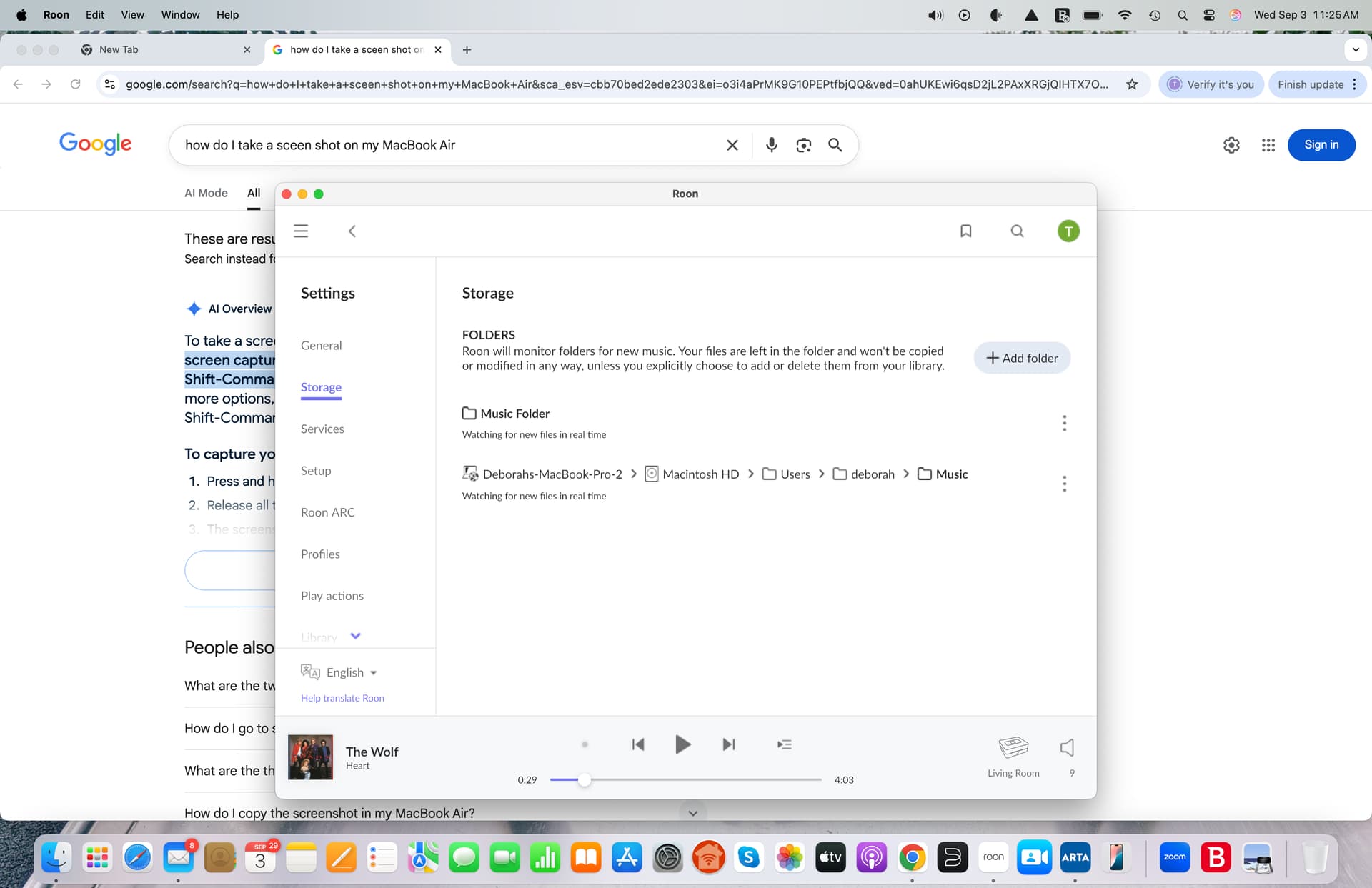
Hey @Tim_deCocq,
Thanks for the follow-up!
It may be good to become more familiar around where your local files are in general - you mention two separate music folders, both of which live on the Macbook Air you’re now using as your Roon Server.
This is good!
It sounds like you’ve restored a Time Machine backup to your new Macbook Air, which now mirrors your prior Mac in terms of all your files.
If you could, please open Roon and navigate to your Roon Settings by pressing the cogwheel icon.
From there, access your ‘Storage’ settings - it’ll look like this:
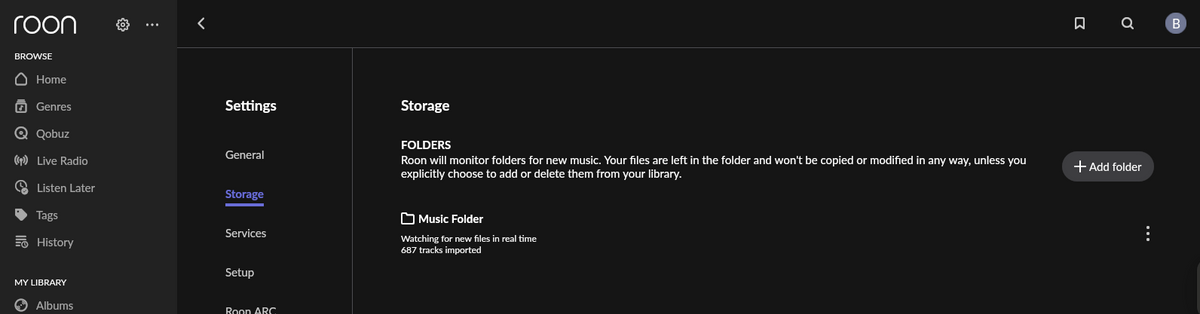
Do you already have folders added here? Do you see any errors?
Got it, thanks for the screenshot @Tim_deCocq!
Based on the screenshot, is there a second folder missing? If so, you can try adding it by clicking the ‘+ Add Folder’ button.
This will bring up a pop-up which will allow you to find and select your other music folders.
Let me know if this is the case, and if this makes sense! 
Thanks Ben, I discovered that the music that went into the other folder seems to be alot of repeated single recordings from my room library and a few albums which I can always download again if i want to. I think i would be satisfied if I were able to transfer the one “music” folder from my apple air to my roon library. I hope that you can help me with this process.
Hello @Tim_deCocq
Roon doesn’t have a built-in feature to transfer music files between computers. To move your “music” folder from your MacBook Air into your Roon library, you’ll need to copy the files manually. This can be done over your home network (file sharing between the two Macs) or by using external storage such as a USB flash drive or external hard drive.
Once the files are on the machine where your Roon library is running, you can point Roon to the new location in Settings > Storage so that the music is added to your library if not already.
Thanks for your reply, but you will really need to provide instuctions in layman’s terms. For example ‘copying files manually’ and, ‘file sharing between the 2 Macs’.
My current server already has the music file folder so why would I need to include my old Mac?
You also suggest using a flash drive to transfer the existing music file folder which is already in my Roon Storage. What I need to do is to get the music into my roon library. Did you happen to read the previous notes from Ben? I am very confused as to what to do.
If you look back in this thread, you will see the screen shot I sent to Ben. You will see in roon storage that there is a Music folder which I want to merge with my roon library. How do I di this? or, maybe you can send this reply through to Ben. Thanks
Further to above reply, it seems as if you are instructing me to now, “point Roon to the new location in Settings>Storage to allow the Music to be added to my Library”. Okay; and how do I point Roon to the Music folder in Storage. Thanks Ben
Hello @Tim_deCocq,
Thank you for your follow-up! Let’s go step by step to make sure your music folder is properly added to your Roon Library. I’ll keep the instructions simple and detailed.
Understand “Watched Folders”
Roon uses Watched Folders to know where your music is stored. Adding a folder as a “Watched Folder” tells Roon: “Check this location and include all music here into my library.”
You can read Roon’s guide here:
Open Roon Storage Settings
- Open Roon on your MacBook Air.
- Click the cogwheel (Settings) in the top-right corner.
- Go to Storage.
- This is where Roon lists all folders it checks for music.
Add Your Music Folder
Since your “Music” folder already exists on the MacBook Air, you just need to tell Roon to watch it.
- In the Storage section, click + Add Folder.
- A pop-up window will appear to locate your folder.
- Navigate to the folder that contains your music (for example,
/Users/YourName/Music). - Select it, then click Open (or Choose) to add it.
- Roon will ask if it should add the folder as a Watched Folder — confirm Yes.
Add Music from Another Computer (Network Folder)
If you have music stored on another computer (for example, your old MacBook), Roon can also watch a folder on that device over your local network.
- Make sure the folder on the other Mac is shared on the network. You can use Mac’s File Sharing feature.
- On your new MacBook Air (the Roon server), click + Add Folder in Roon Storage.
- In the pop-up, navigate to the network-shared folder.
- Add it as a Watched Folder.
Roon will now include all music from the networked folder into your library, just like a local folder.
- You can read this detailed guide here:
How to create a shared folder on Mac and add it as a Watched Folder in Roon
Wait for Roon to Import
- Roon will start scanning the folder. Depending on the size of your music library, this may take a few minutes.
- You will see your albums and tracks gradually appearing in your library.
Share a Folder via SMB on macOS
If your music is on another Mac and you want Roon to watch it over the network, you’ll need to enable File Sharing (SMB).
- On the Mac that has the music folder, go to:
2.Apple menu > System Settings > General > Sharing*. - Turn on File Sharing.
- Click the info button (i) next to File Sharing.
- In the list of Shared Folders, click + and select the folder that contains your music.
- In the Users section, set permissions (Read Only is usually enough for Roon).
- By default, macOS shares folders over SMB.
- To confirm the SMB path:
- Click the folder in the list, then you will see something like:
smb://MacBook-Pro.local/Music
Summary
- Open Settings > Storage in Roon.
- Click + Add Folder.
- Navigate to your local Music folder and add it as a Watched Folder.
- (Optional) Add music from another Mac or network location using the shared folder option.
- Wait for Roon to scan and populate your library.
After this, all music files in those folders will be part of your Roon library. You don’t need to copy them manually or use external drives.
1 Like
Hello Vadim, Did not work.
As I said before, when I go into storage, the folder is already listed as you can see from the screen shot from a few weeks ago. When I click on the folder it brings up a window saying “Folder Listings”. The listing includes a number of files. It doesn’t matter if I choose 1 or all of the listed folders the response (in Red) says, " This folder is already added". As well, I do not receive the messages that you said would show up. For example, I never see an option for: “OPEN or CHOOSE”. Roon never asks, “Add the Folder as a Watched Folder” nor does it ask to “Confirm” my choices.
I have updated roon software.
Now what? Thanks