My NUC updated just like any other update. So no, you don’t have to start over.
It depends.
Old Nucleus and older ROCK which were installed in Legacy BIOS mode only update to RoonOS 1.0, and the only way to get them to 3.0 is to reinstall from scratch in UEFI mode. This seems to be what applies to @Mike_O_Neill to whom @Geoff_Coupe replied.
Nucleus One/Titan and newer ROCK installs that were already done in UEFI mode were already on RoonOS 2.1 and they update to 3.0 by normal updates.
Thanks for this. I have a friend that went through that last night, and was surprised he had to manually make the BIOS change. This explains it.
Cheers.
I have an Intel NUC version 8 - is it possible to install RoonOS 3.0 here? Please help.
All the best
Frank Denmark
I’ve installed RoonOS 3.0 on a 7th generation NUC - but you first must install a UEFI version to get to at least version 2 of RoonOS.
I’m trying to wrap my head around what you guys are saying but it might as well be in chinese  . My Roon Rock fails to update from 2.74 to 3. It downloads, tries to install and stays the same. Do I have to reinstall the whole thing like if it was a new install using a UEFI version? I can’t remember how I initially installed it.
(BTW, it’s a SimplyNUC nuc7i7dnfe)
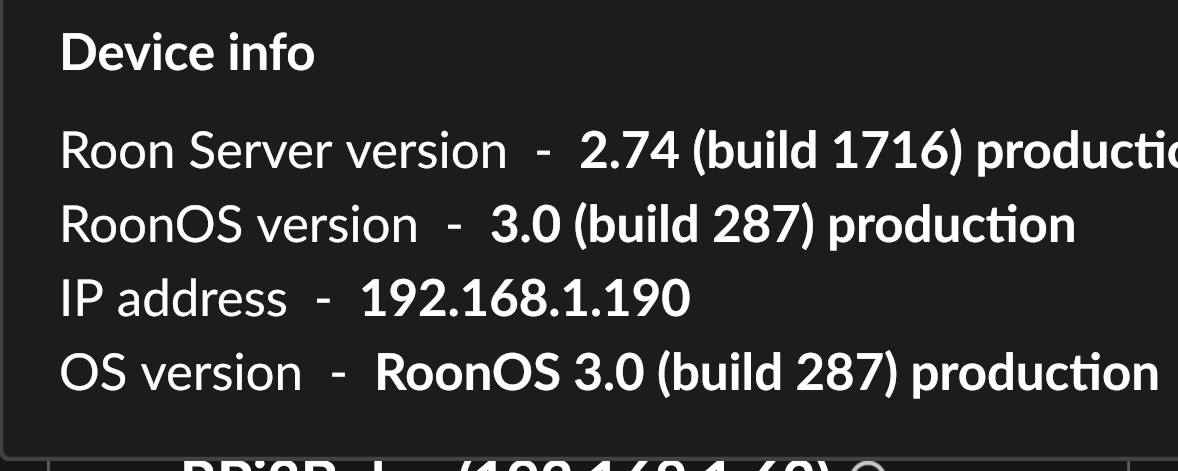
You need to distinguish RoonOS (the operating system for ROCK and Nucleus) and RoonServer (the Roon server software running on top of RoonOS just like Microsoft Word runs on top of Windows).
Roon/RoonServer is currently at version 2.74 and this does not change right now.
RoonOS is what was now updated to 3.0.
- Until this new update, RoonOS was either at version 2.1 if your ROCK was installed in UEFI mode after ROCK started to support it in November 2022, or version 1.0 if your ROCK is older and was installed in Legacy BIOS mode.
- If RoonOS was at 2.1 (installed in UEFI mode), it updates automatically to 3.0.
- If it was (is) at 1.0 (installed in Legacy BIOS mode), it does NOT automatically update to 3.0; this would require reinstalling from scratch in UEFI mode.
The separate versions for both components are listed separately on the ROCK’s web admin UI.
Thanks! Roon OS is 2.1 and Server is 2.74. So it was installed in UEFI mode. For some reason it keeps telling me there’s an update but fails to install it. I think I’ve already run into this problem before so I’ll look for the solution I was given then.
Is anything being undertaken for OG ROCK users on a NUC in legacy BIOS mode?
I have a NUC7i7DN, the quad core version used in the Rev B Nucleus+ Also a backup NUC5i3
I know these NUCs can be changed to use a UEFI boot mode, as I recently built a DietPi based version to run UnifiOS to monitor network and WiFi AP.
Ok, it managed to update once I plugged the NUC to a TV. This is all voodoo witchcraft to me but now all is fine
Yep, this is a known bug for some older NUCs. Plugging in a HDMI device will prevent crashes.
Right, it should update from OS 2.1 to OS 3.0 then, without further ado.
- If you go to the Roon control app (GUI) > Settings > About, it should offer an update for ROCK.
- Or to the web admin UI and click Reinstall in the Operating System section.
Either should work. If not, something is odd and I’d recommend a tech support case via Support → Get Help
Not that we know of. The question came up in Early Access, as you know, and this is to my knowledge the most official statement we have:
Yean, most computers supported UEFI for 10 or 15 years
Hi
Thanks for answering back - could please help me where to find UEFI version (link) to install on my nuc 
All the best and thanks for the help
Frank / Denmark
One question more - when i instæl UEFi version - will my nuc ver. 8 update automatically to version 3.0 or will I need a link on where to download version 3.0
thanks again for the help
Frank / Denmark
Just follow the installation guide…
Hi
successfully upgraded OS from v1 to v3 - simpler than anticipated on my NUC. Get the Roon banner on TV, can select the display for TV but it doesn’t show currently playing, just the banner. Any ideas?
Thanks
Keith
.
Thanks for this, I was where you were. Didn’t dare to ask 