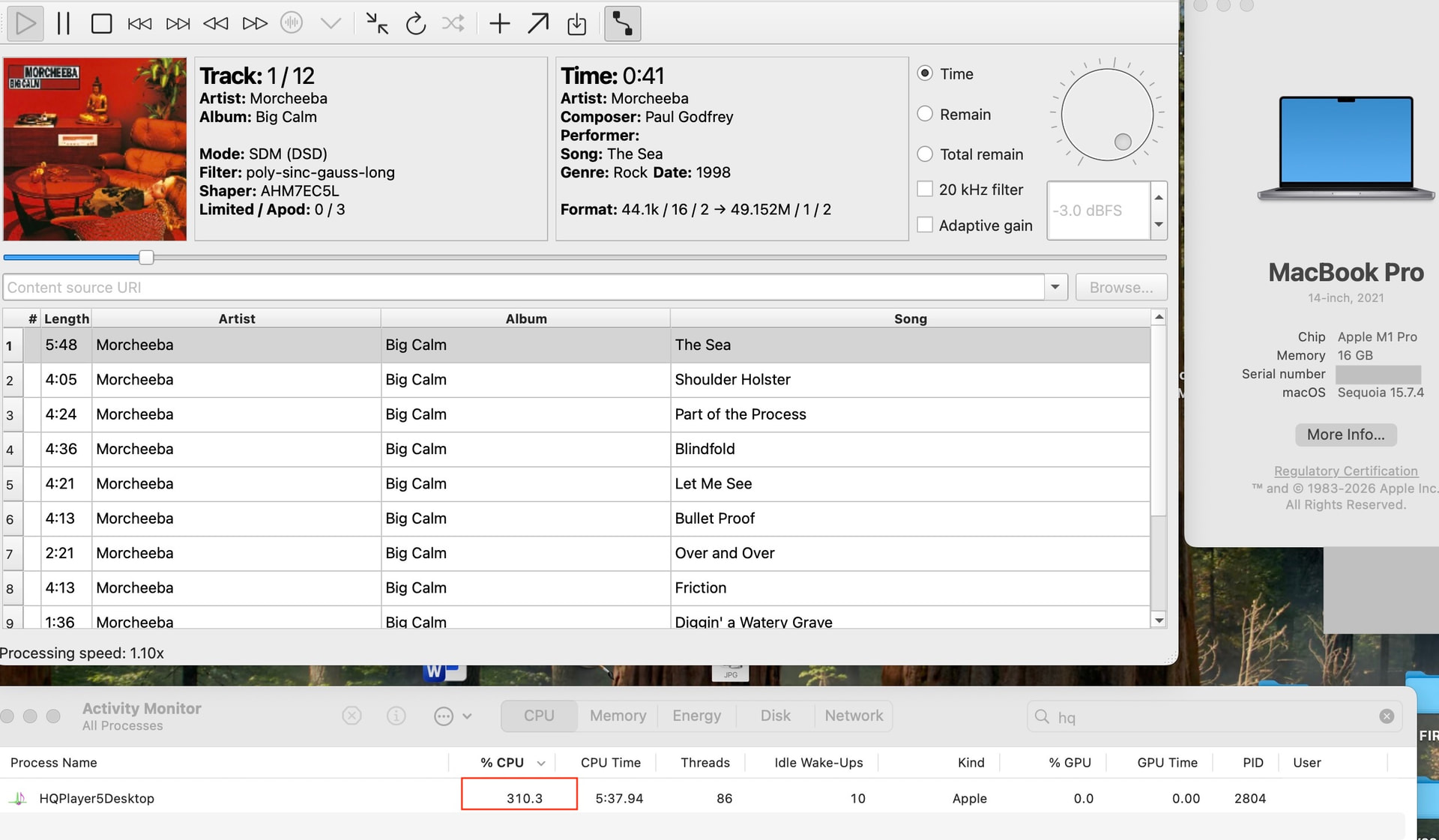
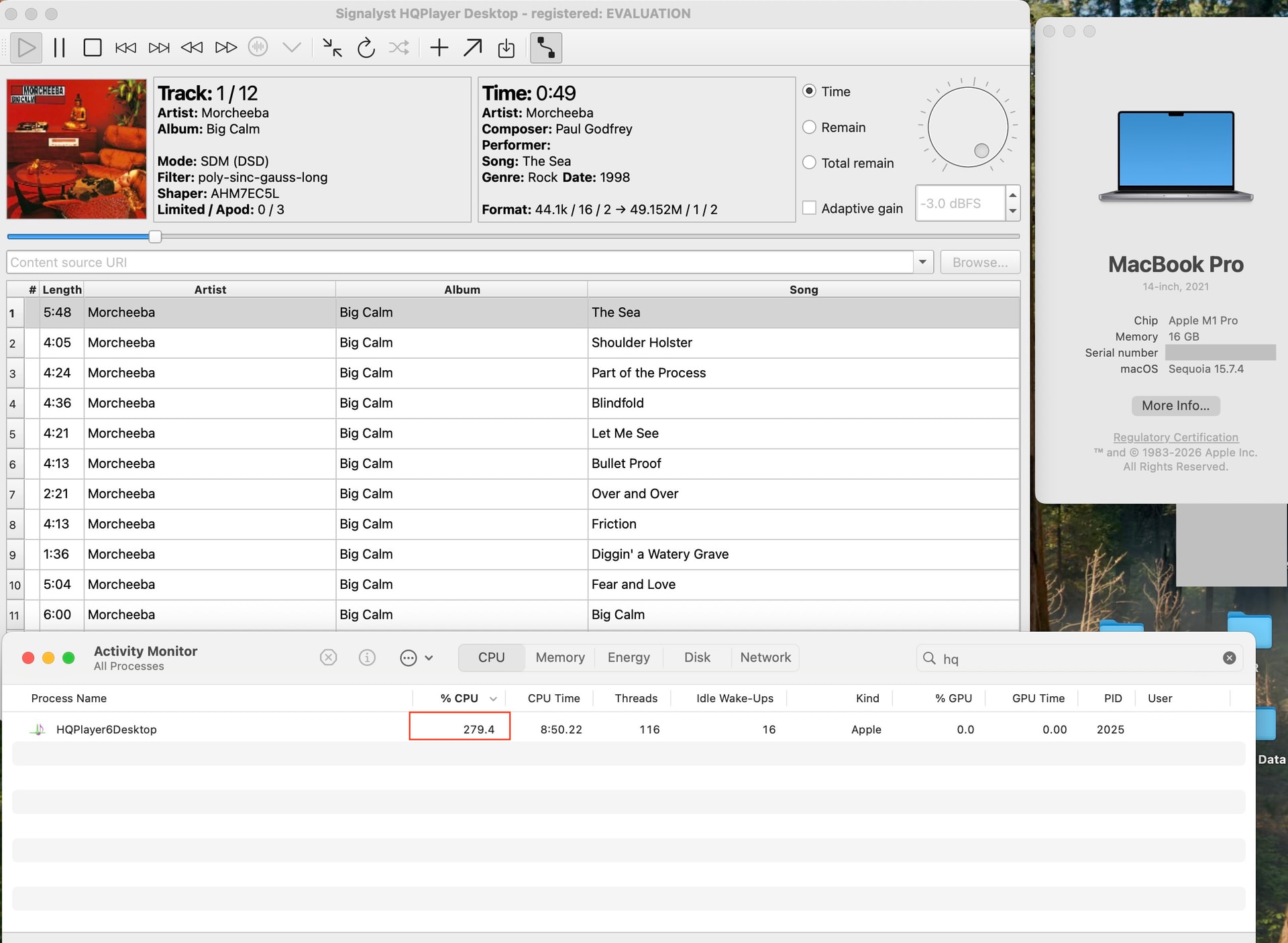
Yes, I’ve updated the figure for 6 after some more measurements.
1 Like
I’m not a benchmark expert, but the numbers show better CPU optimization on version 6 compared to 5.
Testing DSD 1024 experimental modulators. 10% improvement V6
1 Like
Yes I noticed improved performance with 6.0 also. Processing speed indicator on HQP is around x3.2 - 3.4 with 5.17.2 while it’s at x4.6-4.8 with 6.0. HWInfo shows ~2% lower cpu usage. I have AMD 9700X CPU on my server.
2 Likes
Hi @jussi_laako
I am glad to see new desktop v6 release with upnp renderer function. So I upgrade my v5 immediately.
But I had some problem to make upnp renderer working, all my device can not find HQPlayer as upnp renderer in the network
So I check the log and did see upnp renderer start but with strange ip address.
My local network ip is 192.168.90.x, But upnp renderer get 174.32.48.1
Log:
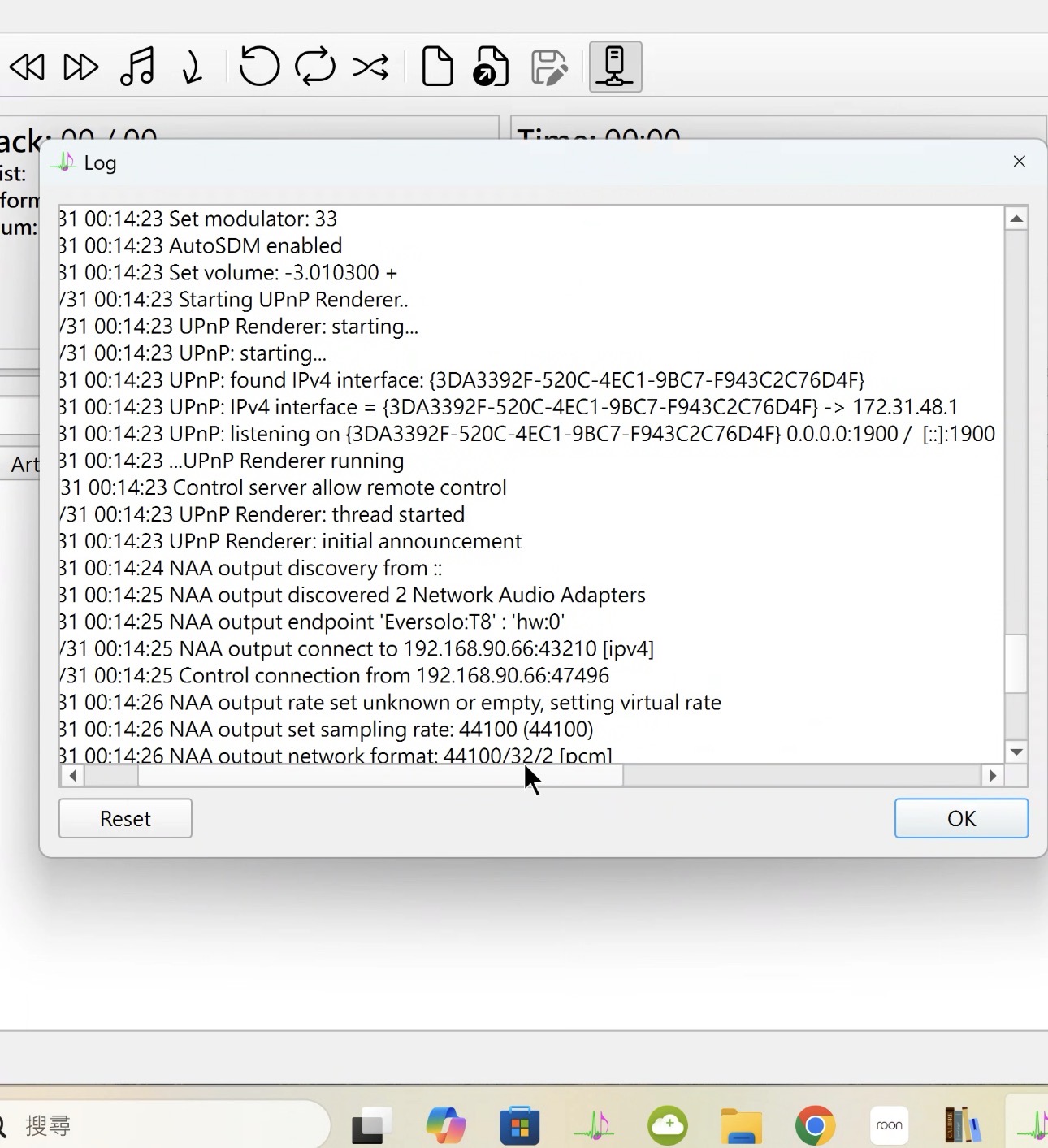
System is Windows 11 with only one network adapter. All other function is working properly with NAA
Please help me out
Thanks
Please check Control Panel → Network → Manage Network Interfaces and see if there are any other interfaces. For example something like VPN virtual interface is commonly interfering extent.
Hi @jussi_laako , I have checked and do some research and find out the reason
after desktop v6 installed, windows 11 auto add wsl hyper-v firewall (virtual network adapter) and only upnp renderer function is using this network interface.
I find the way to reconfigure the ip address and now is working properly.
Thanks for advice
1 Like
Hi @jussi_laako
Is there any way/any possibility to make the web interface available to use with hqplayer desktop?
There’s HQPlayer Embedded for that purpose. I don’t see any point in adding web interface to Desktop product.
if it’s not too much trouble - can you please release the macOS HQPlayer 6 Client as an Universal Application ?
I did not measure the performance, but I tried different DSD configurations with HQP6.
Coming from sinc-Lh, ASDM7EC-fast 512+fs, 512x48
I’m now using:
1x: sinc-Lh, ASDM7EC-super, 512
Nx: sinc-Lh, ASDM7EC-super, 256x48
And I also tried and like very much:
1x: poly-sinc-gauss-long, ASDM7EC-super, 512
Nx: poly-sinc-gauss-long, ASDM7EC-super, 256x48
Above configs work including DAC correction without replacing any hardware.
It would have a performance hit for everyone. And Apple has already abandoned Intel based platforms. HQPlayer 5 Client works on Intel Macs though.
And one can always install Ubuntu Desktop on an Apple-abandoned Intel Mac and gain up to date OS and applications on the same hardware. This can significantly prolong life of Intel based Macs.
I don’t feel we are there yet (or I hope we are not); macOS 15 Sequoia was released in 2024; historically Apple offers support for 3 major versions (N , N-1 & N-2), so I assume macOS Sequia (the current N-1 version) will be out of support next year in Sep '27 (when it will become the N-3 version)
HQPlayer 5 Client doesn’t offer toggles for the new Playback filters ( 30k / 40k / ..); and since it is more likely that the iPad HQPlayer Client will drop support for iPad OS 15.x , I asked for the macOS Intel version
Given that version 5 ends up having five year lifetime, and version 4 had even longer, I’m not sure I can rely that this will be the case until end of version 6 lifetime.
Sequoia also still poses some Apple API limitations I would like to get rid of…
I have two Intel Macs with Sequoia and neither one got Tahoe, nor latest Xcode anymore. And I don’t trust that these would function for certain for longer than next two years which would be enough for the version 5 maintenance period (until May 25th 2028).
So best option is just to stay up to date with Apple stuff.
fair enough - support for Intel Macs will definitely not cover the entire life time of HQPlayer 6; since Sequoia has some API limitations you prefer to avoid, I will stop dreaming for the 1-2 (no commitment & guarantees) Intel-Mac compatible Client builds (that would create undesirable precedent / expectations)
Will hqplayer 6 stream upnp to a teac ud-701n? I have never used upnp so not sure if it will work or not.
HQPlayer cannot stream to a device unless it’s NAA, it can be used as UPNP renderer, it’s exactly the opposite.
1 Like
IOW, HQPlayer is replacement for all the software inside UD-701N; streamer, digital filters and modulators. So UD-701N should be used just as a plain D/A converter with HQPlayer.
When I saw HQPlayer v6 announced, I thought: “I’ll try it on the single-destination Intel-based HQPlayer Embedded install I have, but I won’t risk updating my most important HQPlayer server” (the Desktop one which runs the crossover/driver linearization/room correction for our triamped main system, plus two other systems – 12 channels total).
And then of course a few hours later I’d finished updating everything to HQP v6, including that big Desktop install, because patience when New and Shiny is available is not something I can be counted on to have.
Anyway. I’ve long been really impressed by how well optimized the HQPlayer code is, and in particular how efficiently and effectively it spreads a whole lot of computational load across multiple CPU cores (and of course GPUs when available).
I was naturally curious enough to do some comparative jottings-down of resource consumption and load-bearing capacity before and after my migration from HQP 5 to HQP 6. I remain really impressed. And (TL;DR): yes, v6, even at the .0 release, is even more highly optimized than the most mature v5.
[Backstory: when I was preparing to migrate our Living Room triamplified speaker setup (Avantgarde tweeter and midrange horns, TacT W210 corner woofers) from the TacT-based setup which had been running for about 20 years to something new and more maintainable, because the beloved TacT gear had begun to fail, I decided to do the crossover design using the Acourate toolkit but use HQPlayer as the engine to run the DSP and upsampling filters. I found out that during the 20+ years since I’d bought and configured the TacT system, the cool kids had largely abandoned DSP (even crossovers) at the destination, and were doing the computation server-side. This was possible in large part because in those two decades I hadn’t been needing to pay attention, tightly-synchronized multiple-channel Audio over IP (AoIP) had gone from garage experimentation I’d never been aware of to established standards (AES67, PTP) and established commercial products (all the RAVENNA and Dante gear).
I had no clue how to estimate my computational needs for 6 channels of DSP and upsampling, so I begged for help, and @jussi_laako was as usual very helpful (with lots of additional really useful hints from @Chunhao_Lee).
I was kind of terrified of getting this all set up and then finding out (too late to exchange the computer hardware) that I didn’t have enough processing grunt to make the setup actually work properly; so I opted to potentially-overbuy for safety against that eventuality. I grabbed one of the mighty Mac Studio M3 Ultra machines (this one with 28 CPU cores, 20 of them “Performance”).
It turned out that this was indeed sufficient CPU for HQPlayer to process the six channels I’d originally wanted, and indeed to be able to deliver DSD256x44.1k to all channels (I’d been prepared to accept 352.8k PCM as a fallback if resources were insufficient).
And over time, since there still seemed to be unused CPU headroom, I wondered if I could use this same HQP setup to drive additional channels – partly because I had another system where I wanted to implement 4-channel main/sub setup, and largely because I was mightily annoyed that Roon wasn’t offering me the ability to sync up the multiple zones in the house where I wanted to be able to play the same stuff over the course of the day – not only will Roon not let me synchronize or even just “play the same thing” across a set of RAAT and HQPlayer zones, it won’t even let me group multiple HQPlayer zones. This is not a new issue.
So… I added four more channels, to cover that main+sub setup I mentioned above, and eventually (since even that hadn’t driven the HQP server to its knees), I even added two more channels to add another stereo zone being played simultaneously. That zone’s channels don’t currently run any DSP.
This brings my current channel count being served by that HQPlayer Desktop instance to 12, and now we’re back to the present day.]
I’ll now append some performance comparisons between v5 and v6 (and of course given that these represent the sort of info about a “large” HQPlayer setup I’d have been really grateful to see when I was first planning this setup, I hope any others about to specify hardware for such a setup might also find this useful).
In all Desktop comparisons here, HQP Desktop is accepting 2 channels in, and generating 12 channels out (with DSP crossover/driver linearization/room-correction processing on 10 of the 12 channels).
There is no DAC correction running, because sadly that isn’t (yet?) available for the Merging Technologies DAC channels in use. I understand the issues which have kept this from happening (the multiple Merging hardware versions, and @jussi_laako’s need to have hardware in-house to create the corrections), but it’d sure be swell to be able to hear what this hardware would sound like with corrections enabled.
These observations are all: HQPlayer Desktop on a Mac Studio M3 Ultra (20 Performance cores, 8 Efficiency cores, AFAIK only the former important to HQP), macOS 15.7.7, feeding 12 channels x DSD256x44.1 over Ravenna/AES67 with VAD 3.6.0:
Available processing rate as a multiple of processing done (number followed by “x”) is as reported by HQPlayer Client.
CPU utilization of the HQPlayernDesktop process is as reported by Activity Monitor on that Mac Studio.
Desktop 5 with 44k1/16 source, poly-sinc-gauss-long, ASDM5EC-light:
  2.85x-2.86x, 630%-650% CPU
Desktop 5 with 44k1/16 source, poly-sinc-gauss-long, ASDM5EC-super:
  1.93x-1.98x, 1019%-1034% CPU

Desktop 5 with 352k8 source, poly-sinc-gauss-hires-lp, ASDM5EC-light:
  some NOISES/dropouts so not actually usable
  (inaccurate): 2.95x, ~700% CPU
Desktop 5 with DSD128 source, FIR2/XFi, ASDM5EC-light:
  some NOISES/dropouts so not actually usable, but
  (inaccurate): 1.92x, ~946%-987% CPU


(Desktop 6.0, 29 May 2026)

Desktop 6 with 44k1/16 source, poly-sinc-gauss-long, ASDM5EC-light:
  3.10x-3.15x, 628%-640% CPU
Desktop 6 with 44k1/16 source, poly-sinc-gauss-long, ASDM5EC-super:
  2.02x-2.07x, 1011%-1025% CPU
Desktop 6 with 352k8 source, poly-sinc-gauss-hires-lp, ASDM5EC-light:
  2.74X-2.78X, 684%-685% CPU, no noises heard in 1-track trial
Desktop 6 with DSD128 source, FIR2/XFi, ASDM5EC-light:
  1.28x-1.35x, 929%-949% CPU, no noises heard in 1-track trial

Bonus:
Desktop 6 with 352k8 source, poly-sinc-gauss-hires-lp, ASDM5EC-super:
  1.90x-1.93x, 1064%-1078% CPU, no noises heard in 1-track trial
Desktop 6 with DSD128 source, FIR2/XFi, ASDM5EC-super:
  wouldn't use, pushing the boundaries, might have heard some drops, but
  1.03x-1.07x, 1341%-1361% CPU
There, that was a lot. I expect that many people’s eyes glazed over, but I hope that a few nerds out there found this interesting.
BTW, I love that HQPlayer6Client now includes filter annotations I used to need to find in the PDF manual right there in the Filter menus.
(As another handy thing, I’d love to see the entries in the Rate / Rate limit menu expressed in terms of base rates and multipliers rather than as the raw large resulting rate.)
Oh, you may notice in the above numbers something I’ve found puzzling: HQPlayer is finding it more expensive to process audio coming in at high rates (352.8kHz PCM, for example) than audio coming in at low rates, even though I’d have assumed that less work would need to be done to upsample by a smaller multiple. Perhaps with the higher incoming rate, my correction/crossover DSP needs to be run at that higher rate, and that’s the additional expense? Or perhaps there’s some other phenomenon at work which I don’t understand? At any rate, I wasn’t willing to make the DSP configuration changes to my setup which might have helped disambiguate, so the question remains for me.
1 Like
This is certainly doable, I will add it to my TODO-list.
With two-stage filters, this is the case. Since the first stage (which is heavier) needs to work with more data, while the second stage becomes smaller and lighter.
This is also the case yes. Every doubling of source rate roughly doubles this.
1 Like
Oh, great! Thanks!