If I follow your description, my guess, the subtle effects or feeling you describe are produced at end of the chain (given no other parameters changed), i.e. DAC/PRE/AMP/Speakers. Most likely DAC, indeed, checking the specs on the net, Harmony converts DSD to PCM internally. HQPlayer certainly offers the PCM vs DSD comparison (for this PCM compensation needs to be nailed correctly for the 1 to 1 volume match). I would experiment with PCM 705/768, LNS15 shaper for starters, DAC bits I would set less then 20 (guessing it’s not scientific on my side). While at times I use sinc-l , to my hearing it is not at all universal and quite dependent on source recording. For lengthy playlist style listenings I would be circling around apodising filters, like Jussi’s default or short-mp or ext3… certainly if you find a sweetspot for album/filter it is the best…
This? There’s not so many ways to tame fanless NUC’s, except these limited power settings in BIOS. Once upon a time, having dealt with overheating NUC i would put a cooking pot filled with water on it. Totally unsafe in general electric appliance maintenance terms, but physics worked well. 
I would recommend to avoid sinc-L, such excessively long filters certainly cause some amount of transient blur.
Instead I recommend using for example the default:
1x = poly-sinc-gauss-long
Nx = poly-sinc-gauss-hires-lp
These give objectively much better results.
In addition, Laiv Harmony is R2R DAC, so it cannot play DSD natively. You should always send it PCM data instead. For example 705.6/768k rate, set DAC bits 18 and Dither to NS5, NS9 or LNS15 shaper.
Yes, that is certainly the case here.
I’m actually seriously considering watercooling mine! The idea is fully formed and I have a shopping list but CUDA will probably bring bigger returns than simply taking the brakes off TDP.
Just wanted to share…
I had a problem with the update to 5.15 from 5.14 concerning Profiles. Not sure if this could happen with embedded too.
A few of the configs I made were crashing the HQPlayer Desktop app when I selected them. This happened when selecting the problem profiles from all/any HQPlayer Client apps (old, new, iPad, PC). I resaved the problem configs in HQPlayer 5.15 and they all seem to apply now without crashing the app.

Also, thank you for the new version @jussi_laako, I’m looking forward to the new poly-sinc-ext2 variants…
This is where choices kick into the game. Low power, totally silent, but capped vs big, dirty, noisy but super efficient. In my own experience is very difficult to reach these two goals at the same time. For a long time I am eyeing Cirrus7 fanless builds. On the promise and reviews they seem to squeeze maximum performance possible on capped and fanless systems, but when you put their BOM together, configuring your build, it is rather costly but if you start “saving” there, the whole idea defeats the purpose. Proportionally at the same price you can build server with CUDA and silent NAA (rpi4 for example). But all would depend on the goal and personal preferences, available spare-parts, free-time, you know…
It would be nice to get a copy of crashing configuration to figure out why it happens. There are no major changes to the configuration file…
I sent over the log file, forgot to add the configuration file. I’ll send it in another email.
Thanks, Jussi. I haven’t been able to do this because the iFi iDSD Pro with HQPlayer doesn’t support checking the 48k and adaptive rate box. The DAC does support it, but HQP plays noise with those options checked. Other users have reported this as well. Perhaps it is because the iFi iDSD Pro is compatible with MQA, as your answer suggests:
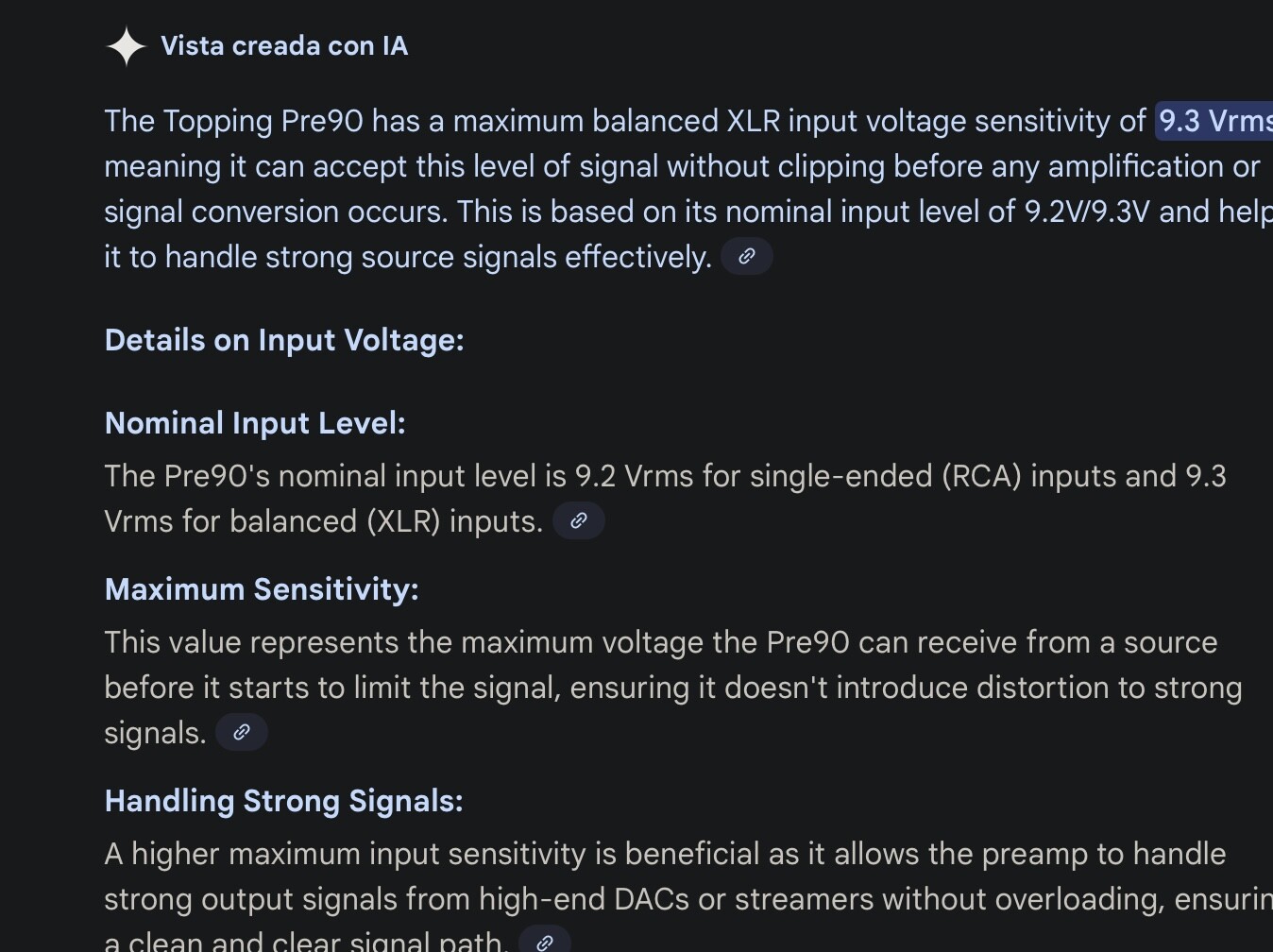
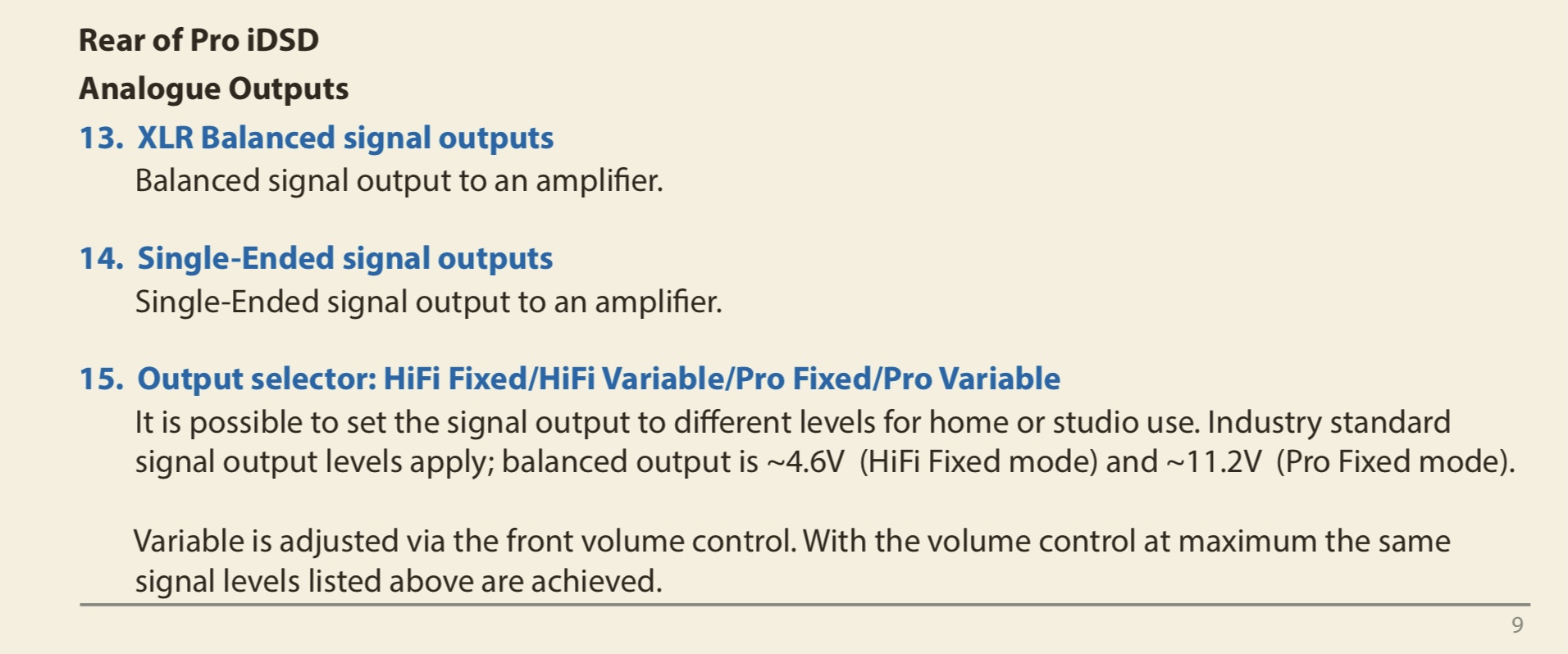
In any case, I have to announce that I have probably found the fault that was causing the glitches. Apparently, it wasn’t a problem with the i7-1260P processor or the HQPlayer shaper and filter settings. I came up with the solution last night, and there haven’t been any problems since then. The iFi iDSD Pro supports four output voltage modes: HiFi Fixed / HiFi Variable / Pro Fixed / Pro Variable. Each mode delivers a different output voltage to the preamplifier. I had it set to Pro Fixed mode, which raises the voltage to 11.2V. However, the input voltage limit of my Topping Pre90 preamplifier is 9.3V per XLR. This seems to be the cause. I changed it to HiFi Fixed mode (4.6V) and since yesterday there have been no more glitches.
Thank you very much. I looked at the core load graphs again, and with your advice, the load is now distributed among all of them
Hi @jussi_laako
After the update to 5.15, cuda is not recognized. When I go back to 5.14 it works again. Did something change in the hqplayer engine with cuda?
- linux mint 22.1
- 6.8.0-79-generic
- nvidia driver 550.163.01-0ubuntu0.24.04.1
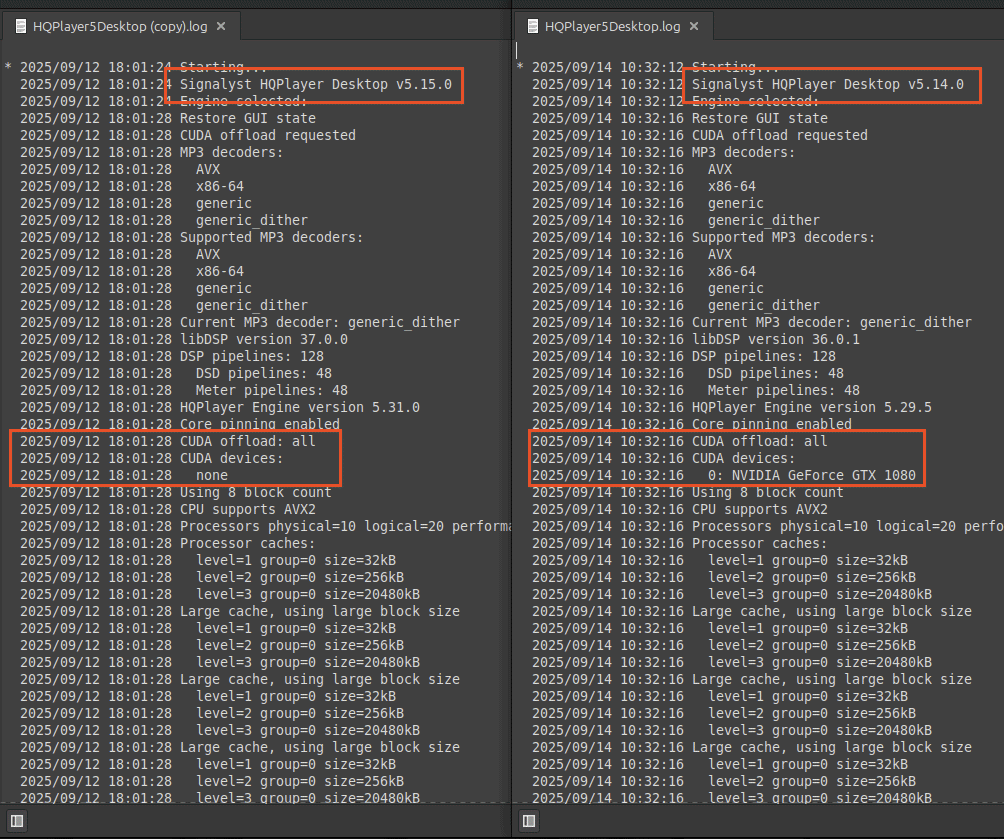
I have updated the nvidia driver to 580.65.06-0ubuntu0.24.04.4.
The results are the same. No cuda devices found with 5.15.
Correction, I just noticed the gtx1080 is recognized in 5.15 with driver 580 but I’m getting an error. I have a log file that I can send to your email but I’m not sure if it’ll help.
clHQPlayerEngine::Execute(): clFilterCuda::Init(): CUDA init error 1
You’ll need Nvidia driver version >= 580 for CUDA 13.x…
To be more specific, on Linux you need driver version >=580.82.07.
I recommend just pulling the “nvidia-open” driver from Nvidia’s official CUDA repository.
Add the repository with:
wget https://developer.download.nvidia.com/compute/cuda/repos/ubuntu2404/x86_64/cuda-keyring_1.1-1_all.deb
sudo dpkg -i cuda-keyring_1.1-1_all.deb
And then install the driver with:
sudo apt update
sudo apt install nvidia-open
Thank you. Updated drivers successfully.
Now running → Driver: 580.82.07 Cuda: 13.0
HQPlayer Desktop v5.14.0 works
HQPlayer Desktop v5.15.0 clHQPlayerEngine::Execute(): clFilterCuda::Init(): CUDA init error 1
OK, strange. I assume your user id is member of at least “audio”, “video” and “render” groups?
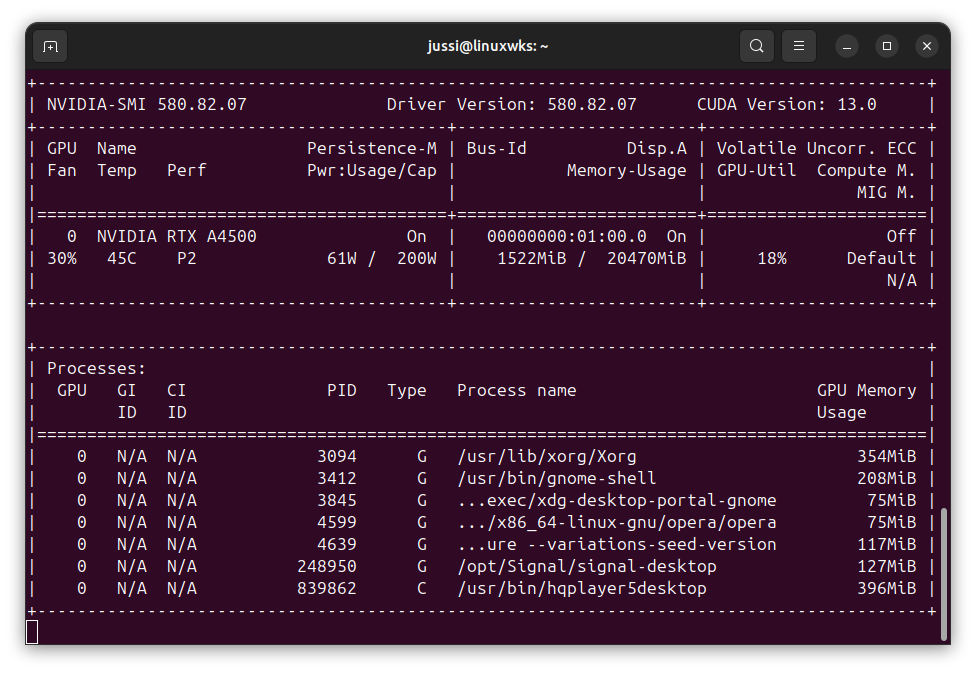
For me it is working fine with RTX A4500:
P.S. Ahh, I see, you are using GTX1080, it has been deprecated and support discontinued in CUDA 13.x. That could be the reason… (Maxwell, Pascal and Volta were dropped on 13.x)
I get this when doing it this way
Reading package lists… Done
Building dependency tree… Done
Reading state information… Done
E: Unable to locate package nvidia-open
Then the earlier step of adding the repository has failed one way or the other…
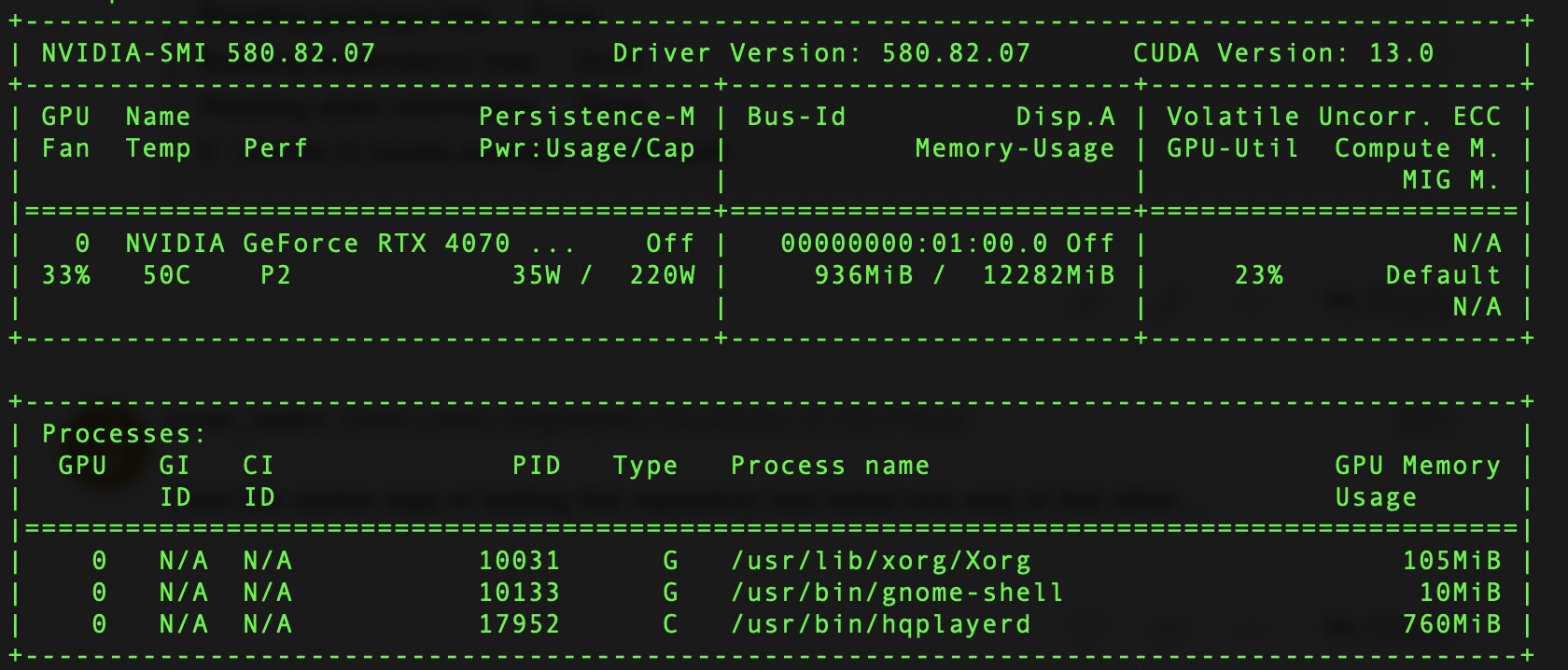

Oh well. So much for making use of old stuff. At least the mystery is solved. It was working quite nicely and getting the job done too…
Hmmh, I just installed latest Nvidia Studio drivers on my old Windows 10 machine with i9-9900KS CPU and GTX1080 GPU and there the CUDA offload is working with 5.15.0 release.
I don’t have Linux machines with GTX-series GPUs, so I’m not sure if the situation is different there.
I think I’m going to build a i9 14900k box and that should be able to do what my i9 10900k w/GTX1080 does currently/ and possibly more… and maybe use about the same power draw at idle since it doesn’t have the additional GPU load. 