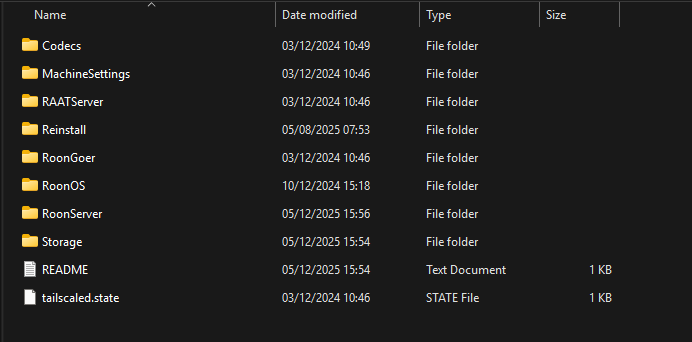
Old Roon Server: window 11 pc
New Roon Server: Nucleus one with 4TB ssd (SanDisk) formatted with roon os successfully recognized. But the roon os gives an error of ‘can not find the path’ or ‘unexpected error’ when setting network path with ‘+ add network’ command.
Networking Gear & Setup Details
Tailscale is used to connect roon arc from out side. The original roon server were in a pc.S moved to pc.L and now being moved to Nucleus One.
Connected Audio Devices
<!—Nucleus One, Kef ls60 roon ready speakers , pc.L.) → They are connected by a switching hub(Silent Angel N8)
Number of Tracks in Library
<!-5,800 tracks" → in pc.L in a Living room.
Description of Issue
Roon server, roon arc are working with tailscales, however, iTunes library which is in a pc.L can not be migrated and merged to Nucleus One with an error of ‘can not find the path’ or ‘unexpected error’ using ‘ +add network’ command of roon os. I can set back up to dropbox but can not set to pc.L. I can not update tailscale in the Nucleus One with the error, 'Failed to update nucleusone: node returned error: "failed to find cmd/tailscale binary: tailscale executable not found in expected place".
For a Nucleus to set up a backup location on a PC, you must first set the PC folder to be a Shared Folder. Have you done this? See this article on setting up a Watched Folder on a PC - the steps are similar for a Backup Folder:
You can’t update Tailscale in the Nucleus - only Roon Labs can do that. They have said that there is currently no known security issue with the version of Tailscale they use in RoonOS, and they are monitoring the situation. See:
Thank you for your support. It took me a week to solve this matter but with your advice solve it right away. I did set my music folder as shared folder but I did not give the right path as indicated in the property of the shared folder, ‘//DESKTOP-LIVING/Music’. I was giving the wrong path, ‘//DESKTOP-LIVING/D:/User/root/Music’. I was able to import 5900 tracks to Nucleus One.
Is there any way for me to see the music folders or files in the internal storage of Nucleus One?
For updating tailscale I understand now Roon lab only could touch. I will wait their decision.
Changes that Microsoft has made to security means that it is no longer possible to access Nucleus or ROCK folders using File Explorer in Windows 11. Then the Group Policy Editor of Windows or Powershell can be used to work around this. See the article referenced below.
Windows File Explorer has a habit of not finding non-Windows devices in your network until it’s told to do so. So typing \\nucleusone\ in the address field (note: NOT the Search field) of File Explorer will kick Windows into displaying it again. In this situation, mapping a Windows drive to a folder in the Nucleus One will pin it permanently in File Explorer as a drive on your PC.
I believe that you have set up a Watched Folder in your Nucleus One that is pointing to the iTunes folder on your PC… That’s the equivalent of using a NAS - it does not copy the files to internal storage on the Nucleus One.
If you want to do that, use File Explorer to copy the files across to the InternalStorage folder of the Nucleus One and remove the Watched Folder (otherwise Roon will see duplicates).
If you have the optional drive added to your Nucleus One, then you will see the Internal Storage folder in Roon’s > Storage by default.
Ok, Thank you. I will copy them to the InternalStorage folder of the Nucleus One. Should I copy them from the Music folder beneath? And I could not see any albums I thought I added from the roon app while playing the albums.
What do you mean by “I thought I added from the roon app while playing the albums”? Are these albums from a streaming service (e.g. Tidal or Qobuz), because such albums are added to your Roon Library, but they are never downloaded into local storage…
Addendum: you can, of course, purchase Qobuz albums and then download those and put them into local storage…
Just to triple-check, did you manually add an internal music storage SSD to your Nucleus One? I ask because the Nucleus One doesn’t come shipped with internal music storage.
If you did, please make sure to properly format it via the webUI - here is more information around this:
If you didn’t add the music storage SSD, you cannot copy any of your local files over to your Nucleus. Let us know!
Thank you for your consideration. Yes, I successfully added and formatted an internal 4TB SSD storage drive using the web UI. I was able to copy the music folder, which contains 5,900 music source files, onto the drive. Where is the library database stored? Aside from storing the source music files, what else is the internal 4TB SSD storage used for?
The library database is held on the m.2 SSD of the Nucleus One, along with the RoonOS and the Roon Server software. You can view the folders in File Explorer under \\nucleusone\Data.
It might be helpful to review this high-level guide about Roon’s architecture and how the different components (storage, server, endpoints, etc) interact:
Please let us know if you have any questions. Thanks!

 > Storage by default.