In case it helps track down the issue : I’m on Tidal and all seems fine on my side.
Hi @Antoine_Auriol,
We have an ongoing investigation into the symptom you reported because it’s not the only active report.
If you’d like, we can keep this thread open so you can receive updates on the status of the investigation. We can also allow this thread to auto-close if the problem hasn’t returned.
Please let us know which you’d prefer. For now, we’ll extend the topic timer to ensure the thread doesn’t close without your input.
Thank you!
Thanks for the follow-up!
To confirm, are you saying that your sorting options aren’t being saved after you navigate away from your ‘My Albums’ page?
Are these all local files, or are there streaming tracks involved as well?
Thank you!
Hello @vqr ,
Thanks for letting us know. Can you please try to clear your Qobuz cache and see if this makes a difference?
- Exit out of Roon/RoonServer (from taskbar)
- Find and open your Roon database
- Navigate to
RoonServer/Cache - Move the contents of the
/Cachefolder elsewhere, like your desktop - Try restarting Roon and verify if the issue still occurs
Hi Mike;
This is an ongoing topic. Ive been speaking with Benjamin and Vadim, both Roon staffers. I have submitted backups and screen shots as well as performing a lot of tasks suggested by them. When I sent in my backups and screen shots in December, Benjamin let me know that he was submitting this to Roon Technical Staff. Not sure what happened since than as I have not heard back.
Thanks for looking into this as I have no answers. This is about Qobuz titles and it is all explained in the lengthy posts I submitted.
OK, I tried that, but the problem is still there. In fact there are now 152 albums that appear to have been added on January 19, instead of 149, so if anything the problem has gotten slightly worse (although I don’t know if clearing the cache caused that because I didn’t check the number just before clearing it).
Just to be certain I did this correctly: I moved the contents of RoonServer\Cache, not the contents of RoonServer\Database\Cache, which was already empty.
I have almost no local files, and my only streaming service is Qobuz, so I can’t answer your question.
All files are in qobuz. No local files.
I restored from a Roon backup. When the restore was complete, the albums were in date order as they should have been. Soon after that, Roon appeared to perform a sync, looking for added files in qobuz and once it did, the sorting reverted to alphabetical.
Thanks for the replies and comments - sounds like I am not alone. To address some of the points above:
- It’s not a clock or a Focus issue
- I have roughly 7,000 albums - approx. 1/2 stored locally, 1/2 Qobuz
- The affected “Recently Added” albums showing the problem are all Qobuz as I haven’t been actively adding to locally stored files. I do not have Tidal linked to my Roon account.
- I tried signing out/back into my Qobuz account with no success.
- I also note now that on my Home screen, it shows I have 7396 albums - but when I go to “My Library” “Albums” it shows 6832. There is no focus enabled.
- I have made absolutely no changes to my Core, remotes, system, etc. whatsoever. This occurred completely out of the blue a few days ago.
This is normal if Show Hidden Tracks and Albums is set to No in Settings. Because with this setting, album versions get grouped in My Albums and each album is counted only once regardless of how many versions there are, but the number on Home counts every version separately.
Bingo - thanks for the tip Suedkiez!  That at least solved that question (not sure I’d ever noticed that before frankly before started digging into this).
Original issue remains - and I will add that (after re-reading support tix linked above) I also find that if I go to “Qobuz” “My Qobuz” and then scroll to “(Qobuz) Favorite Albums” they DO appear in the correct order of recently added.
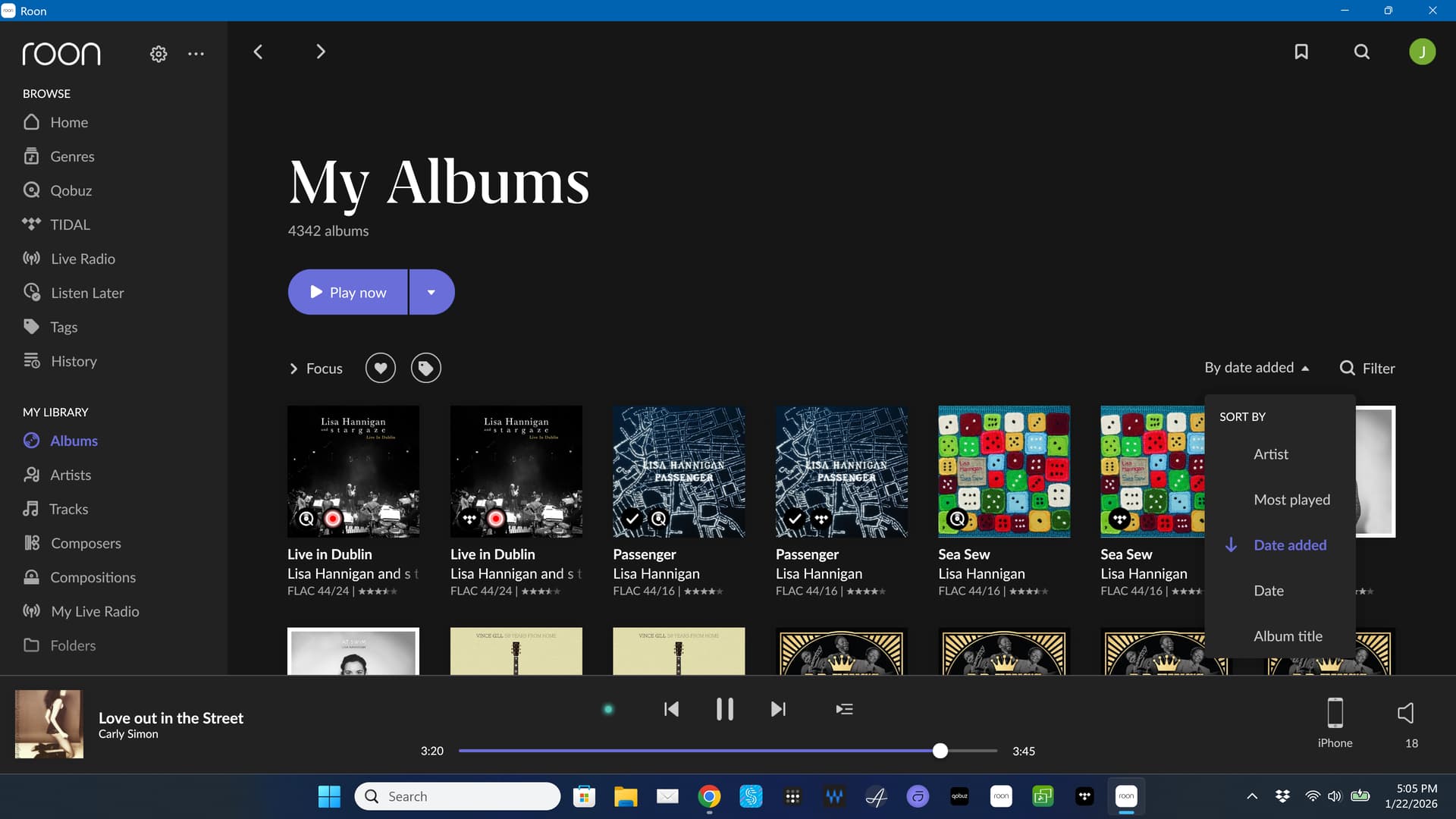
To me, this seems like all Qobuz albums were re-imported and they all have the same new import date. Because of that, the ordering is not faulty, but because all import dates are the same (i.e. the new date), a second sorting level is used, which is alphabetical.
But why Roon did this re-import, that’s the real question.
Edit: could there be any relation to what is mentioned here?
Hello @vqr ,
Thanks for confirming that, that is odd indeed. Can you please use these instructions to send us your database for review? Once uploaded to the below link, please let us know.
https://workdrive.zohoexternal.com/collection/gnhz54df9ddffa33d49a3be8619bd6376a5de/external
Also, please specify a few album names/artists so that we can look into them. Thanks!
I uploaded my database.
The first 3 albums that show up in my library, sorted by date added, newest first, are:
Beethoven: String Quartets, Op. 132 & Op. 135, Talich Quartet. La Dolce Volta 3770001902029.
Mozart: Piano Concertos Nos. 25 & 27, Academy of Ancient Music, Robert Levin, Louise Alder, Richard Egarr. AAM Records 5060340150204.
Mendelssohn, Felix: Overtures, Academy of St. Martin in the Fields. Capriccio 0845221001623.
These now say they were added to the library 19 January 2026, although in reality I added them a long time ago, probably at least 6 months ago.
The most recent 3 albums that I have actually added to the library, earlier in January (before January 19th) are:
Rachmaninov: Piano Concertos Nos. 1 & 2, Krystian Zimerman, Boston Symphony Orchestra, Seiji Ozawa. Deutsche Grammophon 0028945964324.
Live and Studio Recordings for RCA and Columbia, Sviatoslav Richter. Sony Classical 0886444295338.
Leon Fleisher Plays Beethoven & Brahms. Sony Classical 0886443289307.
The Rachmaninov album is now at position 153 in the list based on date added, even though it should be first (the most recent).
Since I have a Roon backup that I was previously was able to restore in ‘date added’ order, is there a way to run the restore but then keep Roon from syncing? That way we can confirm that the problem exists within Roon. It also appears that another user has encountered the same issue.
This process would not change the import date unless the files/location have changed. For instance, moving your library from network share to local drive, if done correctly, does not change the import date.
In your situation, something has changed on the Qobuz side, so I think you’ll need Roon to invesigate further.
Hello,
I have the same issue as above, this morning I opened the albums section in Roon and to my surprise although the sorting is set to “by date added” there are 23 albums on top of the list, these albums were added a long time ago. I have a mix of Tidal and Qobuz albums in my library and these 23 albums that appear on top of my list are Qobuz so it seems that something is wrong with Qobuz sync or metadata.
Let’s keep it open, I’m interested in any updates. I’d love there is a fix to these 40 albums polluting my addition timeline.
Bumping this and adding that yesterday it added four more existing albums to my “Recently Added” that have been in my library for months.