Thanks Mr F
Don’t know what you have to do to engage technical support - it’s been the same for as long as I have been a user
They are a small team and they had to deal with this cloud issue last week causing a hundred new threads and they fell behind.
It has become better with the addition of more people but they can’t do magic.
@Suedkiez Thanks - but maybe a bit of communication about how busy they are would help - there doesn’t seem to be any understanding about who is paying their wages - never has been
Ok, thanks for sharing.
A library of that size shouldn’t use all 8gb of memory.
I’ve 168k tracks and uses 6-7gb of memory.
As Roon support has mentioned an out of memory state in your logs I’m wondering if there’s an issue with your Nuc 11.
IIRC, these are fussy with RAM. I believe some found setting the RAM voltage from auto to 1.2v or 1.23v saw a benefit.
Might be worth checking the RAM module and its specific voltage. It could be a 1.3v+ module.
But I read you moved from a fanless case to a case with a fan. Is this to say you moved the Nuc board etc?
Could be worth remounting the RAM module.
Once again many thanks Mr. F
Your interest is very much appreciated
I am not in the least bit technical but bought Roon because I love music. Yes I did mount the NUC board into the fanless case over a year ago, and it worked well for many months.
Not being technical I don’t know how to check the voltage but your suggestion about remounting the RAM does make a lot of sense. I will do that tomorrow and, if I may report back.
Thank you so much for your help
Thanks again Mr F
I did as you suggested, making sure the RAM and the heat sink were mounted properly.
Unfortunately it lasted about an hour before rebooting
Once again no response to my previous message to you
Please inform me of who I need to contact to escalate this issue to finally achieve a resolution
Unfortunately you don’t seem to have a complaints process.
Please Respond! Which is the least to be expected from any company allegedly providing a “service”
Hi @Ken_Talbot,
Thank you for your patience.
We completely understand how frustrating it is to have your ROCK rebooting so frequently. Diagnostics show the unit continues to report out-of-memory errors in var_logs, which means there’s still insufficient RAM. Please know we’re actively investigating this issue. There are two possibilities:
RoonOS/RoonServer itself might be experiencing unexpected memory pressure. We’re investigating reports of this on RoonOS machines
Or, the NUC is experiencing independent problems with RAM that Roon is simply triggering/exacerbating.
Practically speaking, the team needs more time to investigate the first possibility and whether it’s a factor here. However, there are steps you can take in the meantime that can hopefully limit the ROCK’s vulnerability to memory pressure crash/reboots regardless of the cause:
Reduce simultaneous heavy activity. If possible, avoid performing multiple high-load actions at the same time, such as streaming multiple endpoints while importing new tracks or browsing large collections.
Check external drives. Make sure any connected drives are stable and not going into sleep mode during playback, as intermittent drive access can stress the system. We see back in 2022 that you encountered some edge-case behavior with ROCK attempting to boot from an external drive. Is this the same ROCK and/or drive as that old report? https://community.roonlabs.com/t/rock-not-booting-up-nov-22
Keep the system cool. Fanless cases can run hotter under load. You already checked the heat sinks, but also ensure your ROCK has good airflow and isn’t in an enclosed space.
Restart periodically. A simple reboot once every day or two can help stabilize the system until we resolve the underlying cause. You might try to reschedule network drive rescans, too, in Settings → Library as relevant.
We realize these aren’t perfect solutions, but users often see improvement by pacing heavy activity and keeping the system stable.
We’re continuing to dig into this and will update you as soon as we have more concrete information.
Thank you again for your patience.
Hi @connor
Thank you so much for your helpful and informative communication
I am still using the same external hard drive but the NUC board placed in the fanless case is an upgraded one from the one involved in the 2022 incident.
What I have done is disable the hard drive and am now only playing tracks from Qobuz.
I’ll report back in a couple of days whether this has resolved the issue
Best wishes and many thanks
Hello @Ken_Talbot ,
The new Roon update includes a change where metadata background work is scheduled for off-hours. I would be curious to know if it helps in your case here, when you have a chance to test this further, please ensure you are using the latest build and let us know how it goes, thanks!
Hello @noris
Thank you for your continued interest
It’s now Thursday evening here in the UK and (I hesitate to say this) but the problem has not recurred since Monday.
As a result of Connor’s message I disabled my hard drive on Monday evening and then downloaded the new version on Tuesday. It all seemed to be working fine, and so I re-enabled later that day. So far so good.
One thing I have noticed is that now I have this screen
where the blue circle is turning - it’s not done this for some while.
Hopefully something has worked
HI again
I knew that it was too early to speak - it’s just rebooted about an hour after my previous message to you.
It was a track from my hard driving playing when it happened
and the blue circle has disappeared
Hello @Ken_Talbot ,
Thanks for letting us know. We are looking over the new diagnostics from your Roon Server and do see the reboot, though there is no clear indication to why, and it looksl ike the RAM usage was still within the limits, right under 4GB usage. Do you have two RAM sticks installed in this unit of 4GB each? It is not very likely, but it is possible that one of the RAM sticks failed. I am also asking the team to review the logs to see if there’s anything else of note, we will get back to you once this has taken place. Please let us know if the reboots continue to happen, thank you.
A suggestion from my side.
Did you ever experience reboots while the external drive was disconnected?
If this only happens with the drive attached it may not be the additional tracks on that drive but the additional power this drive draws from the NUC.
I had my very own issues with large power consuming drives or other devices attached to my NUC. Some NUCs simply don’t like USB devices drawing “too” much power.
Please check the following.
Is there a spec. USB port at your NUC offering higher Ampere? Look for the one with the highest Ampere. Do you use this one already for your drive? If not, switch to this port and test for a while.
Does your drive offer a separate power adapter? If so, use it and test for a while.
Does your NUC have the latest firmware installed? If not, do a firmware update.
Try to use internal storage (SATA or NVMe) instead of your external drive.
If all the issues began somewhen after you made your NUC fanless, then it may be overheating indeed. Check in your BIOS settings for any power options like e.g. CPU overlocking/performance mode and the like. Set those to rather low power consumption thus reducing heat. Also take care of enough space around your NUC for the hot air leaving your case.
Thank you for your message
There is just one RAM
So the ROCK rebooted 5/3 @ 21.47, then 6/3 @ 21.48 and then 8/3 @ 11.04 (all GMT)
One thing that I did notice was that every time the reboot happened it was whilst playing a track from my hard drive.
So after the last reboot I disabled the hard drive, and it has not rebooted since (now 13.31 on 11/3). I have now connected the hard drive but to a different USB port on the ROCK. So if it reboots again that would leave me suspecting the hard drive if not perhaps the USB port has an issue. Does this seem logical to you?
It seems to me that the new software version helped as the number of reboots fell significantly once the latest version was installed; however, maybe the hard drive or the USB port are the real culprits.
I’ll keep you updated.
Thanks
Further to my last message investigating whether this issue is caused by my hard drive or one of it’s USB ports I can now confidently say that it is not.
I continued to use the original hard drive (known as New Volume) but plugged into a different port on 11/3 - however on 12/7 at 11.50 it rebooted.
So I connected another hard drive (known as Seagate) but the number of files Roon found was more or less 20,000 fewer tracks than the original database even though the two databases have exactly the same files
So I tried another database, this time on a USB stick connected to a different port (one not used before) and it found more files but still not as many as it should.
The key point is that using this USB it rebooted 15/3 at 9.40 and today (16/3) at 12.10.
Once again in each reboot it was a track from a database that was playing rather than Qobuz.
Where do you suggest we can go next?
Hey @Ken_Talbot,
Thank you so much for your thorough troubleshooting and shared outcomes. I’m sorry you’re still suffering from this issue.
After reviewing a fresh Roon Server diagnostic report, we’re seeing some interesting failures, outside of a typical ‘out of memory’ related RAM crash.
At 11:50:18, your RoonServer threw an out of memory exception, immediately followed by a Segmentation Fault (segfault) in libpillowsimd.so.
libpillowsimd is a library Roon uses for image processing (album art, thumbnails).
TIFFFetchNormalTag: Warning, IO error during reading. It appears Roon is trying to index an image file that is either deeply corrupted or formatted in a way that the library can't handle, causing it to spiral, grab all available memory, and crash.
13:01:26 when you plugged in the SSK Portable SSD. The kernel is struggling significantly to talk to this drive:
exFAT-fs (sdc1): invalid boot record signature.
TIFF errors mentioned above are likely happening because the system is trying to read metadata from this drive, but the drive (or the filesystem on it) is unresponsive or corrupted.
A few next steps for you here, Ken:
Hello @benjamin
Thank you for your recent advice which I followed
Firstly let me explain that the SSD drive to which you have referred is not my main database - just one that I had made, copying across many but not all the files from my main external hard drive known as “New Volume”. I created the SSD pen drive for use with another app i.e. Media Monkey (with which it has run without a problem). It was part of my plan to check if the problem was specific to the New Volume hard drive which I have been using with Roon for years. As the crash occurs with either drive it’s clear that it is not just my New Volume where there is a problem.
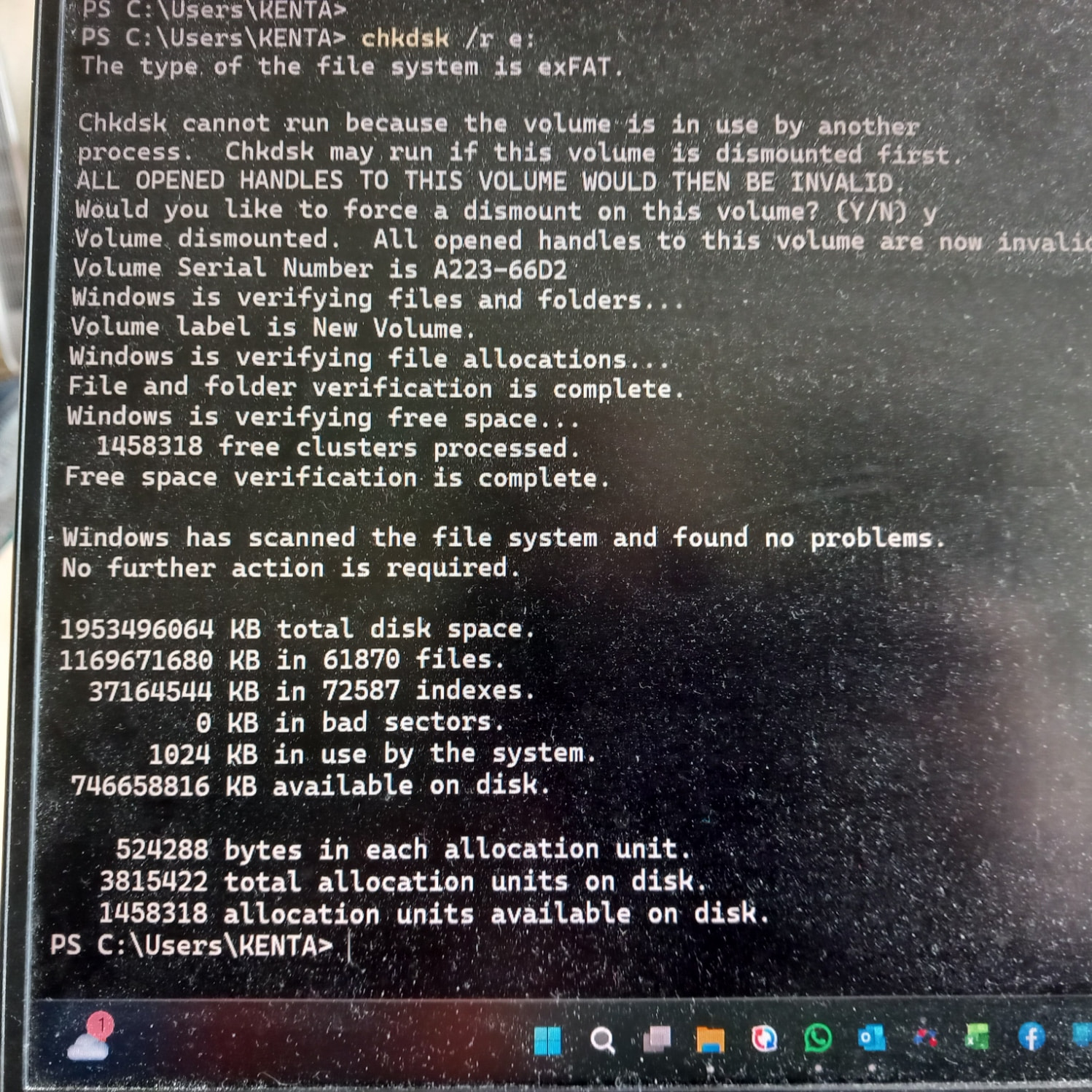
However, if I have copied across corrupted files these could be on both drives, and so I took your advice and scanned the New Volume drive - the results are
As you can see no corruption could be found - I then repeated the scan for the SSD drive and once again obtained the same result
This is puzzling as the crashes only occur when accessing my databases and not Qobuz tracks. The crashes have continued after the scans.
Hey @Ken_Talbot,
Thanks for confirming the details.
It seems that the Out Of Memory (OOM) issue might be due to a corrupted file.
Next time this happens, please make a note of the song that was playing before the crash.
After rebooting, try playing the last few songs again to see if it crashes as quickly.
Let us know how it goes(whether it crashes same fast again, or not).
Thanks!