Hi @Arno_Hanninen,
Thank you for setting up the reservations. We had another look at fresh logs from your Nucleus, and I want to explain more clearly how grouping works in Roon, because it explains what you are seeing.
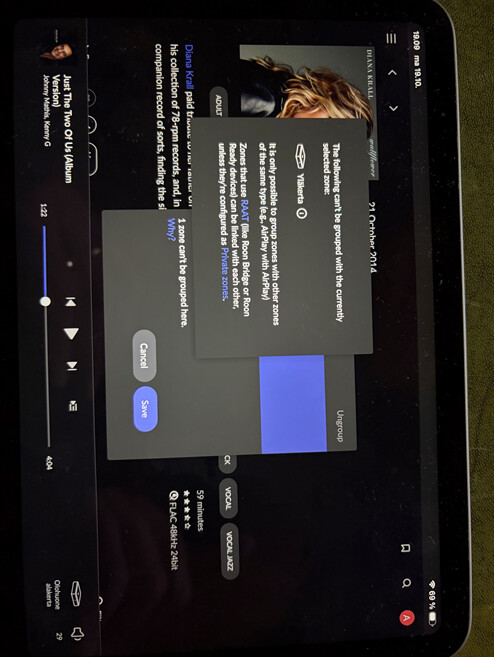
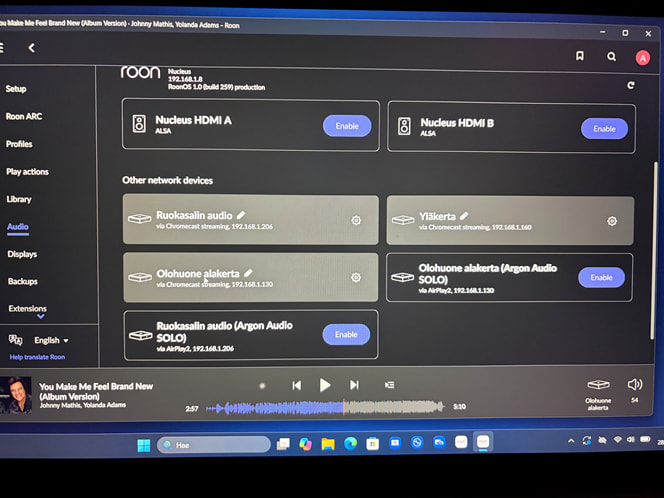
In Roon, you group zones from the zone list: select one of the zones, press Group, tick the other zones you want to include, and press Save. Roon can only group zones of the same type. Roon Ready devices can be grouped with other Roon Ready devices, and AirPlay devices with other AirPlay devices, but the two types cannot be mixed. Chromecast devices cannot be grouped inside Roon at all. That is why the Group option does not show your SOLOs together while they appear under Chromecast.
We also need to correct what we wrote last time: since October 9 your Nucleus has not been able to connect to any of the SOLOs as Roon Ready. The SOLO refused the connection, so the Nucleus currently sees them only through Chromecast. The upstairs SOLO has not appeared at all since then, most likely because it lost its Wi-Fi connection when the router password changed on October 7.
You have two ways to get all three playing together:
Option 1, works with Chromecast now. Create a speaker group with the SOLOs in the Google Home app. The group then appears in Roon > Settings > Audio as an extra Chromecast device. Enable it, and you can play to it like any other zone. More on this here:
Option 2, the best result in Roon. Connect the SOLOs as Roon Ready:
- Update the Nucleus, it is still on Roon 2.73:
https://help.roonlabs.com/portal/en/kb/articles/updating-nucleus
- In the Argon app, please make sure all three SOLOs have the latest firmware and that Roon Ready and network standby are turned on.
- Restart the SOLOs and open Roon > Settings > Audio. They should appear in the Roon Ready section. Enable them, give them names, and disable their Chromecast and AirPlay entries.
- Group them as described above.
For either option, the upstairs SOLO first needs to rejoin your Wi-Fi. Please factory reset it and set it up again with the Argon app. Argon support can help with the reset if needed.
Your home network itself looks fine for this. The Nucleus, your laptop, your iPad and the SOLOs are all on the same network, so the upstairs Huawei is working as an access point as it should.
If the SOLOs still do not appear under Roon Ready after these steps, please let us know the time you checked and we will look at the Nucleus logs from that moment.