Issue with TEAC UD-507 DAC via Roon Bridge using USB (ref#N6GUU1)

Hi! What’s not quite right with Roon?

· None of the above quite fits

None of the above quite fits

· None of these quite match

Tell us what's going on

· I’m using Ropieee and just bought a TEAC UD-507. TEAC has Windows and Mac drivers. I am wondering if the Nucleus works USB to this dac. I switched to a Wiim pro using coax which sounds great but want the USB working.

Tell us about your home network

· I have 500 Mb internet service to a 16 port dlink switch that feeds an 8 port dlink switch that runs to a pi4 ropieee.

Is the TEAC UD-507 connected to the Nucleus or a streamer running RoPieee?

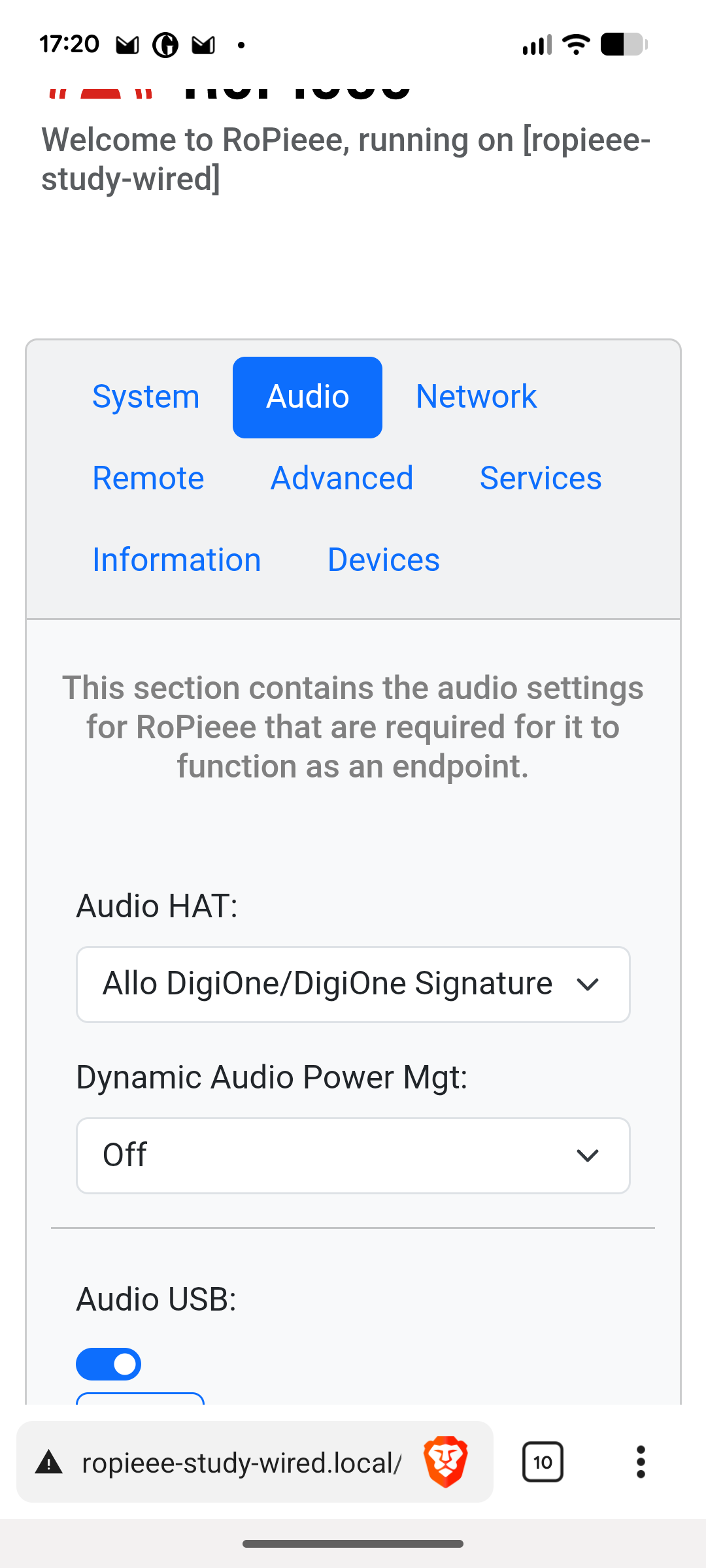
If it’s RoPieee, I’ll move the thread to Audio Gear Talk > RoPieee. It would be helpful to show your RoPieee Audio tab, and to confirm that you have enabled USB audio.

I was using ropieee with a TEAC UD-501 using usb and a topping D50iii that both work without drivers. The UD-507 works on windows after installing a driver and the user manual only lists windows and Mac. When I googled whether a Nuceus would work the AI reply said it is supported. The TEAC transports would work but a pi is much cheaper.

Since the 507 is a UAC2 (USB Audio Class 2) compliant device it should work with Linux without a driver (as with macOS.)

I’ll move this thread to Audio Gear Talk > RoPieee so @spockfish can take a look.

To me it’s rather unclear from the initial ‘ticket’ what the problem is. Is the TEAC not working?

The Teac does not output audio from ropieee usb but does output usb audio from a windows pc after the driver is installed. In the manual Teac says that Windows and Mac are supported so I assumed Linux had no driver and Ropieee would not work. At that point I wanted to know if a Nucleus would work.

I have had roon play for a short while and then die when the content changed but usually it stays dead on usb and I use coax from a Wiim pro into the Teac.

For what it’s worth, i have a TEAC UD-505 which is working perfectly:

Nucleus One → wired ethernet to Ropieee → USB to TEAC UD-505

TEAC describes it as proprietary so I’m sure it works with their network streamer. It sounds really good using coax and I bought it because I liked my UD-501. Your UD-505 would be very nice.

The UD-507 is equipped with our proprietary “TRDD 5” discrete DAC,

Does this mean Roon fails to play or you see the progress bar moving with no sound?

What device settings for volume have you used? This DAC has hardware volume. Is the volume set to zero?

You really need to provide more information as it is not clear what the problem is.

As already stated, neither macOS nor Linux need a driver since this is a UAC2 compliant device, which both support.

I also got the ud507 and DSD512 works through roopie. Also DoP DSD256 through Mac mini works.

Hi @Doug_Sadler,

Thank you to the community (@mjw, @spockfish, @Calum_Mackay) for jumping in here. They are completely correct - because the UD-507 is a UAC2 (USB Audio Class 2) compliant device, it does not require proprietary drivers to work with macOS or Linux.

To answer your initial question directly: The Nucleus runs RoonOS, which is a customized Linux operating system. Because both the Nucleus and your Pi4 (RoPieee) rely on the same underlying Linux USB audio architecture (ALSA), if the TEAC has a specific USB handshake quirk with Linux, it might exhibit the exact same behavior if plugged directly into a Nucleus.

However, you mentioned a very important clue: “I have had roon play for a short while and then die when the content changed.”

This confirms that the Linux OS does see the DAC and can stream audio to it perfectly fine without proprietary drivers. The failure is happening specifically during a sample rate change (e.g., when the playlist moves from a 44.1kHz track to a 96kHz or DSD track).

If you would like to get the USB path working reliably, here is what we recommend:

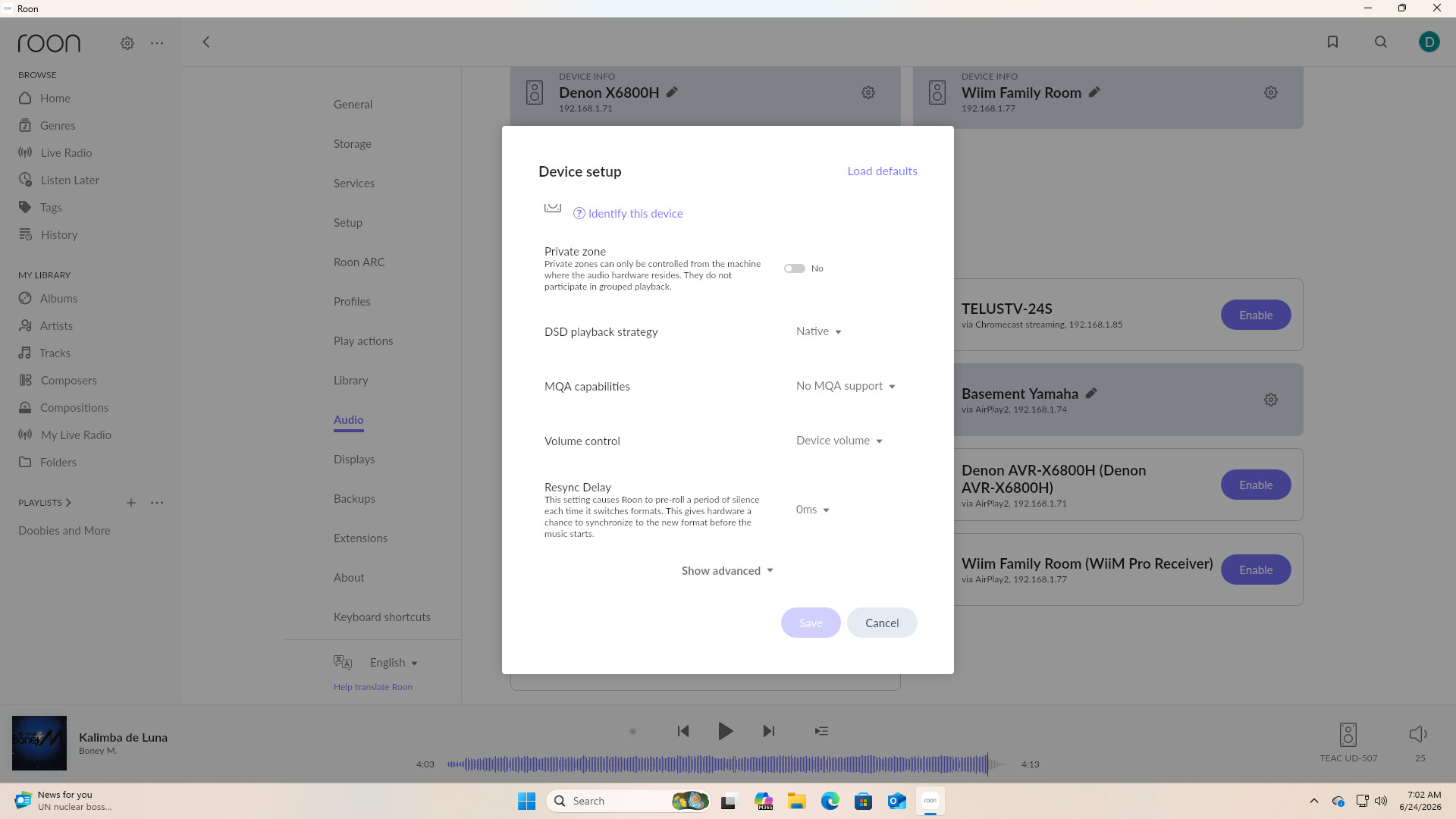
  1. Add a Resync Delay: In Roon, navigate to Settings → Audio, click the gear icon next to your TEAC zone (when connected via USB), and select Device Setup. Set the Resync Delay to 1000ms or 2000ms. This forces Roon to pause briefly when the audio format changes, giving the TEAC’s USB receiver enough time to lock onto the new sample rate before the audio stream resumes.
  2. Note the Timestamp: If you test the USB connection again and the audio dies when the content changes, please reply here with the exact local time and date of the failure, along with the name of the track that failed to play.

With that timestamp, we can enable diagnostics for your account and check the exact ALSA driver logs to see why the USB connection is dropping at that precise moment.

Of course, if you are happy with the sound quality of the WiiM Pro via Coaxial, that is an excellent workaround! Let us know if adjusting the Resync Delay helps the USB connection stabilize.

I set the resync to 1000 ms but I get no audio. I tried to reset everything and pulled the power to the dac but I am unable to get it playing for even a short while.

Volume is variable and when testing I have adjusted the output from the dac and preamp (Bryson bp-25).

When the output of the UD-507 is set to headphones there is no sound at all.

When roon plays tracks it shows that it is progressing and then skips to the next track but after resetting everything the whole track is played before going to the next track.

There is a usb c on the front that I have tried but I get the same result so using coax seems to be the answer unless I buy a TEAC transport.

As already pointed out, your DAC will work with USB and Ropieee. We simply need to understand what is not working correctly.

When the pi4 is connected to the rear USB it says usb r and no error message but if I switch to the front USB it says usb f check. I would think that the rear is talking to the pi4 but data is going in and audio is not coming out. No information is displayed regarding data rate.

On the coax I can see the data rate is 44.1 so it seems that on usb there is no data. If they are talking one is speaking Japanese.

If the progress bar in Roon is progressing, then Roon is sending data to the DAC. Nonetheless, please wait for Roon Technical Support to assist you.

It would be really helpful if you confirmed the DAC settings in Roon. Please share screenshots of the following:

  • Settings → Audio, specifically the section for RoPieee
  • In the same location, click the :gear: icon, and show the Device setup
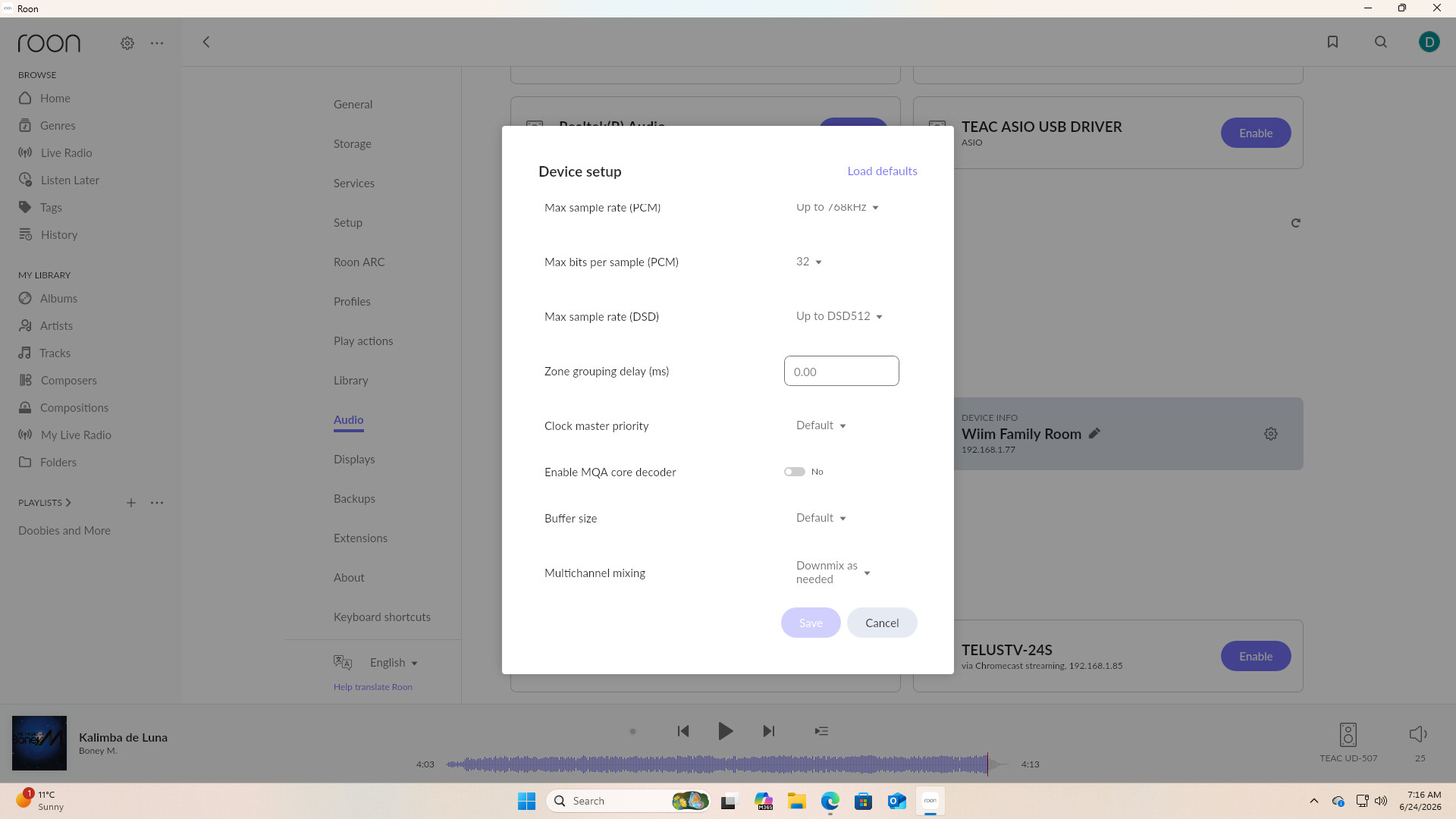
    • Scroll down and click on Show advanced, and display these settings, too

Finally, please confirm that the progress bar is moving as expected, and no errors are displayed.

Hey @Doug_Sadler,

Thanks for the update. @mjw is quite correct in the above reply.

In the meantime, we were able to review a fresh diagnostic report from your Roon Server, and can see that your DAC is not the problem, and neither is a missing Linux driver.

The UD-507 is detected cleanly by the Pi every single time, as a fully UAC2-compliant ALSA device, TEAC Corporation UD-507 at usb-0000:01:00.0-1.4, high speed, driver USB-Audio, with the full PCM/DSD format list exposed (up to DSD512 / 384kHz PCM).

RoonServer also successfully sends setupstreamstart and tracks play. So the USB handshake is fine.

The failure is happening one layer up, on the network link between RoonServer and the RoPieee bridge, and it manifests as RAAT clock-sync loss. The recurring fatal sequence is:

[zoneplayer/raat] failed to sync sender clock to endpoint UD-507
[zoneplayer/raat] failed to sync clocks with any endpoints..giving up
[zone TEAC UD-507] Track Stopped Due to Error

and separately:

[zone TEAC UD-507] Track Stopped Due to LostEndpoint
[raatserver] [RaatServer ropi4eee @ 192.168.1.81:9200] lost client connection
[raatserver] ... client connection failed. Giving up
[raat] RAATServer discovered: RaatServer ropi4eee @ 192.168.1.81:9200 ← re-appears moments later

The Pi keeps vanishing from the network and then being re-discovered seconds to minutes later. That is exactly the symptom you described: “plays for a short while and then dies,” and “usually it stays dead.”

The two concrete root causes we can currently see:

1. The Pi’s IP address is changing (DHCP lease churn). The bridge appears on the network as both 192.168.1.81 and 192.168.1.93. When the lease flips mid-session, RoonServer’s existing RAAT connection to the old IP dies, that’s your “lost client connection / Giving up / re-discovered” loop. This is the single most consistent pattern in the logs.

2. The link to the Pi is dropping/flapping at the transport level, on top of the IP change. The clock-sync drift figures themselves are healthy when a session does hold, so the DAC and the audio pipeline are sound, the connection is simply being yanked out from under an otherwise-working stream.

Notably, the network path described in the thread — 16-port D-Link switch → 8-port D-Link switch → Pi4, is a classic spot for this. Cheap unmanaged switches with green/EEE (Energy Efficient Ethernet) power-saving, or a marginal cable on that second hop, produce exactly this intermittent-drop signature.

Let’s see if any of the following helps:

  • Give the Pi a static/reserved IP (DHCP reservation in your router by the Pi's MAC). This directly kills root cause #1.
  • Bypass the switch chain as a test: plug the Pi directly into the main 16-port switch (skip the 8-port), or temporarily run it straight to the router. If drops stop, the second switch or the cable to it is the culprit.
  • Swap the Ethernet cable to the Pi and the uplink cable between the two switches.
  • Disable EEE / green-ethernet on the switches if they're managed; if unmanaged, try a different/known-good switch.
  • Only after the link is stable, if you still see issues — revisit Resync Delay.
We’ll be monitoring for your reply, thank you!
Thank you for the help @mjw and Benjamin.

The ip of the Ethernet has been set as static 192.168.1.81 all along and when it switches to wifi it assigns 192.168.1.93. I moved the dac and pi4 to a switch that is beside the router. The Ethernet cable to the pi4 is different and has been used on a computer for a long time.

I had no luck getting music out of the dac and not had time to copy configuration due to the World Cup taking over my life but I will get to it.

The USB cable is new and I was using headphones to listen for music . The sync I set back to 0

Why do you have wifi enabled when it is on cable? Keep in mind that RoPieee priorities wifi above cable if both are present. If you’re wifi connection is somewhat flaky you can into this kind of issues.

Thanks

Thank you for that information I think I must have tried it as an option at some point. I have a mesh wifi setup and the pi is within 10 ft of one access point. I turned wifi off now.