· The Nucleus boots up and I can connect to it in the Roon app without issue, but I have a question about configuration/storage/attached devices
Describe the issue
I purchased a Nucleus One over the Holidays as part of your lifetime sale. It was delivered to my house on Jan 5 and my neighbor held it for me while I was on vacation. Today, Jan 11, I unboxed the Nucleus One and connected it to my home theater system. I wanted this unit to be able to play back 5.1 music files as well as 2-channel files on my system which consists of an NAD M17v2 processor, NAD M28 amp, 5 KEF LS 50 Metas, and 2 JL Audio D110 subs. I connected the Nucleus to an open HMDI input and powered up the unit.
The NAD M17v2 settings are: Source 9 Enabled Yes Name Roon Analog Audio Off Digital Audio HDMI 5 Video Input HDMI 5 A/V Preset None Trigger Out None Right now I have my Roon Core software running on a Dell XPS Desktop in an office room elsewhere in my house. I have the Nucleus One connected to Comcast Mesh WIFI Extender via ethernet cable. After boot up, the Nucleus One was found on my WIFI network with an IP address of 10.0.0.63. I enabled the device going to Roon running on my desktop, going to Settings-> Audio, finding the device, hit the enable button, and named it Nucleus One HDMI. It has the output type as ALSI.
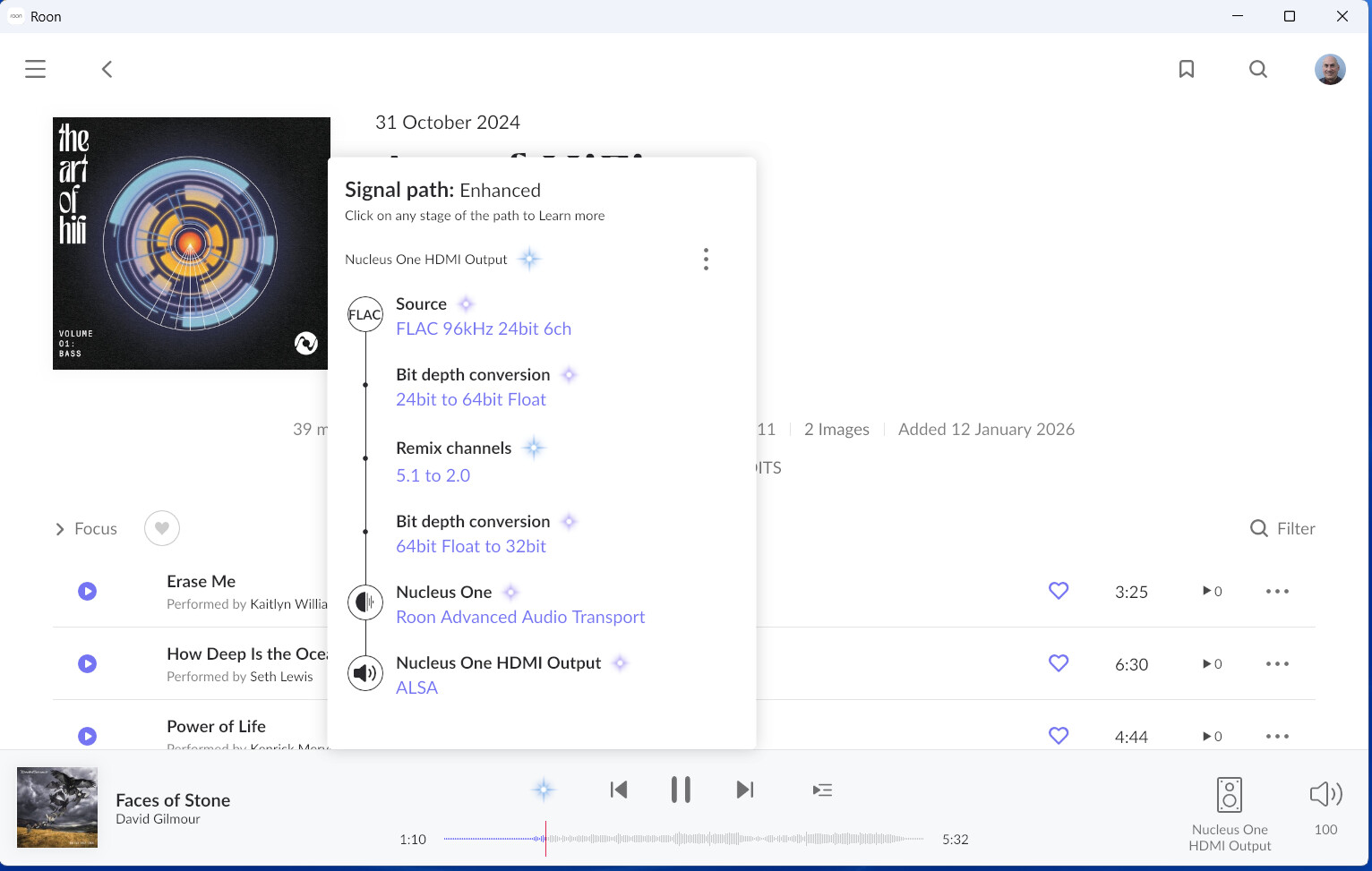
I then went back to my home theater room, used the BlueOS app to select the input associated with the Roon device, then went into Roon app and selected Nucleus One HDMI, selected a file, pressed play, and had no sound output. I did see track timeline advance, the "sound bars" were moving, and pressing the star-like icon showed the processing steps associated with the file.
Unfortunately, I have no sound output. Can you please suggest ways to make this setup work? I was wondering if I need to move my Core license from my Dell computer to the Nucleus One and complete any necessary setup.
Yes, in order to make it work properly you would need to move Roon Server to the Nucleus and make it your master licensed server (so your Dell laptop remains used only as Remote).
Without that it is not likely to play music as you expect it to because that is the primary purpose of the Nucleus.
After you roll out your Server on the Nucles (migration Guide) please try to enable the HDMI output on it once again and try to play music once again.
If this doesn’t help, please send us a screenshot of the problem and the exact time it occurred so we can analyze the automatic diagnostic report we might receive from your Nucleus and find the cause of the problem.
Please keep your Nucleus on and configured to be your Roon Server.
Hi Alex,
Here is my status at of 10 PM ET in the US. In summary, a partial success. I was able to move the Roon Core to the Nucleus One. I did all the Device Enabling (I have quite a few Roon Ready components). I named the output of the Nucleus One to be Nucleus One HDMI Output. I selected that as my audio zone and set the NAD M17 to the Roon settings defined in my previous email. I played back a standard 16-bit, 44.1kHz FLAC file and got not sound. Note that device setup->audio device shows that Nucleus One HDMI Output is an unidentified device (I did not see Roon in the company list). The playback diamond icon showed FLAC RAAT ALIS and bars and the timeline were moving.
I have a Dell laptop connected via Roon Bridge and powered KEF EGG speakers as a device. This played back the same file as I tried with the Nucleus One output with no problems.
I also played back the same FLAC file on the M17 using the BlueOS Roon connected (a totally different system input than that HDMI). This worked flawlessly. Same for my iPad.
On my Dell desktop computer that previously hosted the core, I was able to play back the file with no problem via that system output (an Audioquest Dragonfly Red DAC).
I have not been able to test connections to my Bluesound Node Icon, Bluesound Pulse Soundbar+, and Marantz Cinema 40 AVR yet (today is my wife’s birthday so I am squeezing this work in late in the evening).
Please let me know what suggestions that you have for next steps.
Thanks,
Paul
Hi Alex,
I did one more thing after sending you my previous message from 10 AM. I checked the HDMI connection from the Nucleus One to my M17 and noticed that the input to the Nucleus was not really firm. I changed to the HDMI output from my trusty old HD DVD player (connected to HDMI 3 on my NAD) to the Nucleus, set the input to HDMI 3 and got sound! Part one is a success from 2 channel FLACs. I then tried playing back a few 5.1 FLAC files but I was only getting downmixed 2 channel outpus. I tapped the rightmost icon and did not see that multichannel enabler option. Any thoughts as to what might be happening?
In addition to your feedback, I will check the settings for that input on my receiver but HD DVD players did pass 5.1. Tomorrow i will swap the cable with my Sony Universal BluRay player cable and input and see how that works. That definitely passes 5.1 channels as it plays back all BRs and 4k BRs.
OK I did try playing back with the 4k HDMI cable that was connected to my BR player. Same thing. The file processing said that the input format was not a match and downmixed to 2.0. I used the DVD Audio app on my PC to create the FLAC files. In the Roon album display the file is clearly shown as a 5.1flac so that should not be a cause of the problem.
Sorry if I missed this in the info you provided but what is the Channel Layout set to in the HDMI zone - Device Setup - Show Advanced? Your options should be 2.0 5.1 71.
I use 7.1 with Multichannel Mixing set to Downmix as needed. With these setting Roon plays the files as recorded, Stereo or Multi-channel.
Hi Mike, as of last night , advanced was not showing either option. It was empty. Hence, that is why I was reaching out again. I am not sure why this is the case. Thoughts or suggestions?
Thanks for all the information and troubleshooting you’ve attempted so far!
Just to summearze:
HDMI handshake issue likely resolved by reseating/changing the cable and HDMI input.
2-channel FLAC playback works over HDMI → confirms basic audio path is correct.
5.1 FLAC files are being downmixed to 2.0
No “Multichannel” / “Enable Multichannel” option visible in the signal path / zone controls.
Roon explicitly reports “input format not a match → downmixed to 2.0”, which is a key clue.
This points less toward file corruption and more toward device capability negotiation. Some additional thought here - Roon will only send multichannel audio if the entire HDMI chain advertises multichannel support via EDID.
If the NAD M17 input (or processing mode) reports itself as 2-channel PCM only, Roon will downmix automatically.
Some next troubleshooting steps for you: On the exact HDMI input you’re using (HDMI 3, for example):
Check:
Input audio mode is set to PCM / Multichannel PCM
NOT set to:
Stereo
“Downmix”
“Direct 2.0”
Any legacy HDMI audio compatibility mode
If there’s a per-input setting like:
“HDMI Audio Format”
“PCM Mode”
“Speaker Configuration per input”
Ensure it is 5.1 or higher, not “Auto (2.0)”. Let me know if this makes sense and if this helps! 🙌
Hi Ben,
I went into the NAD and in the listening mode section I made sure that PCM stereo and multichannel did not have any processing done. I then rebooted the Nucleus One, restarted Roon on my laptop, selected Nucleus One HDMI output, and still get the remixing. The comment says,“channels are remixed because source and playback configurations are different.” I have included a screenshot and a server status pdf. Any thoughts? I am going back through my mind when I ripped the files off BR and DVD discs. If I copied a DTS or Dolby strea
m, would there be problems. I will check on this. If you do not think of anything obvious, I will reach out the NAD support to get their opinion. Thanks, Paul
Thanks for all the additional information and for all the troubleshooting you’ve done so far!
This tells us exactly what Roon thinks is happening. Roon believes the HDMI sink (NAD M17) only supports 2-channel PCM. So Roon is falsely protecting you by downmixing 5.1 → 2.0.
That’s why:
You do not see the “Enable Multichannel” toggle
You see “5.1 → 2.0 remix”
The device shows as Unidentified
ALSA is listed instead of a Roon-identified HDMI profile
As a side note - can you temporarily connect the Marantz Cinema 40 via HDMI and check your Roon device settings for any multi-channel options?
Hi again, Problem solved. I do not understand why but here it goes. About 15 min while I was using the Roon App on my iPhone listening to music on a 2-channel system, I started looking at my connected devices. In the device setup, if I scrolled down after hitting advanced, I did see all the extra fields including channel setup and downmixing for the Bluesound Node Icon. I said to myself, “why not try it for the Nucleus One HDMI Output?”. Well, I did continue scrolling down and sure enough I saw the necessary fields. I set it to 5.1 and channel mapping only. I then went to my garage room, selected a 5.1 album and, sure enough, the NAD was showing 5.1 and playing out of all my speakers! This seems to have come down to the Roon App UI on my laptop and iPad not automatically scrolling down after hitting advance in the device setup I will now go back to listening to multichannel audio and buying downloads from companies like 2L. Thanks to all on this thread for their help. Seems to be a great product and now happy that i purchased it. Thank and best wishes for 2026! Paul
 I will now go back to listening to multichannel audio and buying downloads from companies like 2L. Thanks to all on this thread for their help. Seems to be a great product and now happy that i purchased it. Thank and best wishes for 2026! Paul