I moved my Nucleus+ today. After moving it, the power button wouldn’t work. I followed instructions given elsewhere for troubleshooting, all the way up to resetting the CMOS. The power button works now, but the light in the button itself does not turn on, and my Nucleus+ will not connect to my network, even though the Ethernet ports has a clear link light and activity light blinking. Given that the power button doesn’t light up, I’m wondering if it makes sense to try to replace it. For clarity, when I say that the power button works now, I mean that when I push it for 4 to 5 seconds, the Ethernet port lights go dark. Then, when I push it again, the Ethernet port lights turn on, so the button is doing something, but I’m wondering if it may still be defective, since the light doesn’t come on. Not sure what to try next, but I’m dead in the water. Thoughts?
You might plug a monitor up to the Nucleus so you can verify that the button is really doing nothing.
Thank you for the suggestion. Nothing appears on the monitor when I turn the Nucleus+ on.
More info:
With the Ethernet lights on and blinking, pressing the on/off button normally does nothing. However, pressing and holding the on/off button for about 5 seconds causes the Ethernet lights to turn off. Pressing the on/off button after that causes the Ethernet lights to come back on, but nothing appears on the monitor.
So, the on/off button is doing something, but only in the above-described scenario.
Thoughts?
Thanks again for the help!
I followed the steps in this video. Someone posted it on another community thread trying to solve a similar issue. Nucleus Battery Reset.mp4
If you dont take care about static you can damage the motherboard.
Thank you for reminding everyone reading this about ESD. Personally, I use a grounding wrist strap when digging into electronics. I should probably add a rubber mat to the equation, but I tend to do it on a wooden bench. Anyway… motherboard is all safe in this case, but I suspect it may have been damaged before I popped it open. I guess my next step may be to find a repair shop. Anyone have suggestions there? I purchased this Nucleus+ directly from Roon in February of 2021, so it’s out of warranty.
I am not sure about the NUC used in the Nucleus + but in my series 10 i7 there is a BIOS setting to “restart on power resumption” which obviously bypasses the ON switch . If the switch is broken it may be an option.
Before I am told it’s risky , mine has been set that way for around 2 years to cope with the vagaries of South Africa’s power outages it hasn’t melted the NUC yet. So a 24/7 NUC started this way occasionally should be OK (famous last words)
Hi @md_tl ,
If you’re just concerned about the power button aspect, you can also push the white toggle on the motherboard, this is also a power switch:
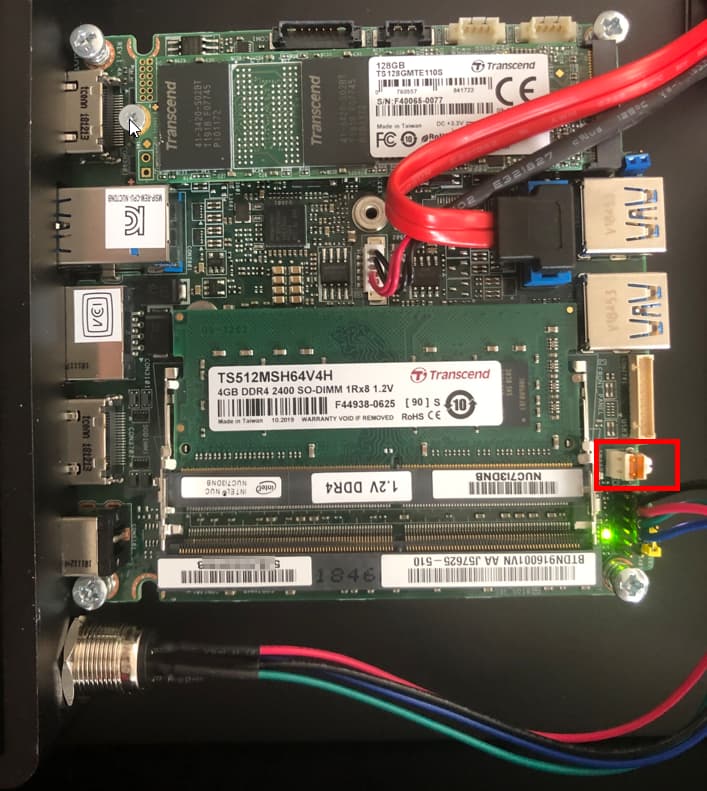
If you’ve tried the CMOS reset and there was no change in behavior for HDMI output, it does sound like a motherboard issue though. If you’re looking for a lower-cost Nucleus replacement, the Nucleus One might be a good option for you to look into.
Thank you. I ordered a Nucleus One on Monday, and it showed up today. I moved my SATA drive from the Nucleus+ to the Nucleus One and I’m up and running again. I’d like to get the Nucleus+ box fixed, though. It seems like a waste to have it just sitting around being “dead.” Anybody know the best path for getting it looked at and fixed, or is that just a bad idea?
A computer repair shop would be my first call. Not much to these, and a power switch should be pretty easy to install. It may not be the same, but it should not be to difficult to source one that will work. Or, a TV/Audio repair shop… If it is just the power button, an easy fix.
Thanks Michael. Appreciate everyone’s comments and help here!
Hi @md_tl ,
Have you been able to confirm if the power button was the issue? Is the power switch on the motherboard working as expected and the unit boots, or are there still boot issues?
Hi Noris,
I no longer think the power button is the issue. Here’s what I’ve done since last posting:
- Using the on/off switch directly on the motherboard. This made no difference.
- Replaced the motherboard. I have the exact same symptoms with a new motherboard. To refresh, those are:
- With a monitor plugged in, nothing shows on the screen when I boot it up.
- The link light on the ethernet connection blinks while off, then both lights become active when turned on, but my network does not see a connection and is not doling out an IP address.
At this point, I think the problem must be with one of the two chips I moved from the old motherboard to the new one (RAM and the Kingston 2000). What are your thoughts?
Thanks very much for your help!
Mark
Well, that is not the only potential. A failing power supply can also lead to a situation where the PC doesn’t boot.
You can test between the two by removing the M.2 drive. With just RAM you should be able to get video and to the BIOS screen, obviously not boot since a drive is not attached. That might provide additional troubleshooting information.
If nothing, then I would replace the RAM, I like Corsair personally.
Thanks Daniel! Removing the SSD gave me new info. Without it installed, I immediately got video and the screen said “No bootable device found.”
I see an exact replacement on eBay for $50, so that’s easy, but I don’t know how to install the Roon OS. I’m sure that’s “googlable,” but do you agree with the that the M.2 is the problem, based on this troubleshooting step? You mentioned a failing power supply could be the problem, too.
Thoughts? Thanks again!
I think that if you pulled the SSD and it came up with video and the option to go to the BIOS screen then I would replace it. I only use/recommend Samsung M.2 drives, something like this.
Make sure you are using your original motherboard not a replacement. Pop the drive in. Download the ROCK install and install it. Once that is done. Then leave it alone, message Noris and ask him to upgrade the Rock install into a Nucleus RoonOS version. Once that is done, then finished restoring backup, etc etc.
Thanks again. I will get the Samsung M.2 drive you recommend. This is probably a dumb question, but how do I download the ROCK install if I can’t boot the computer up? Or will the new SSD boot up with whatever OS is already on it, which will give me access to the internet, which will, in turn, allow me to download ROCK?
Really appreciate your help (along with others who have chimed in).
You download the installer using a PC or Mac and then put it onto a USB stick which you plug into your Nucleus.
Start from Step 3 here:
Got it. Thanks! Will do.