Pausing a song breaks its playback

Whenever I pause a song for more than a few seconds, like for an incoming phone call, it will not play again for a long time. Meaning, if I give up and continue writing or reading, or whatever I was doing when I was interrupted, it will eventually startle me when it suddenly starts playing again, or moves on to another song. Going back and forth to prior or future songs in the queue in an attempt to force the paused track to play doesn’t reduce the period of time before it finally plays. Restarting the Core will fix it, but that kills the whole mood.

This has been an issue for months if not longer and I need this to be fixed. Roon’s propensity to do nothing for unpredictable lengths of time, sometimes with no interaction on my part, but almost always when I pause a track or skip a track, is getting me to the point of buying a more modern streamer/server with Connect or its own app and dropping Roon all together.

Nothing I know of matches Roon’s collection aggregation and metadata gathering capabilities but this is getting to be intolerable.

I know this next part should probably be in another question, but: How can I report egregious errors in the metadata? I’m thinking of the few, but very aggravating, times that it associates the wrong song lyrics with a track.

@Tony_West,

Just a fellow Roon subscriber here trying to help out. This behavior must be frustrating.

The symptoms you describe—where a paused track hangs and then eventually jumps forward or skips—often happen when the audio device and the Roon Server lose their “handshake” during the silence, leading to a timeout when playback tries to resume.

Before digging into deep diagnostics, there is one setting you can try immediately that is designed for this type of situation.

Go to “Settings” → “Audio”, find the zone you are listening to, click the gear icon → “Device Setup”, and look for “Resync Delay”.

  • If it is set to 0ms, try changing it to 500ms or 1000ms.
  • This forces Roon Server to send a brief period of silence before music data, which gives your DAC or endpoint time to “wake up” and lock onto the signal again before the music starts. This often fixes the pause/resume hang.

If that doesn’t resolve it, Roon Labs and the community will need a bit more detail to pinpoint where the chain is breaking. Could you let us know:

  1. What computer and operating system is running your Roon Server?
  2. Is the Server connected via wired Ethernet or Wi-Fi?
  3. What specific device are you listening to when this happens? (e.g., a USB DAC connected directly to the Server, a network streamer, a Sonos speaker?)
  4. Does this happen with local files, streaming services (Tidal/Qobuz), or both? If local, where are the files stored?

Regarding the metadata/lyrics issues: Roon generally sources these from third-party providers. The best way to report egregious errors is to create a separate post in the Support category of this forum with the Artist and Track. Roon staff monitor that section and can submit official correction requests to the data providers.

Hope this helps!

Good day @Tony_West !

We’re sorry to see you face this problem.

But can you please answer a few questions for us so we better understand the situation :

  • What device is being used as audio endpoint when the problem happens ?
  • Does it happen to every zone ?
  • Is zone connected via Wi fi or via ethernet?
  • is Core connected via ethernet ?
  • Do you have only one core or many ? If many, which one is affected ?
  • is this happening only with local content or streaming too ?
  • if you press pause and then play back immediately, does the problem persist ?
  • Is it playing via Roon or roon ARC ?
  • is your audio endpoint where you play music to is the same remote device where you receiving a call that pauses playback? (f.i. you playing to your iPhone’s headphones and getting call to the same phone which causes a pause to happen )

    Looking forward to your reply!
    Regards.

Hi,

Thanks to all who responded. I am trying to answer everyone’s questions in this message.

Typically, the endpoint is a Sonore microRendu. However, problem is not limited to the Sonore.
It also happens when using a WiiM, PC, Android, or iPhone as the endpoint.

Yes, can happen on any zone. I very rarely have more than one zone running at a time.

Zones are wired (primary), and wireless.

Core server is connected via Ethernet (gig). There are a couple of switches between the server and the various endpoints. Server is a QNAP TS-453D with 8 gigs RAM

Devices include an Android phone (WiFi only, there is no cellular account), the aforementioned iPhones, and, most often, the microRendu. Most often, it is a USB DAC (Marantz SA-10) connected to the microRendu, but also happens with iPhone. Doesn’t seem to matter if songs are local (FLAC, WAV, and DSD/F). Local files are stored on spinning discs on the server running Roon. The Roon DB is on an M2 SSD.

Pausing and then resuming playback immediately doesn’t happy very often. I just tried it and that worked fine. It does usually happen when the pause is prolonged. I can play other songs after the pause, but the one that was paused takes a while before it will play again.

I should stress it often happens with no user intervention at all. I.e., playback is randomly interrupted while it does whatever it does instead of playing back the next song in the queue.

Happens primarily with Roon; much less frequently with ARC. Usually, ARC is used while driving or walking and I don’t have much occasion to pause. I have noticed it often doesn’t resume after phone calls in the car, a problem I associate with Carplay, but sometimes happens while walking - with same iPhone as in car. This problem has persisted through multiple iPhones. At home, where problem is most noticeable, controller is usually an iPad, but can also be iPhone or PC. Calls don’t cause it (unless driving or walking).

Thank you to all that responded.

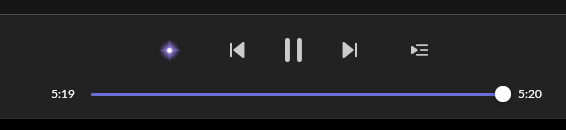
It just did it again. After playing a song, it just stops with one second indicated left in the song. The “now playing” animation in the track list is still running.

image

This is a Tidal track.

When I clicked the icon for next song, nothing happened until I clicked again. Then it went to a new album altogether. Then, I clicked on the next song in the original album track list and it played immediately.

Hey @Tony_West,

Before anything else, it may be worth testing a differrent DNS server - we have seen users have a better experience in the past if they change their Router’s DNS servers from the ISP provided ones to Cloudflare DNS, Quad9 or Google DNS. Can you please give this a try and let me know if it helps?

Thank you!

I use Google’s DNS servers.