Great idea, but unfortunately this is not possible with the API that Roon offers and that I have to use. There is no functionality that allows me to change anything in the Roon database.
Sorry DrCWO
Great idea, but unfortunately this is not possible with the API that Roon offers and that I have to use. There is no functionality that allows me to change anything in the Roon database.
Sorry DrCWO
Thank you 
Today I purchased and setup my rooMAX.
rooMAX is FANTASTIC; Thank you DrCWO. Great job…
The process was smooth w/o any issues, “It just works…” Previously I was using an Autohotkey script on Win11 w/ the Xencelabs Quick Keys which was functional but limited compared to rooMAX.
I do have a couple of feature questions about rooMAX.
Currently the Volume adjustment is set to clockwise to increase vol and counter-clockwise to decrease. Could you perhaps add the option to reverse this in the “Settings”? A small tid bit I know but I’ve been using this remote for several years now and my preference is counter-clockwise vol-up and clockwise vol-down.
I currently have 3 Xencelabs Quick Key remotes for 3 different rooms. I understand that each USB dongle has a limit of pairing two Quick Key remotes. Would it be possible to add a 2nd usb dongle to expand the remotes to four? The limit w/ a single usb dongle is currently preventing me from using my 3rd remote in my house.
I also noticed that my rooExtend is on v.3.4.0 which I downloaded from your google drive. How do I upgrade it to v.3.4.3? I’m on a Pi 4.
I will add this to my list for the next release. This seems to be quite a simple Add On.
Thanks’ for your proposal 
Guess I don’t understand exactly what you’re doing. rooMax is designed that one rooMax and one QuickKeys can be operated per Raspberry Pi. This means one Raspberry Pi plus one rooMax license per QuickKeys controller. If I’ve misunderstood your question, feel free to ask again.
The download image for the Raspberry Pi is on v3.4.0 but it should update at night between 2 and 4 AM. So keep it powered on (my recommendation is alwasy on) at night and it should update be it’s own.
Best DrCWO
I will add this to my list for the next release. This seems to be quite a simple Add On.
Thanks’ for your proposal
Thank you for the consideration.
Guess I don’t understand exactly what you’re doing. rooMax is designed that one rooMax and one QuickKeys can be operated per Raspberry Pi. This means one Raspberry Pi plus one rooMax license per QuickKeys controller. If I’ve misunderstood your question, feel free to ask again.
I only need to use a 1 (single) Quick Key remote at a time. I have 3 Quick Key remotes for the 3 rooms I use. One usb dongle currently is paired to 2 of my Quick Key remotes, which I can easily swap between by powering off one and power up the other.
I understand that rooMAX supports only 1 (single) Quick Key at a time, which is fine as I only need 1 (single) remote active at a time but if I attach a second usb dongle for my 3rd remote it will not activate/connect.
The only way to get it to connect is to power down the Pi, unplug the dongle for the 2 paired remotes, plug in the other usb dongle for the 3rd remote and power up the Pi + rooExtend.
So for my question, is it possible to be able to have rooExtend + rooMax detect both usb dongles so that I can actively swap between all 3 of my remotes w/o having to reboot, unplug & replug the usb dongles.
Again I’m NOT trying to use more than 1 Quick Key remote at a time but rather the ability to swap between 3 different Quick Keys w/o the previously explained process? If not then it seems the only other solution to negate that process seems to be to build another Pi4 w/ rooExtend + rooMax.
The download image for the Raspberry Pi is on v3.4.0 but it should update at night between 2 and 4 AM. So keep it powered on (my recommendation is alwasy on) at night and it should update be it’s own.
Tyvm, woke up this morning, checked for the update as you mentioned and it’s updated to v. 3.4.3
One last question that I neglected to ask. What are the chances of Roonlabs issuing an update to Roon that breaks the rooExtend / rooMax software extension? Do I need to disable Roon automatic updates to negate this potential issue to allow you time to update the extensions?
This remote software literally is the best Roon Remote ever!!! and well worth its purchase price, again Thank you.
This is interesting
I never knew that more than on Quickkeys controller can be paired with one dongle. This leads to the question why you don’t pair three of them with the same dongle 
Adding the capability to use more than one dongle I have to own a second Quick Keys and see hoe those two dongles are visible in Linux. For me this is too much of an effort at the moment. If you can send me one and I’ll find out
Regarding your last question:
The Roon API stayed very stable during the last few years. I’m always up to date with the latest stable Roon release. If there will be issues I will recognize and fix.
Best DrCWO
This is interesting
I never knew that more than on Quick Keys controller can be paired with one dongle. This leads to the question why you don’t pair three of them with the same dongle
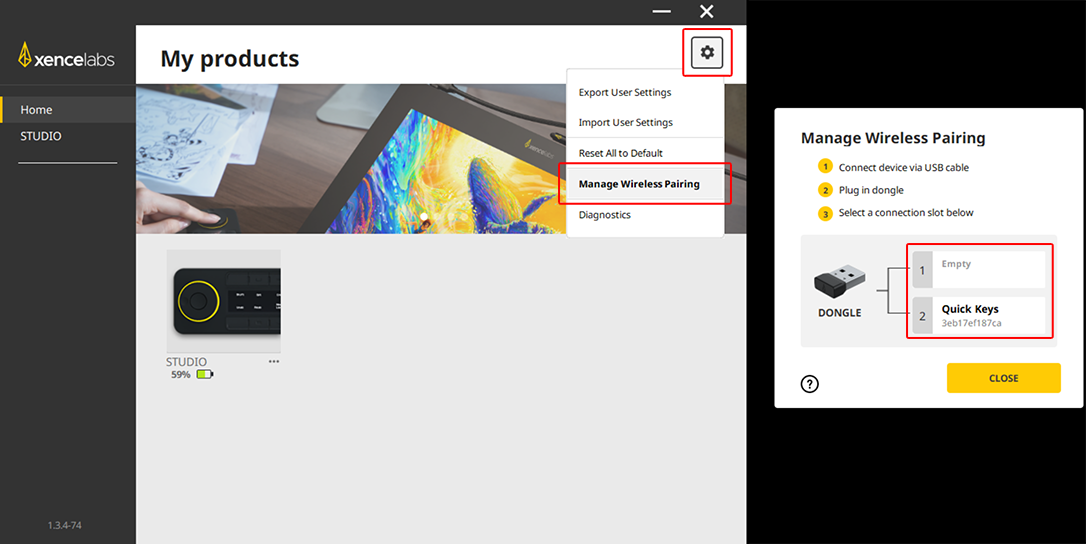
Yes, Xencelabs Quick Keys usb dongle allows for two devices to be paired with it. Initially I was led to believe it was only one bc the devs intended for one tablet pen device and one Quick Key device to be paired to a single usb dongle. I accidently discovered after purchasing my 2nd Quick Key remote that you can pair two to a single usb dongle.
So to pair two Quick Key remotes you need to install the Xencelabs software on your OS of choice (I use Win11). You will need a usb cable to connect each device (one at a time) and have the usb dongle plugged in. Open the Xencelabs software and go to the sections I’ve marked in red and click on either Slot 1 or 2 to pair a Quick Key remote.
Once you have both Quick Keys paired to the usb dongle you can now use that single dongle for two devices at the same time in Windows. However, on rooExtend/rooMax you can only use one at a time BUT you can easily swap between the two by turning one off and then powering up the other.
Forgive me but I was under the assumption that you already knew this bc you literally re-wrote software for this hardware which is amazing to me. Any how I’m glad to hopefully be of some help in showing you this feature.
This is why I was asking if you could add the option for a 2nd usb dongle bc that would expand the Quick Keys remote from 2 devices to 4 from a single Pi4 rooExtend/rooMax.
Then depending on your home size, you could run a usb fiber optical cable for longer distances (up to 50m) to another section of your house w/o having to have a 2nd Pi4 device. I use one (15m length) atm for a touch screen display to my pc which works perfectly.
I recommend fiber optical usb cables bc you can get some very long distances w/ them, their safe to run thru walls, and easily power the dongle for this simple function or you can plug in an active hub at the end of the usb fiber optical cable and plug the dongle into that. I’d say the only downside is the usb fiber optic cables is that they are a bit pricey.
I hope this info can be helpful and tyvm for your prompt replies.
Thanks’ for clarification.
I will put this on my long term list of activities as I need to get a second QuickKeys controller. But to be quite frank: I think it might be easier to get a Pi Zero W2 (25€) in a small case and connect to WiFi instead of drilling holes for USB fiber cables and installation of a powered hub.
But maybe I will get back to this idea for what reason ever 
Anyway thanks’ for your input helping me (and all folks here) to learn more about the QuickKeys and its application scenarios.
Best DrCWO
I think it might be easier to get a Pi Zero W2 (25€) in a small case and connect to WiFi instead of drilling holes for USB fiber cables and installation of a powered hub.
I’m not familiar w/ the Pi Zero W2 setup but I’ll def look into it.
Tyvm
It’s the same as Pi4. Please check the Quick Installation Guide here to setup WiFi.
If you get a Pi Zero W2 you can use the Pi ARMv8 image.
Best DrCWO
So I’m fairly new to Linux and Pi imaging but I’ve been able to manage to get things working w/ rooExtend w/ great instructions.
With that being said I’m thinking what you are leading to by using a Pi Zero is to put one of those in my other room and plug the 2nd Quick Keys dongle into it which will kinda work as a network pairing to control rooMax w/o the need for running extended usb cables?
If that is what you are proposing that sounds like a much better solution than the cables solution; provided at some point you can perhaps figure out how to add a 2nd usb dongle to rooMax.
I really like that idea if that is what you meant. These lil Pi devices are very cool.
This is exactly what I’m proposing. Be sure to get a Pi Zero W2 and not a Pi Zero W.
Best DrCWO
Hello again,
Been meaning to make this request for rooMax.
Could you add a feature to allow us to remap/reposition of the Volume & Track Time buttons which are the buttons closest to the Volume Wheel?
I very much appreciate that they are there but would like to move them to another position or perhaps even swap positions.
Tyvm
Hi @heyguyslol,
this is not so simple as it is a hard coded position and it would be quite an effort to realize that. So probably i won’t do it, sorry 
Best DrCWO
Understood, tyvm for the response.
I am new to the RooMax / RooExtend, but have just gotten the Quick Keys Controller and the RoMax license trying to get it set up. It works beautifully and does everything it should.
I am using it together with a Marantz AVR, so I wonder if anybody has succeded in getting the RooMax volume to operate the AVR?
I saw some discussion about connecting RooMax to miniDSP and thought that might be a similar issue?
Please let me have some inputs to how people a solving this issue
Is your Marantz AVR Roon Ready?
Best DrCWO
Hi DrCWO, thanks for your fast reply.
It’s a Marantz CINEMA 70s and I think it’s Roon-testet, but that may not necessarily be the same as Roon-ready? Further, it does not have an USB input except on the front for external disk.
When I select Device Volume or DSP volume in the device setup, the RooMax regulate volume nicely, but it is all taking place locally in Roon, that runs on a Mac.
I have an LG TV and an Apple TV connected as well, and both of those regulate volume on the Marantz via the HDMI-CEC interface.
I feel a little stupid, but I simply cannot get the combination MAC and Marantz to work similarly.
I am not really sure what next step should be - maybe the only way forward is to exchange the Marantz with a real Roon-ready box? Any suggestions?
Best regards Per
I digged a bit deeper into it and this is what I found:
This means: If the Marantz is connected via Ethernet it will show up in Roon as an Airplay device. Using this mode changing volume in Roon should also change Volume at the device. I wonder why it did not. Please test it with an iPhone connected via Airplay to the Marantz.
Did the device volume change if you change volume at the iPhone via its volume knobs?
Please also let me know what setup you run with the LG TV. How are the devices connected there. I guess the Marantz is connected to TV and TV to Apple TV. Right?
If yes please stream from Roon to Apple TV and report if you can change device volume via Roon in this case.
The Marantz natively supports UPnP/DLNA. If you use this protocol (for example with the mconnectHD App) can you adjust device volume with the app?
Best DrCWO
Hi DrCWO, I appreciate your involvement in this issue.
You are right, when running the Marantz via airplay, the volume works as intended.
With regards to connections, everything is connected via the Marantz - the LG TV to the HDMI eARC out and the Apple TV and the Roon Box to HDMI inputs.
If I run airplay from Roon to the Apple TV, Roon volume will not change on the Marantz whereas the Siri remote will change the Marantz volume??
Running UPnP/DLNA, allows me to change the volume from the app.
In the meantime I found out that the Mac M2 does not support HDMI-CEC, which could be the explanation that Roon cannot adjust volume on the Marantz directly. Maybe the solution could be to run a Roon bridge on a piece of HW with HDMI-CEC support - could be NUC or even a Raspberry Pi. Could that possibly solve the volume issue?
Best regards Per