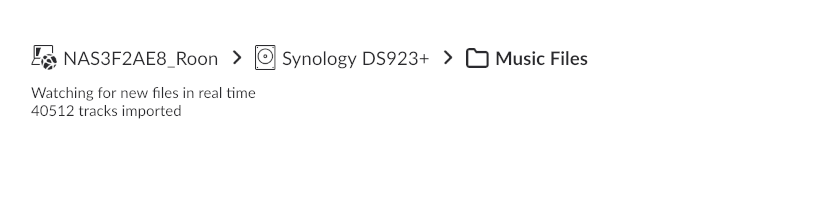
· Roon cannot connect to a Melco network share. I can see the network share in Windows as \\IPAddress\share. Works fine. I go into Roon and try the Add Network Share function. I add in the same Network Share location as \\IPAddress\share with username/password nobody/nobody but it keeps coming back with Unexpected Error and cannot connect. The Melco is quite old (N1ZH60) and runs Mimimserver. The content directory in Minimserver is /mnt/disk1/share. And this works too. So why can't Roon connect?
Thanks for reaching out. According to some other posts on the forum, I am seeing users report success with Melco network shares. Have you specificed the exact internal share directory needed? I was able to find this thread which may help:
Tried using “internal” as a path to the share but it didn’t work. I think this might be something for newer Melco units. IP address followed by \share works in Windows. Why wouldn’t it work in Roon?
I have uploaded the files but the upload process starts with “Name”. Was not sure what was required here - my name or the name of the file. I entered H:\Downloads\RoonServer_log.06 and this was accepted. Perhaps you were asking for my name. Anyway I uploaded the log file during the next step. The errors relate to IP address 192.168.1.22 and there are several.
We have reviewed the logs you provided and can conclude that the user who mounted the folder on your Melco device does not have sufficient access rights to the shared resource.
Please ensure that the access rights are assigned correctly and try again.
02/02 20:33:24 [Local 02/02 20:33:24] Trace: [roon/cifs] [roon/cifs] Got exception trying to create mount directory, retrying with sudo mkdir.  Exception message: System.UnauthorizedAccessException: Access to the path '/mnt/RoonStorage_cd0a77fc7178c08b498676f9b5915017e72f186b' is denied.
 ---> System.IO.IOException: Permission denied
   --- End of inner exception stack trace ---
   at System.IO.FileSystem.CreateDirectory(String fullPath)
   at System.IO.Directory.CreateDirectory(String path)
   at Roon.CIFS.CIFSUtil._CreateDirectory(String s)
02/02 20:33:36 [Local 02/02 20:33:36] Info: [stats] 7728mb Virtual, 3092mb Physical, 1315mb Managed, 1777mb estimated Unmanaged, 359 Handles, 74 Threads, 0.01% of runtime in GC pauses, 33ms last GC pause duration
02/02 20:33:38 [Local 02/02 20:33:38] Trace: [broker/accounts] [heartbeat] now=02/02/2026 20:33:41 nextauthrefresh=02/02/2026 20:45:39 nextmachineallocate=02/02/2026 20:43:41
02/02 20:33:39 [Local 02/02 20:33:39] Error: [broker/filsystem/drivelistshares/addsharedrive] error adding share: System.Exception: [cifs/mountconfig] invalid cifs path (post windowsization, missing third backslash): \\n1-0f22
   at Roon.CIFSMountConfig..ctor(String networklocation)
   at Sooloos.Broker.FileBrowser.DriveListShares.AddShareDrive(CIFSConfig config)
02/02 20:33:51 [Local 02/02 20:33:51] Info: [stats] 7784mb Virtual, 3092mb Physical, 1320mb Managed, 1772mb estimated Unmanaged, 359 Handles, 84 Threads, 0.01% of runtime in GC pauses, 33ms last GC pause duration
02/02 20:34:06 [Local 02/02 20:34:06] Info: [stats] 7720mb Virtual, 3092mb Physical, 1326mb Managed, 1766mb estimated Unmanaged, 359 Handles, 73 Threads, 0.01% of runtime in GC pauses, 33ms last GC pause duration
02/02 20:34:07 [Local 02/02 20:34:07] Error: [broker/filsystem/drivelistshares/addsharedrive] error adding share: System.Exception: [cifs/mountconfig] invalid cifs path (post windowsization, missing third backslash): n1-0f22
   at Roon.CIFSMountConfig..ctor(String networklocation)
   at Sooloos.Broker.FileBrowser.DriveListShares.AddShareDrive(CIFSConfig config)
What is Roon trying to do here? It looks like it wants to write to the share. Why is that?
I have contacted Melco and they say what I have done should work. There is no further setting that would affect this. The default share is //IPAddress/share and username and password are the same - nobody.
Roon server is running on a Synology NAS using Roononnas. Does that make a difference?
Using native Windows file share there is no issue.
I have created a share on the NAS itself called Melco which points to the actual device share. I still cannot connect to it using Roon.
I have a share on the Roon NAS setup but I cannot see how I set this up.
I have a folder on the NAS called Melco and a folder called share that is mounted on the Melco. I can see this within File Station and browse so it is accessible.
I now need to create another share to the point to the new share I’ve created on the NAS called Melco.
Adding //IPAddressOfNAS/Melco/share with the correct credentials still causes an error and it’s the same error:
02/06 15:01:17 [Local 02/06 15:01:17] Trace: [roon/cifs] [roon/cifs] Got exception trying to create mount directory, retrying with sudo mkdir. Exception message: System.UnauthorizedAccessException: Access to the path ‘/mnt/RoonStorage_0246b75cf53c6df623ea44a3bed6b9d9654079a8’ is denied.
—> System.IO.IOException: Permission denied
— End of inner exception stack trace —
at System.IO.FileSystem.CreateDirectory(String fullPath)
at System.IO.Directory.CreateDirectory(String path)
at Roon.CIFS.CIFSUtil._CreateDirectory(String s)
Thank you for your patience and for uploading the log files.
I have analyzed the diagnostic data, and the error System.UnauthorizedAccessException confirms that the issue is not with your Melco password or network settings. Instead, it is a permissions issue within the Synology NAS itself.
The Technical Detail:
When you try to add a “Network Share” in Roon, the RoonServer process attempts to create a mount point in the system directory /mnt/. The Synology operating system (DSM) blocks Roon from doing this due to security restrictions.
The Solution:
Since you mentioned that you have already successfully mounted the Melco share within Synology File Station, you have already done the hard part. Because the Synology OS is handling the connection, Roon can simply “see” that share as a Local Folder rather than a network share.
Please follow these steps to configure it:
Verify Permissions (Crucial for DSM 7)
Roon needs permission to read the folder where you mounted the Melco.
Go to Synology Control Panel > Shared Folder.
Select the shared folder where the Melco is mounted (e.g., "Melco" or "Music") and click Edit.
Go to the Permissions tab.
Change the dropdown menu from "Local Users" to System Internal User.
Find RoonServer in the list and check the Read/Write box.
Save your changes.
2. Add the Folder to Roon
Open Roon and go to Settings > Storage.
Click Add Folder (Do NOT click "Add Network Share").
In the browser window, locate your NAS volume (usually under / -> volume1).
Navigate to the folder where you mounted the Melco (e.g., /volume1/Melco/share).
Click Select This Folder.
By using this method, Roon treats the Melco files as if they were physically stored on the Synology NAS, bypassing the network mounting error entirely.
Yes that looks to have worked but it’s not the answer to my original question which was how do I connect to Roon to the Melco without having to use the Synology as a bridge (in effect)? Using the Synology is a workaround.
If you want to connect from Roon directly to your Melco then you would need to follow @vadim’s advice: create a new user for Melco and give Read & Write permissions to this user. Then try to connect from Roon To melco using this account.
I cannot create a new user on the Melco nor can I create a user called nobody on the Synology as this is a reserved username. The only user on the Melco is “nobody” which has full access permissions.
Looking at the behavior (Windows connects fine, but Roon throws “Unexpected Error”), this usually points to an OS-level negotiation issue, especially if your Roon Core is running on a Linux-based system (like a QNAP, Synology, or Nucleus) rather than on Windows.
If your Roon Core is running on a NAS (Synology/QNAP), the Roon application acts differently than on a PC. Roon needs to create a local directory to “mount” the external share.
If the user account running Roon on your NAS does not have permission to create folders in the /mnt/ or /media/ directory, the connection will fail immediately with a generic error.
This thread is now closing due to inactivity/lack of response, but you can reactivate the conversation anytime by submitting a new support request. Our team will merge or reopen topic threads accordingly. Thank you!