I may be able to perform some simple check at startup to verify pyroonconf is syntactically correct and if not issue a warning. I could also offer a reset configuration option to go back to some default settings. I’ll think about it while reviewing the code for possible cause.
I’ve seen this kind of thing where I was somehow editing the file in two different windows and one save didn’t see that the other save had already modified the position of the end of the file.
1 Like
@Bill_Janssen thanks. It may be that either system or user actions corrupted pyroonconf. It’s a writeable plain text file so it is prone to being accidentally damaged. My guess is system error but I am double checking RoonCommandLine code to verify it was not a bug.
In any case, I am adding a check to verify the syntax is correct and, if not, issuing a warning. I may also offer the option to restore to a default setting. This detection and protection against corruption is warranted regardless of the source of this problem. It will make RoonCommandLine a little more robust but won’t prevent unintended configuration errors.
I don’t really know how to protect against a system write error such as can happen during a power failure. Is there a way? I have all my critical systems on UPS backup power so they don’t go immediately down during outage. Other than that, I don’t know of any way to protect in software but maybe there is. If you know of anything, please enlighten me.
Of course, it is possible this is just a bug and I am an idiot so I am checking my code as well as hardening it a bit.
@Gyorgy_Rath , I have done a little research and there is an undocumented API call to subscribe to the queue. This allows an extension to monitor the queue by adding a callback to the subscription. However, since RoonCommandLine is not continuously connected to the Roon Core, it is not running as a service, the queue subscription needs to be triggered somehow to call the callback. That is, it may not be possible as I have currently architected RoonCommandLine. I am still working on it. I will let you know if I get any queue management working but right now it is still in the “is it possible” phase.
2 Likes
@Ron_Witkamp I have published an updated release of RoonCommandLine which includes modifications to the roon command to perform a syntax verification on the pyroonconf configuration file. If a corrupted or incorrect pyroonconf is detected, the user is prompted to revert it to defaults. The only functional change between version 2.0.5r3 and version 2.0.5r4 are these changes to the roon command.
See RoonCommandLine Version 2.0.5 release 4 · Ron Record / RoonCommandLine · GitLab to read the release notes and download the appropriate release asset.
2 Likes
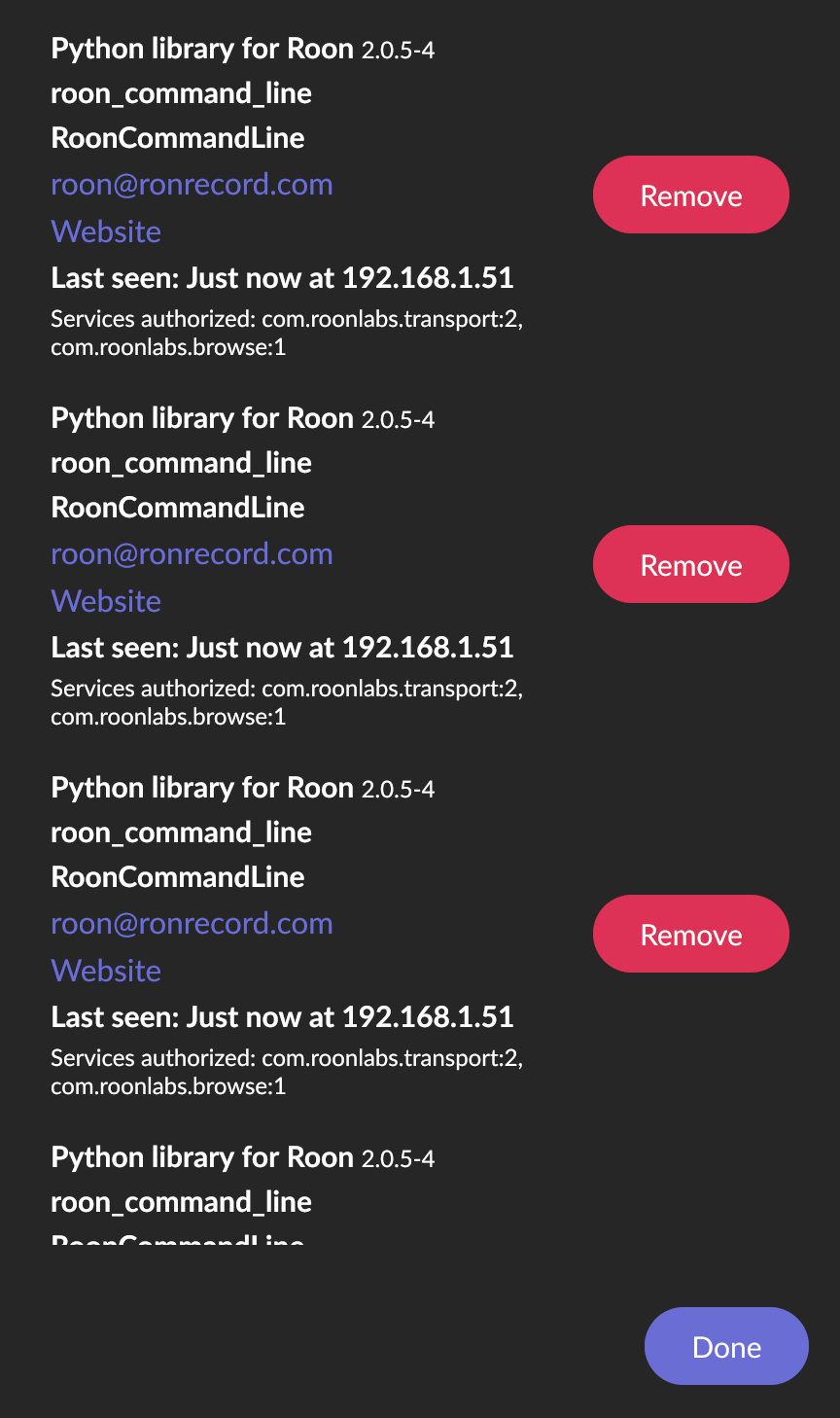
I just rebuilt my Ubuntu Roon Server and installed the latest RoonCommandLine from the git repository. I’m seeing a request for accepting the extension every time I attempt a command? The extension request s then pile up. This seems like a new issue beginning in last few days?
1 Like
Update: I Remove-d the extraneous mentions in the Extensions authorization queue and am not seeing more piling up. Before this I rebooted the server, thus rebooting Roon Server. FWIW…
@ExUnoPlura thanks for the report and update. The RoonCommandLine commands utilize the Python Roon API to make API calls to the Roon Core. Once authorization has been obtained an authorization token is stored by RoonCommandLine and used for subsequent requests. So you should not see these requests for accepting the extension in subsequent RoonCommandLine command API calls. But, you did see them.
Since rebooting seems to have eliminated the issue, I am going to guess that the Roon Core has some way of identifying the extension+version with the token and you were using a stashed token from the previous version of RoonCommandLine. Just a guess. If so, then it may be necessary for updates of RoonCommandLine to refresh the token or obtain new authorization.
I do not yet know how to resolve this but I will look into it. In the mean time, is all well now? Let me know if you experience this again.
Yep, looks good. I did file a bug report on absolute volume levels at GitLab a few months back. I have a work-around so just an FYI. I’m guessing that the Roon API doesn’t always give good visibility into the device capabilities for you to access (Matrix X-Sabre 3 in this case.) I can debug if you want additional details.
Thanks for your contribution! It’s been a lot of fun for me.
Thx @Ronald_Record so much for this been looking for something like this for ages!
I think I installed correctly but I keep getting an error each thing I try
zeltak@IMBP21 bin % ./roon -n -z 'Office-KEF'
Traceback (most recent call last):
  File "/usr/local/Roon/api/zone_command.py", line 36, in <module>
    from roonapi import RoonApi
ModuleNotFoundError: No module named 'roonapi'
No zone matching Office-KEF
Unable to set zone for zone = Office-KEF
Exiting
any clue?
best and thx for your amazing work!
Z
so to anyone interested I have found the solution on the Mac:
make sure pip3 is identified :
to do so just alias the latest pip3 with pip:
in your ~/.zprofile file (or to your .bashrc file if not using .zsh)
vim ~/.zprofile
###
eval "$(/opt/homebrew/bin/brew shellenv)"
alias pip=pip3
install the roonapi package
if the RoonCommandLine didn’t manage to install the roonapi, you will get an error:
zeltak@IMBP21 bin % ./roon -n -z 'Office-KEF'
Traceback (most recent call last):
  File "/usr/local/Roon/api/zone_command.py", line 36, in <module>
    from roonapi import RoonApi
ModuleNotFoundError: No module named 'roonapi'
do this manually
pip install roonapi
then it should work
is there now ply/pause action to toggle play pause? I currently only see a play and pause option?
thx!
Z
Be slightly wary with this trick, you’re effectively “cross wiring” Python package managers across different versions. I’m guessing you have both Python 2 and 3 installations, so when you use pip before the alias it’s installing to the Python 2 environment. Post alias you’re installing to a different Python 3 environment. BTW, if you do have P2 anywhere support ended two years ago.
thx @killdozer I clearly done know what im doing here 
im not very technical at al can you recommend a better (safer) way to address the issue of pip and the Roonapi not working on a Mac (latest Mac 12.5)
thx!
Z
Without knowing all of the details of your installation, it’s a little tricky. I no longer have Python 2 installed but lived with a dual install for a long time. Rather than alias one package manager to another, just use the one that you want, e.g. pip3 install roonapi. Without the alias, you can use which to work out what you’re really running. In this example I’ve installed a Python 2 virtual environment (my default for now) but have a regular Python 3 installation.
❯ python --version
Python 2.7.18
❯ which python
/home/cfw/.venvs/carl/bin/python
❯ which pip
/home/cfw/.venvs/carl/bin/pip
❯ python3 --version
Python 3.9.2
❯ which python3
/usr/bin/python3
❯ which pip3
/usr/bin/pip3
So python and pip refer to my Python 2 virtual env and python3 and pip3 are my Python 3 install. If I want to install to Python 2 I use pip and I run installed Python 2 software with python. If it’s Python 3 you want then install with pip3 and run with python3. Hoping this helps you understand what’s going on, am happy to provide further clarification/confusion if that helps 
Edit for clarity
[Edit] I see in subsequent comments that this issue was resolved by appropriately aliasing pip. I am just catching up on my reading here. Please ignore the following unless there is still an issue.
Hi @zeltak_b , it appears the roonapi module is either not installed or not found. How did you install RoonCommandLine? Did you use the Debian or RPM format installation package? Or, did you perform a manual installation? Any details of the installation process would be helpful in resolving this issue.
There are a few commands you can run to help get an idea of what’s going on. First, check if the roonapi module can be found by pip:
pip list | grep roonapi
That command should return something like roonapi 0.1.1. If it returns nothing then you probably need to install the roonapi module.
Another command to run to retrieve info on what Python thinks is installed wrt roonapi is:
python3 -m pip show roonapi
This should return several lines of info about the roonapi module. In the example above I use python3 but if that is not available then use python.
If it appears the roonapi module is not installed, it can be installed with the command:
python3 -m pip install roonapi
However, that avoids answering the question of why didn’t roonapi get installed during the initial installation. Also, manually installing roonapi will not install any patches I include in the RoonCommandLine installation packages.
I think we can get this working for you. Let me know how you installed, what the above commands return, what system you are on, and any other relevant info.
1 Like
No, there is no play/pause toggle. I’ve implemented toggles where I could - mute, shuffle, repeat. Unfortunately, only play and pause are available so there is no single command to toggle play/pause.
I might be wrong, but I’m using
roon -z zone_name -c playpause
as a play/pause toggle and it works fine
Am I missing something ?
@nihil I forgot I did that. You are correct. You’re not missing something but I might be missing a few brain cells.
1 Like
@Ronald_Record I think your brain cells are fine, especially because documentation on your gstrong textitlab repo is pretty exhaustive.
I’m gonna use this occasion to thank you for this great piece of software that I use daily! It’s actually become my first way to interact with Roon for playback and volume control. Combined with Apple Shortcuts, it’s just perfect!
Thanks again!
2 Likes