· The Nucleus boots up and I can connect to it in the Roon app without issue, but I have a question about configuration/storage/attached devices
Describe the issue
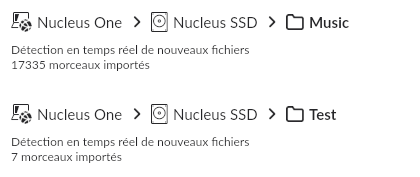
I have a USB disk attached to my Nucleus One that I have been using without problems since its acquisition (about 8 months ago). But for some time I have noticed that when I add files to the library, I no longer have an automatic update... I have to "force" the update in the "storage" menu...
I created a new directory at the root of my USB disk and declared it in "Storage": automatic update is done without problem! Strange...
In addition, I noticed in the "Library" menu that the Roon server seems to be blocked on the audio analysis: the counter runs without ever reaching the number of files to be analyzed.
Thank you for the detailed description — this helps narrow things down
A couple of clarifications and quick checks would help us understand what’s going on here:
Storage configuration
In Settings → Storage, is the original folder on the USB drive (where auto-updates no longer work) explicitly listed as a Music Folder and showing a healthy status?
Audio analysis spinner
The analysis counter continuously running usually means analysis jobs are queued or restarting.
Please perform a full physical restart of the Nucleus One:
Power it off completely (rear button)
Wait ~30 seconds
Power it back on
After reboot, check:
Does the audio analysis spinner still run indefinitely?
Does the track count change over time?
Auto-update behavior after reboot
After the restart, try adding a small test file to:
the original folder (problematic one)
the newly created folder (which currently works)
Let us know if the behavior differs after a clean reboot.
Once you confirm the points above (especially whether the spinner persists after a cold reboot), we can advise on the next steps.
I did a total reboot as requested. I no longer have the audio analysis spinner running indefinitely… but the addition of new tracks is still not detected, while on the 2nd disc (“Test”) it works well
Thanks for the additional information! Could you please access the webUI of your Nucleus and share a screenshot? Here’s more info:
With that, we were able to review a fresh diagnostic report from your Nucleus, and saw some issues with Roon attempting to scan a few files from the /Music share that could be causing you your issues. They were:
Classical/Savall Le Royaume Oublié - La Tragédie Cathare - Savall (2009) [Apple Lossless]
and
Yuri Korzunov Through [DSDFLAC HD Format Test]/yuri-korzunov_through_chill_2022_1024fs.dsf
If you temporarily move these tracks to a different location, not watched by Roon, do you continue to run into issues?
Bingo! You were right: it was indeed a directory that caused thus issue in Roon ( Classical/Savall The Forgotten Kingdom - The Cathar Tragedy - Savall (2009) [Apple Lossless]). Indeed, the file names were much too long (and some characters must have been a problem too!).
As soon as I set aside this directory and relaunched the Roon server, everything got back in order
NB: it is still damaging that this kind of situation is not detected by the Roon server: these files were even not listed as “corrupted”… How can I protect myself from this kind of inconvenience in the future?