Hi,
I just read, that since eof April, Roon doesn’t work any more on my QNAP - it just stopped, and there was no chance to restart it. After de-installation ( ithought just to re-install it - sometimes that helps…), there is no Roon any more in the App-store of QNAP. According to the internet, there seems to be some kind of incompatibility with resources now in the new Roon version… seriously? To be honest I’m quite obset about it - I’m paying for this service as I bought Roon, as it is a fantastic tool - and now it’s not working any more?
Please let me know what to do to get it running again.
Thanks
Walter
The Roon Server package no longer works, please switch to the official Docker image to run Roon Server on your NAS. See also:
You can use the forum search to find answers to questions that arise when switching to the Docker installation as already some time past since the change so most of the questions have already been asked and answered since then. If you need assistance, please open a support request.
I just did an update and found out the same problem. Followed the instructions on how to install the docker with Roon, add Roon and yesssss it works again. I also removed the old ROON app as instructed.
The app in docker is now resyncing all music that sits in the Music folder on DataVol1/Music but my playlist are not there anymore.
I am also afraid that the Albums I added via Tidal are not there anymore.
I have made regular backups that I stored via the old app on a folder on the QNAP NAS, I copied the last one to the new folder on DataVol2 where my docker/roon sits, it seems to do something when restoring but my playlists did not come back.
Any ideas?
Peter
Hi,
same heare, even more disapointing, I didn’t get the server installed, following the instructions.
@Peter_Schut how does your yaml looks like?
I couldn’t find it but generated it again, and was default
services:
roonserver:
image: Package roonserver · GitHub
container_name: roonserver
network_mode: host
environment:
- ROON_INSTALL_BRANCH=production
- TZ=Europe/Amsterdam
volumes: - /share/Container/roon:/Roon
- /share/Music:/Music
- /share/Container/roon-backups:/RoonBackups
restart: unless-stopped
logging:
driver: local
Could you share any screenshot of Container Station > Containers > Logs pls? Usually there is a hint why the installation failed, like ´No space on drive´.
The three share paths in docker generator have to be individualized for every machine (depending on name and hierarchy of the shared folders, as well as permission on existing data/folders), and troubleshooting can be a bit tricky here. For example, for many QNAP machines with preinstalled shared folders, the second default path would not work, as /Music folder is not existing, it is /Multimedia instead.
Feel free to share a screenshot of volumes, shared top-level folders and how it looks inside the /Container folder!
Could you check in QNAP preferences pls, if there is only one top-level folder named /Container and on which volume this one is sitting?
If you choose to restore a backup from the Pre-Docker installation, does it offer you all the previous backups with exact time and date, once pointed to the RoonBackups subfolder as visible in the container?
Hello Peter, Sorry for the late answer, I was on an Business tripp.
Thank you for the screen shot, this helps a lot, you have also all standard settings and it worked for you. Not in my case, it seams something other, what do not work. I will check this.
Hello Arindal,
thank you for your help, but there is no log entry because even if I have a green check mark the create button is not active.
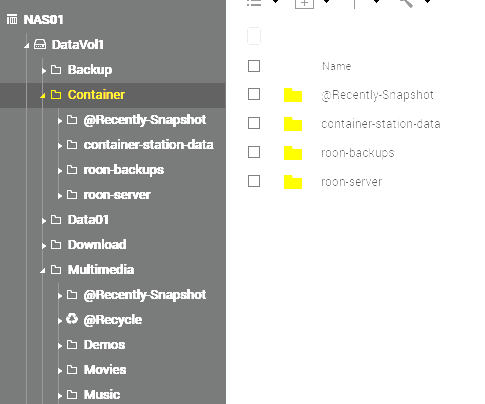
This is my file structure and I have the shares created.
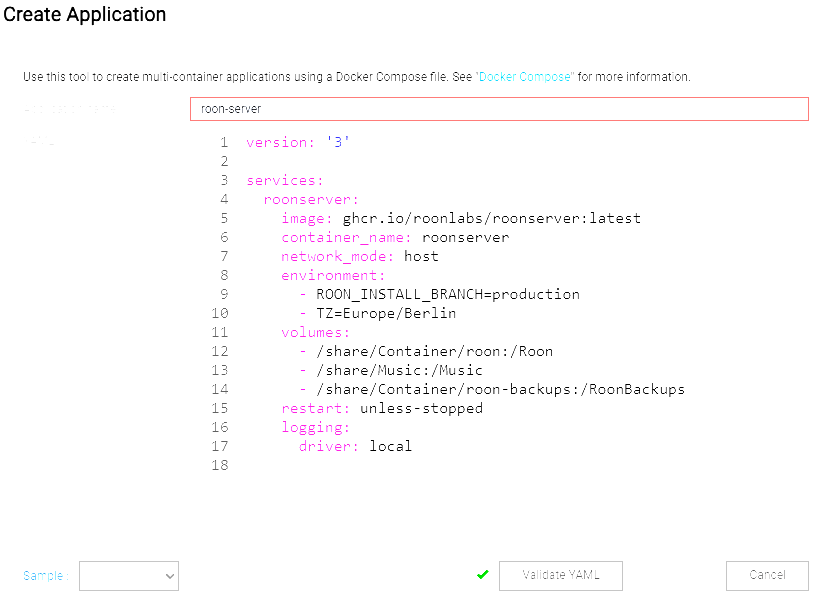
this is the yaml
services:
roonserver:
image: Package roonserver · GitHub
container_name: roonserver
network_mode: host
environment:
- ROON_INSTALL_BRANCH=production
- TZ=Europe/Berlin
volumes: - /share/Container/roon-server:/Roon
- /share/Multimedia/Music:/Music
- /share/Container/roon-backups:/RoonBackups
restart: unless-stopped
cap_add: - SYS_ADMIN
- DAC_READ_SEARCH
security_opt: - apparmor:unconfined
- label:disable
logging:
driver: local
Do you have a hint whats wrong?
Kind regards.
Your folder structure looks healthy and matches the mounted top-level folders.
Could you pls elaborate on the step-by-step method you start up Container Station and try to create an application, and maybe share a screenshot of the point where you end up in a dead end?
I found the ´Downlad as file´ option on Github configurator to be the most reliable way, and Applications > +Create > Upload > Apply in Container Station always worked so far.
Hello Arindal,
thank your for the update. After some research I may got the root cause of my problem.
My Qnap TS-470 Pro is to old, it does not support Docker Engine 20.10 or later.
The latest OS is 4.3.6.2805 and
the ContainerStation is 2.0.957 from 2019.
The Docker installation is fairly straightforward but the post-install tweaking is a PIA. ChatGPT will take you through the whole lot. But FYI multiroom is even more twitchy than before. I’m alternative hunting as MR is why I use it.
Hi there. I’ve followed the docker process to set up as a new Roon used. Roonserver seems to be running on the QNAO but I connect connect to it from my Mac. Help please!
- QNAP TS-253D running QTS 5.2.9.3541
- Roon Server in Docker container and running
- Roon app gets stuck whilst “connecting” to server
- Port 9100 showing as refused from local network
- Host networking confirmed
thanks
Welcome to the forum @Terry_Willows1. To get proper attention from official staff for your specific case, please open a tech support case by following the instructions here:
Dear Roon support,
after resolving some issues with the QNAP container installation together with the QNAP support and some tries, it’s almost working now. Roon server has been installed in the correct directory, and 20.000 titles have been integrated - so far so good (more or less).
But all data and manual settings and configurations of the titles in my library are lost. As the roon application has been deleted, as requested. Question: Where can I find the CD-title configurations and all the data I put already into roon? Backup-restore was not working at all, as system couldn’t find any backup-file on the server… Maybe in the trash-folder? Or anywhere? Could you please give me the file-names to be searched for and some advise again? And how to install or enabling the backup, that the “old” data would be available again (without jeopardizing the new installation itself, hopefully…).
Other question: By reading some of the support comments, there were some to pay some special attention to certain settings, not that in case of any updates or changes data might be lost again. As I understood only parts of all the comments: Anything I need to take care for? Please advise… Thanks. By the way: I enabled the backup-function in roon - hopefully at least this would work…
By reading all the flac-files in my directory, the date of “latest file added” is now the same for all the files. How could I change the order to the files to the file-date itself? So to get some basic overview again and at least some kind of the wanted view in the apps…
And general comment once again I started with: It’s still a mass, that I needed about 2 month (of course not working on it every day - but pure working time, we are talking about a week) of looking for solutions to re-install a software I payed for - due to some changes in the software you as roon are accountable for, as I understood. Why not just deploying an new app being compatible again, or at minimum requirement to deploy an app or whatever to make a transistion to some kind of new installation easy for the customer. I’m not a server- or linux-expert, I’m just a user to use the software.
And beside all criticsm - thanks for your support and thanks to the community for the comments - seems, that I’m not alone…
Thanks
Walter
The standard way is to restore a backup. There is also a workaround for cases where the user did not create a backup.
As was suggested before, to get proper attention from official staff for your case, please open a tech support case by following the instructions here:
You need to have the backup data as a whole in the dedicated backup folder which roon can see from inside the container, defined by the third share link in Docker script. Feel free to share the link, and screenshot of your top-level folder structure in File Station.
The easiest way is to find the old location of backup data for RoonOnNAS installation, and copy everything, including “_roon_backup_root” and all the folders with cryptic names “c124hduh2jl…” to the new backup folder, which you have defined. Roon should see it and you can restore a backup, ideally prior to having the files scanned and identified.