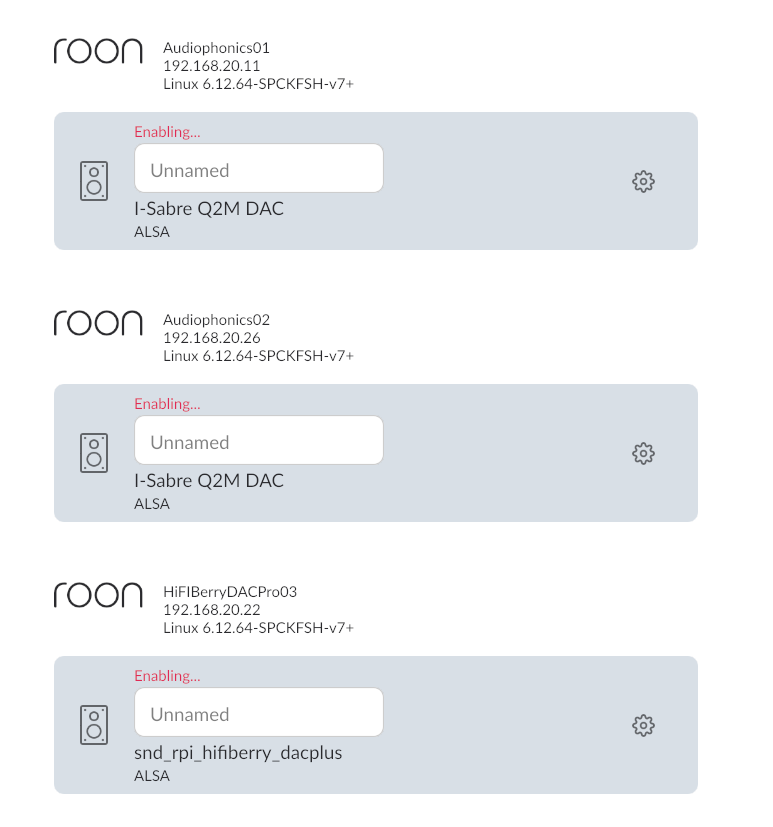
Suddenly my Roon setup has stopped working. The Roon app (V 2.60 build 1629 production 64-bit) reports No Audio Devices Found and displays a Manage Audio Devices Button.
Clicking on the Manage audio devices button shows all three of my audio devices listed, but they're unnamed, and their status is Enabling... I can't name them. I can Disable, and then Enable them, but it goes back to the same status.
I can't play any music.
How can I resolve this issue?
INFORMATION
I have an Intel NUC7i7BNH with 16GB RAM and 256GB SSD running ROCK Version 2.59 (build 1625) earlyaccess. IP: 192.168.20.10
The 1TB of FLAC music files are stored on a Synology DS218plus 2-bay NAS. IP: 192.168.20.8
There is an Audiophonics RaspTouch I-Sabre ES9028Q2M, Raspberry Pi 3B with Audiophonics I-Sabre ES9028Q2M DAC, 7" OLED Touch Screen, Volume control, Steel case, and 8 GB memory card running RoPieee OS to create a RoonBridge. Device Name: Audiophonics01 Default Roon Zone: Main Bedroom IP: 192.168.20.11 RoPieee 2026.01 (3177) [STABLE]
There is a second Audiophonics RaspTouch I-Sabre ES9028Q2M, Raspberry Pi 3B with Audiophonics I-Sabre ES9028Q2M DAC, 7" OLED Touch Screen, Volume control, Steel case, and 8 GB memory card running RoPieee OS to create a RoonBridge. Device Name: Audiophonics02 Default Roon Zone: Study IP: 192.168.20.26 RoPieee 2026.01 (3177) [STABLE]
There is a HiFiBerry DAC+ Pro, Raspberry Pi 3B+ with HiFiBerry DAC+ Pro, Steel case, and 16 GB memory card running RoPieee OS to create a RoonBridge. Device Name: HiFIBerryDACPro03 Default Roon Zone: IP: 192.168.20.22 RoPieee 2026.01 (3177) [STABLE]
Your Roon Server is an earlier build - version 2.59. So your issue is being caused by an incompatibility between Roon clients version 2.60 and earlier versions of Roon Server. See:
Either update your Roon Server to version 2.60 (Production) or, if you are running Early Access builds of Roon Server, wait until Roon Labs release a new Early Access version. Roon Labs said that they hoped to release the new version last Friday, but apparently it’s still stuck in QA testing.
I’ve tried to switch from early access to Roon Server version 2.60 (Production), but my Windows 11 PC isn’t letting me map the \\ROCK\Data drive so I can move the production install file onto the server.
ROCK OS
Version 1.0 (build 259) production
Roon Server Software
Version 2.59 (build 1625) earlyaccess
In case you see the error like in the screenshot below, do not panic. Modern versions of Windows have security settings that may block guest access to network shares by default.
I finally managed to get access to the storage on ROCK and switch to Roon Server Software Version 2.60 (build 1629) production.
This has fixed the access to the endpoints, though I have lost my Groups.
However, it has lost the connection to my Synology NAS storage directory and is now rebuilding. I hope I don’t lose all of my modifications by doing this.
Please keep us posted on your progress! Once you’ve had a chance to test the system with aligned versions (matching both Core and Remotes to either Production or Early Access), let us know if your audio devices are correctly identified and enabled.