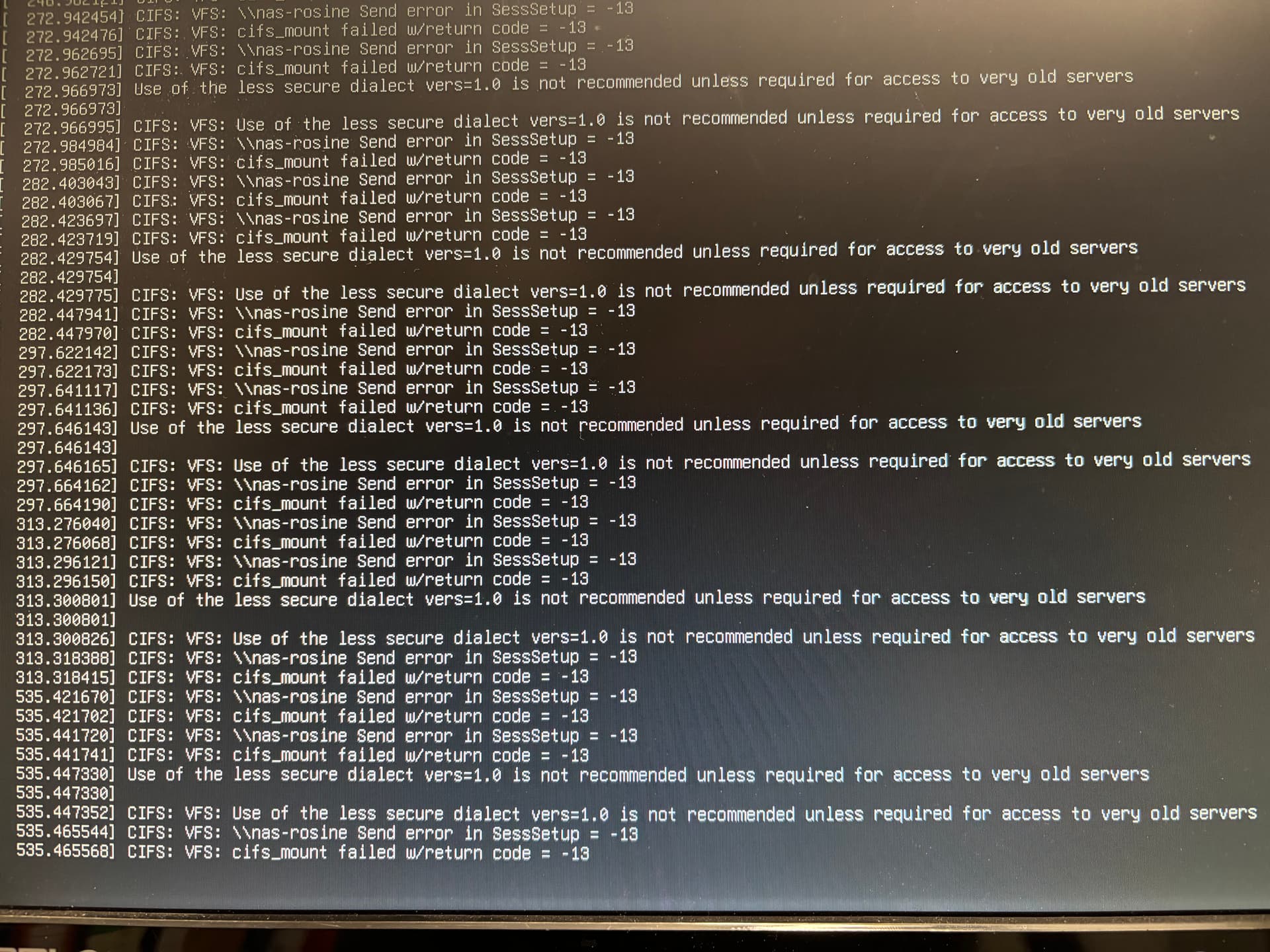
So this might be the bit not working anymore in Debian Trixie (but worked before in Bookworm) resulting in permission errors in the “/mnt” folder. → no it’s not!
Using the Easy Install script by Roon to install roonserver on DietPi Trixie doesn’t change anything.
Roonserver runs as root. Root user has full access to “/mnt” folder (Owner root:root, mode: 755)
Still mounting SMB shares via the Roon GUI fails with “unexpected error” and the above screenshotted console errors pop up:
Warning about SMB vers1 (code = -95).
SMB server send session error (code = -13).
This time, I can’t even find anything in the logs about this to post here .
So after all a problem with Roon and Trixie for Roon Support to look into.
RoonServer machine (SMB Client):
I setup a clean DietPi Trixie machine (Debian 13) and installed RoonServer via the Roon Easy installer script.
Roonserver runs as root. Access to /mnt is possible.
NAS-Server (SMB Server):
I enabled SMB v1 and NTLMv1 for testing purposes (lowest possible security …).
Still no luck making connections to the SMB server via the Roon GUI “add network share” function.
The only difference is that with SMB v1 enabled, you still get the Warning about SMB v1 on the console, but not the error code -95
You still get error code -13 on the console though.
Error Message in Roon GUI changes to “unauthorized”.
And yes, the correct user/password were entered.
Again, no entries in RoonServer log about this.
This is how the console output looks with SMB v1 enabled on the server side:
To my interpretation, this confirms that the roon app is trying to make a SMB v1 connection through cifs utils (hence the “insecure dialect” warning), which fails completely if the server refuses a SMB v1 connection (error -95) but also fails during user authorisation (error -13) if the server should accept the connection for some reason.
So I think this is a clear indicator that the issue lies with how the roonserver app sets up smb connections through cifs utils. Usage of SMB v1 should be avoided as well.
Again, manually mounting the share using the mount command or dietpi-drive_manager works just fine and can be used as a workaround as pointed out already by @mookr.
Or it is some governing process (like AppArmor or the likes) that blocks access for an unknown (to him) application. Maybe something is being logged in syslog or or other system logs?
Here is the output of journalctl with Server set to SMB v2 and higher:
Dec 28 21:23:47 DietPi kernel: CIFS: Attempting to mount //nas-rosine/RoonBackup
Dec 28 21:23:47 DietPi kernel: CIFS: Status code returned 0xc000006d STATUS_LOGON_FAILURE
Dec 28 21:23:47 DietPi kernel: CIFS: VFS: \\nas-rosine Send error in SessSetup = -13
Dec 28 21:23:47 DietPi kernel: CIFS: VFS: cifs_mount failed w/return code = -13
Dec 28 21:23:47 DietPi kernel: CIFS: Attempting to mount //nas-rosine/RoonBackup
Dec 28 21:23:47 DietPi kernel: CIFS: Status code returned 0xc000006d STATUS_LOGON_FAILURE
Dec 28 21:23:47 DietPi kernel: CIFS: VFS: \\nas-rosine Send error in SessSetup = -13
Dec 28 21:23:47 DietPi kernel: CIFS: VFS: cifs_mount failed w/return code = -13
Dec 28 21:23:47 DietPi kernel: Use of the less secure dialect vers=1.0 is not recommended unless required for access to very old servers
Dec 28 21:23:47 DietPi kernel: CIFS: VFS: Use of the less secure dialect vers=1.0 is not recommended unless required for access to very old servers
Dec 28 21:23:47 DietPi kernel: CIFS: Attempting to mount //nas-rosine/RoonBackup
Dec 28 21:23:47 DietPi kernel: CIFS: VFS: cifs_mount failed w/return code = -95
And here the same in case SMB v1 is allowed on the server as well:
Dec 28 21:26:53 DietPi kernel: CIFS: Attempting to mount //nas-rosine/RoonBackup
Dec 28 21:26:53 DietPi kernel: CIFS: Status code returned 0xc000006d STATUS_LOGON_FAILURE
Dec 28 21:26:53 DietPi kernel: CIFS: VFS: \\nas-rosine Send error in SessSetup = -13
Dec 28 21:26:53 DietPi kernel: CIFS: VFS: cifs_mount failed w/return code = -13
Dec 28 21:26:53 DietPi kernel: CIFS: Attempting to mount //nas-rosine/RoonBackup
Dec 28 21:26:53 DietPi kernel: CIFS: Status code returned 0xc000006d STATUS_LOGON_FAILURE
Dec 28 21:26:53 DietPi kernel: CIFS: VFS: \\nas-rosine Send error in SessSetup = -13
Dec 28 21:26:53 DietPi kernel: CIFS: VFS: cifs_mount failed w/return code = -13
Dec 28 21:26:53 DietPi kernel: Use of the less secure dialect vers=1.0 is not recommended unless required for access to very old servers
Dec 28 21:26:53 DietPi kernel: CIFS: VFS: Use of the less secure dialect vers=1.0 is not recommended unless required for access to very old servers
Dec 28 21:26:53 DietPi kernel: CIFS: Attempting to mount //nas-rosine/RoonBackup
Dec 28 21:26:53 DietPi kernel: CIFS: Status code returned 0xc000006d NT_STATUS_LOGON_FAILURE
Dec 28 21:26:53 DietPi kernel: CIFS: VFS: \\nas-rosine Send error in SessSetup = -13
Dec 28 21:26:53 DietPi kernel: CIFS: VFS: cifs_mount failed w/return code = -13
So it’s the same as already seen on the console. dmesg shows the same.
A Google search for changes in mount.cifs introduced in Debian 13 trixie shows a lot security related changes and some deprecated syntax options like user%password, so plenty of possibilities here …
Out of curiosity I tried Ubuntu instead of Debian regarding the issue at hand.
Roon was installed with the official easy install script by roon.
With Ubuntu 24.04.3 LTS roonappliance ist able to make SMB connections through mount.cifs.
With the latest release 25.10 the exact same errors occur when roonappliance tries to make SMB connections through mount.cifs.
So the problem is quite clearly not limited to a single linux distribution like DietPi based on Debian13 Trixie, but seems to affect all distributions using the latest security enhancements in mount.cifs.
IMHO definitiv an issue, Roon needs to address as this will affect an increasing number of linux users when updating their existing installations in the future.
Thank you for the extensive testing and detailed findings — that’s very helpful.
At this point, the recommended workaround is to mount the SMB share at the operating system level and then use that local mount path inside Roon.
In practice:
Mount the SMB share using the OS tools
(e.g. mount.cifs, /etc/fstab, DietPi drive_manager, or a systemd mount)
Verify the share is accessible locally on the RoonServer machine
In Roon, add the local mount path (for storage or backups), instead of adding the SMB share via the Roon UI
This avoids the SMB mounting step inside the Roon appliance entirely and is known to work reliably on Debian Trixie and other newer Linux distributions.
We appreciate you flagging this behavior — we’ll pass the findings along to the team for further investigation.
I actviated the debug logs on my Synology Diskstaion (SMB server running DSM 7.3) to take a look what’s going on on the server side in the matter.
Following results:
a) SMB v1 connection:
I get the following warning in the regular logs (Log-Center in the DSM GUI):
12.01.2026 14:29:35 SYSTEM Host [xxxx] failed to connect via [SMB] due to [SMB1 not permitted].
So Roon definitely tries to connect via SMB v1 first and connection is refused. However, the connections seems to be re-established via SMB 2 afterwards as I get the following errors described under B) even with SMB v1 disabled.
B) Authentication:
Roon still fails to connect with an authentication error as described in the one of my above posts. Here’s what the server side log has to say about it:
[2026/01/12 14:29:35.221075, auth 3, pid=27073] ntlmssp_server_preauth
Got user=[roonbkp] domain=[WORKGROUP] workstation=[DietPi] len1=0 len2=136
[2026/01/12 14:29:35.221154, auth 3, pid=27073] auth_check_ntlm_password
check_ntlm_password: Checking password for unmapped user [WORKGROUP][roonbkp]@[DietPi] with the new password interface
[2026/01/12 14:29:35.221177, auth 3, pid=27073] auth_check_ntlm_password
check_ntlm_password: mapped user is: [WORKGROUP][roonbkp]@[DietPi]
[2026/01/12 14:29:35.221781, all 3, pid=27073] ntlm_password_check
ntlm_password_check: NTLMv2 password check failed
[2026/01/12 14:29:35.221832, all 3, pid=27073] ntlm_password_check
ntlm_password_check: NEITHER LanMan nor NT password supplied for user roonbkp
[2026/01/12 14:29:35.221994, auth 2, pid=27073] auth_check_ntlm_password
check_ntlm_password: Authentication for user [roonbkp] → [roonbkp] FAILED with error NT_STATUS_WRONG_PASSWORD, authoritative=1
So it very much seems like for some reason no password is provided during the login process (see bold text: NEITHER LanMan nor NT password supplied for user roonbkp).
And yes, the correct password has been entered in the Roon GUI.
My best guess would be, that Roonserver App uses a deprecated method to provide user and password information to mount.cifs (like user%pass or deprecated syntax in a credentials file) which results in the password getting lost in the process.
Do you have a user roonbkp setup on your NAS with appropriate rights and matching password?
To me, this reads as there is no password supplied insamba’s (LanMan or NTLM) user database to check if it matches the one provided in the connect request, but I might be wrong here.
[2026/01/12 17:53:50.882244, auth 3, pid=14177] ntlmssp_server_preauth
Got user=[roonbkp] domain=[NAS-ROSINE] workstation=[DietPi] len1=0 len2=136
[2026/01/12 17:53:50.882332, auth 3, pid=14177] auth_check_ntlm_password
check_ntlm_password: Checking password for unmapped user [NAS-ROSINE][roonbkp]@[DietPi] with the new password interface
[2026/01/12 17:53:50.882355, auth 3, pid=14177] auth_check_ntlm_password
check_ntlm_password: mapped user is: [NAS-ROSINE][roonbkp]@[DietPi]
[2026/01/12 17:53:50.882951, all 3, pid=14177] ntlm_password_check
ntlm_password_check: NTLMv2 password check failed
[2026/01/12 17:53:50.883017, all 3, pid=14177] ntlm_password_check
ntlm_password_check: NEITHER LanMan nor NT password supplied for user roonbkp
[2026/01/12 17:53:50.883162, auth 2, pid=14177] auth_check_ntlm_password
check_ntlm_password: Authentication for user [roonbkp] → [roonbkp] FAILED with error NT_STATUS_WRONG_PASSWORD, authoritative=1
I don’t think the domain provided is relevant. This is how it looks like when successfully logging in from the DietPi machine via dietpi-drive_manger (no domain provided):
[2026/01/12 17:55:24.344863, auth 3, pid=14641] ntlmssp_server_preauth
Got user=[roonbkp] domain= workstation=[DietPi] len1=0 len2=136
[2026/01/12 17:55:24.344944, auth 3, pid=14641] auth_check_ntlm_password
check_ntlm_password: Checking password for unmapped user [roonbkp]@[DietPi] with the new password interface
[2026/01/12 17:55:24.344967, auth 3, pid=14641] auth_check_ntlm_password
check_ntlm_password: mapped user is: [roonbkp]@[DietPi]
[2026/01/12 17:55:24.346470, auth 3, pid=14641] auth_check_ntlm_password
auth_check_ntlm_password: sam authentication for user [roonbkp] succeeded
[2026/01/12 17:55:24.346572, auth 2, pid=14641] auth_check_ntlm_password
check_ntlm_password: authentication for user [roonbkp] → [roonbkp] → [roonbkp] succeeded
We’ve raised an internal ticket regarding this matter and will discuss it with our developers. We will get back to you with a solution or update as soon as we hear back from them.
I can confirm this ‘problem’ with debian trixie, went down the same route the past two weeks, just stumbled on this post today.
Roon also has the same problem with mounted shares with music files. It sometimes works till the moment you add some new music a week later and ask yourself when they will be available in the interface. Sometimes going to the storage tab and hit rescan works, sometime a restart of the roon server is the only option to play the newly added music.
I’ve been suffering from this since i switched from ubuntu to trixie for various reasons.
Roon version 2.58 has the same issue, just to inform everyone.
Mounting smb via fstab or commandline works as expected, somehow roon ‘loses’ these connections doing it’s scanning etc. during the day. The weird thing is I’m still able to play my music files, so roon knows about its existence but adding music via smb to the share does trigger nothing in roon.
I physicallyt transferred the ssd’s with my music to my roonserver, mounted them locally using uuid’s, unfortunately with the same result! Roon loses them during a day or so. This has worked for the past two years with ubuntu 2024.
Also tried it with the latest arch and the locally mounted disks - indeed same issue, someone also tested ubuntu 2025.x with the same outcome.
Time for roon to chime in and solve this? ((Adding tickets to a dev que doesn’t solve it, putting it at the top of the que might help also))
It seems to me, as you’re describing another issue here apart from the original SMB-mounting problem using the “add network share” function in Roon.
If I understand you correctly, real time monitoring of music folders doesn’t work anymore with latest linux kernels (debian trixie, ubuntu 2025) even for locally mounted drives, correct? Does scheduled scanning (like daily) still work or does it fail as well?
I would recommend starting a separate support thread on this issue to make sure it gets recognized by Roon and eventually adressed.
Hi,
This seems to fix the scanning issue, Upgraded Roonserver from Debian Bookworm to Trixie, some caveats . You have to install the icu-devtools package. It has probabely something to do with localization and file/date orders, that’s my best explanation. So another ‘dependency’ for roon to work properly. I installed it on my debian box and since then the scanning for new music is still working.
The SMB mount option is still broken, can’t mount anything via the roon-interface.For now I mount everything via fstab and uuid’s
No updates yet, but our team has a ticket in for further investigation. To set proper expectations, it’s likely the case that progress will be a bit slower than usual on this - you have my apologies here.
Thank you for your ongoing patience in the meantime!
 .
.