You should rebootvthe Pi if you change the USB audio device. No guarantee if it works without reboot.
Will do. Did a ‘reboot’ option get discussed/implemented rather than just shutdown in rooextend.local scripts? Or do it via ssh?
Martin Booker
Just unplug and replug the power 
Revisiting the Apple Superdrive.
Just purchased from Amazon. Extensions notes the ‘Apple Superdrive found, Stream test signal, Focusrite 2i2…’ 10 seconds after loading CD no sound, cannot eject. rooPlay does not autostart, no CD drive actions. Drive works fine on Mac. Issue with Focusrite at 24/96 and CD needs 16/44?
Please advise, and thanks,
Martin Booker
Please send me the system log to info@definiteaudio.de after that happened. rebooting the Pi with the drive attached you should be able to eject the CD via the settings dialog of rooPlay.
Best DrCWO
Resolved…and a theory.
The issue appears to be that versions of the Apple Superdrive can draw 1.6A from the USB. Forum research shows it will work on a Mac that can deal with that out of bounds USB spec. The Pi 4 outputs only 1.2A from its 4 USB connections combined. What I noticed when I was using a LG DVD drive for playback (1.5) that the Focusrite on another USB connection continually ‘rebooted’ as the drive played and fell in and out of attachment as viewed on the Extensions page. Your YouTube video had a Superdrive and the UFO202 working, which must be in the available power envelope? My assumption is the RME you use for turntable to rooExtend at home has its own power. I plugged the Focusrite into its own power supply and now the Superdrive is working as advertised - it gets through at least half of a CD. 
System log on the way,
Martin Booker
1 Like
Ok yes, I already heard that in combination with the rooExtend-Box. Best is using an externally powered USB HUB to solve this.
Best DrCWO
A quick question! I have been running rooPlay 1.0.4 for several months now. It was originally intended for use with the Furutech ADL GT40a USB interface to enable playback from a turntable. Thanks Dr CWO for the assistance to get it running by the way!
Now i am trying to use rooPlay to listen to Greatest Hits Radio premium over roon. It does work but when starting to listen it loses the stream several times before settling down and its stable thereafter, usually.
The question is really about the correct extension settings to use. Presently i have the ADL GT40a set as the audio interface and the playback zone as the room with the turntable. Will the signal be more stable if i alter any of these? The GHR radio signal comes from their app running on an ipad near the Raspberry pi running rooPlay and Nuimo over bluetooth. I am also not sure what the number of test signal repetitions option does!
Can anyone advise the ideal settings?

I wonder that rooPlay over WiFi works at all. Roon never recommends WiFi and the Roon API is not made for it. better connect via Ethernet.
But there may be one more thing to think about.
A radio Station sends data with a certain speed based on an XTAL in their transmitter. Your DAC also has an XTAL that is not in sync with the one from the radio station. So you face a certain frequency differente between these two clocks. This is normally quite short, some ppm.
This is why Roon uses quite along internal buffer for webradio that prevents a breakdown of the playback for some time. As closer the clocks are as longer you can playback without interruption.
In my setup with the ADI-2/4 Pro I encounter a breakdown of the stream some minutes after power on of the ADI-2/4. After the ADI heated up the XTALS are more in sync and I can listen for hours until that happens again.
There is nothing I can do preventing a breakdown in playback if the clock did not match.
Best DrCWO
Sorry if i was not clear, the RAspberry Pi running rooPlay is connected to the Roon Core over wifi. The app running the radio stream connects via bluetooth.
What impact do the settings in the rooplay extensions page have on playback? At present bluetooth is not mentioned, only the ADL DAC is shown and this is not used when using bluetooth?
The DAC is inside the Dutch & Dutch loudspeakers and i dont know what clock is used but most radio stations in Roon do not display the problem.
Hi @jeremy_davies,
rooPlay don’t support Bluetooth.
Would you please describe the data flow you use in detail?
I have attached the screenshot of the signal path and extension settings for rooPlay. On double checking the ipad running the radio app is using airplay (not sure if this is wifi or bluetooth?) but in any case Rooextend comes up as an option.
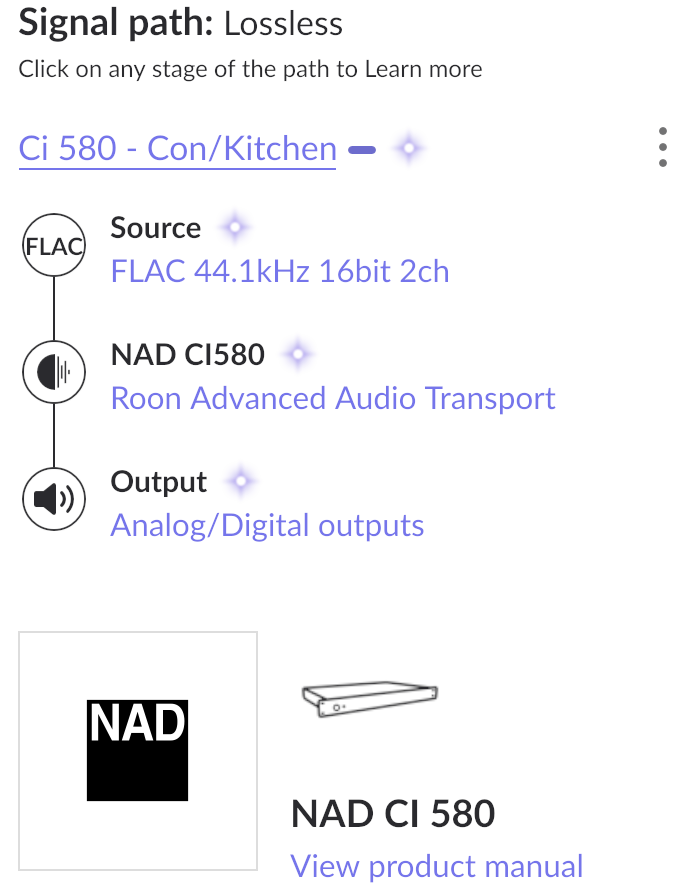
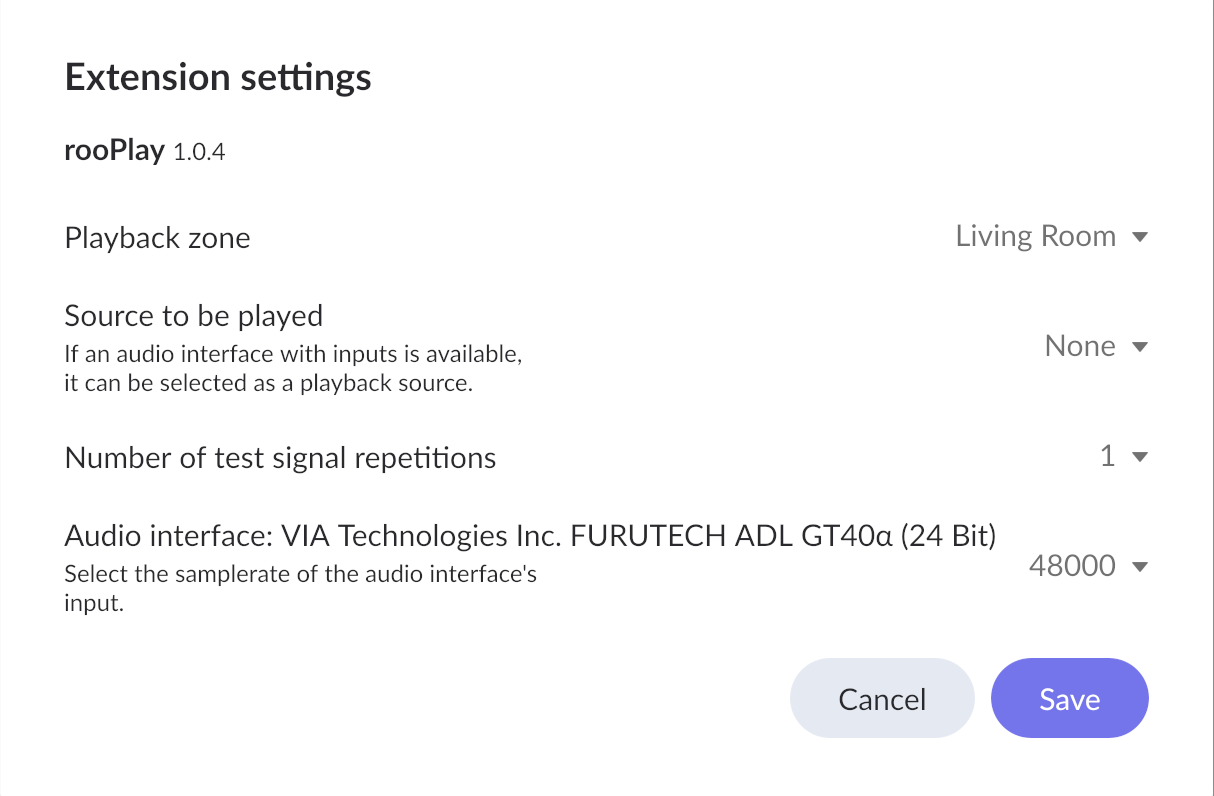
Ok, now I see. Airplay uses WiFi so data from the iPad is streamed to rooExtend via WiFi.
Regarding your question about settings.
In case of airplay the sample rate and bit width are fixed to 16/44. This overrides the settings. So a “don’t care” for you in this case. Using Playback via turntable you can set the sample rate here.
For more information please consult the rooExtend-Manual you find in my Download Area.
Best DrCWO
Thank you. Should i set up 2 ip addresses for RooPlay? One each for the turntable and the ‘Radio’ playback?
Also the dac sync issue you mention, i cant see why playback would be stable for many hours during the day, but would often stop playing when first initiated multiple times?
One Radio Station for rooPlay is mandatory and needed internally if you stream to Roon with your iPad via airplay.
In my eyes it makes completely sense to set up a second Radio Station for the turntable as it eases starting turntable playback as described in the rooExtend-Box Manual.
Best DrCWO
Thank you. I have set up a second radio station for rooPlay. I notice that the rooPlay extension settings include a playback zone. Is it possible to have a different playback zone for each instance of rooExtend radio? I hoped this might make for better stability and also stop the TV coming on in the playback zone that is not in use.
If you have setup a ´Radio Station for your turntable for example it will stream to the zone you currently have selected in your Roon GUI staring the Radio Ststion. This is the same behavior as starting any other webradio.
As airplay is routed internally it uses the zone selected in the settings of rooPlay.
Best DrCWO
Saw some older posts about Spotify integration coming. What’s the current status of this?
1 Like
Spotify is now queued and I hope to realize it till end of summer. These are next things in the queue:
- Finish the new Roon Extension rooMax that integrates the QuickKeys Controller. I uploaded a draft video so you can see what will come.
- Bigger update for rooDial to offer more layers of functionalities based on the new Settings-Dialog of rooMax.
- New Roon Extension rooSpot for Spotify integration. During this I will also upgrade rooPlay using the New Roon Audio API which will make creating the rooPlay default radio station unnecessary in future.
But my current work on that will be interrupted for two or three weeks from now as I move to Fürth (a city in Bavaria) with my business. This will fill my days for some time 
Best DrCWO
1 Like
Hello.
Perhaps it is answered before (i didn’t find it):
LP recording on the usb stick starts with starting the radio station if i understand right. Will it stop if the LP it’s at the end or do i have to stop then the station manually?
The flac file is always one! file for the complete LP side, right? Means i have to separate it manually on the Mac with an audio tool?
That’s in advance.
Kind regards, Dirk