Status 4 hours later:
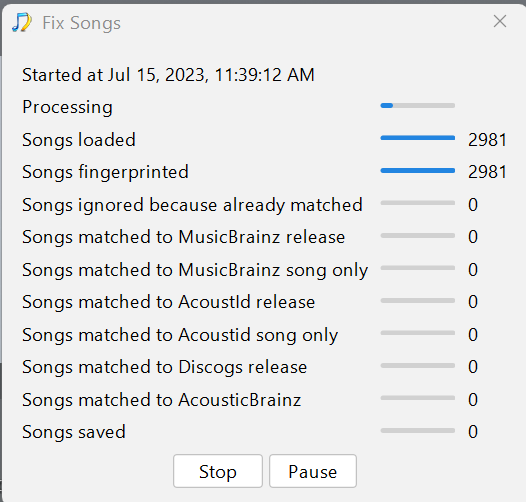
Well, it’s been more than “several hours” (actually it’s been 22 hours) and the status is the same - all songs fingerprinted but no song matched or saved.
I’ve moved the Mozart boxset away from the _WX directory (on the Roon server - not the backup drive, where Song Kong is still trying to do something to the files) into a new directory of its own. When I do enable that _WX directory I won’t need to wonder if the Mozart boxset is causing any problems. If we ever figure out how to get Roon to add the Mozart boxset I’ll enable that new directory.
If I were to disable the _T directory (where Roon has likely been grinding away for weeks and weeks), will Roon “forget” all the matches it had found before disablement? In other words, when I re-enable that directory will Roon have to start over from scratch?
Okay so certainly a problem with this, but although it looks like it is doing nothing it is probably doing something, but maybe stuck in a loop. So I realize this is side issue to main problem but can you please run Create Support Files again so I can look at it.
Okay, make sense.
Yes, I think so, but that is what you want because it seems to have got itself into mess.
So you could either remove _T directory from Roon, then replace your _T directory with the backup as that has already been processed by SongKong and then try and readd that to Roon. Or you remove _T directory from Roon, and then repeat the process just on _T of deleting all metadata in Jaikoz and reprocessing in SongKong and, run again in SongKong as it seems to get more matches second time round, then re-add folder into Roon to see if that works better for you.
I need to put a disclaimer in here, I dont know for sure this is going to resolve your Roon issue, but your album metadata is seriously messed up for mnay of these compilations so it seems there is a good chance.
I tapped “stop” on Song Kong’s Fix Songs. It has been a half hour since I did so. If it is
Then will it ever stop? Or must I force a stop with task manager?
I walked away from the computer and when I got back the entire program had exited. I’m sending the support files anyway.
Thanks, it actually ran out of Memory 36 minutes after starting at 15/07/2023 12.25.53 but didn’t report it , I will look into this further tomorrow.
But this shouldn’t affect the main Roon issue, have you decided what you are going to do ?
Regarding Mozart issue, what is making extra hard is combination of:
- Very large box set
- No metadata in files
- You don’t have seem to have complete boxset
The 3rd point prevented match to complete boxset in first stage, and then we haven’t managed to get to disc by disc matching yet because of the memory issue.
I think I have now fixed the memory issue so if you could re-download and try that would be good.
- Uninstall SongKong (need to do this on Windows in order to reinstall replacement for same version)
- Download and Install SongKong
- Check have new version installed by going to About menu, build date should say now 18/Jul/2023
- Rerun Fix Songs on Mozart folder
- Wait for it to finish, or two hours if not complete after two hours.
- If it doesn’t finish, then press Cancel once to stop task but allow the report to be created.
Run Create Support Files
I am running this on my backup files - not the Roon server files. As you say, I can always replace the Roon server files with the backup files later.
As far as the main Roon issue is concerned, I was hoping someone at Roon support could give me some guidance. This is a support forum, correct? There must be some log file or other way to determine what is causing this issue. After weeks of “adding music to library,” I would hate to lose what has already been added. Disabling the “offending” directory might just do that. Please, Roon support, if you are still there - does disabling a directory destroy the information already collected so when the directory is re-enabled the “adding music to library” process will need to start all over again?
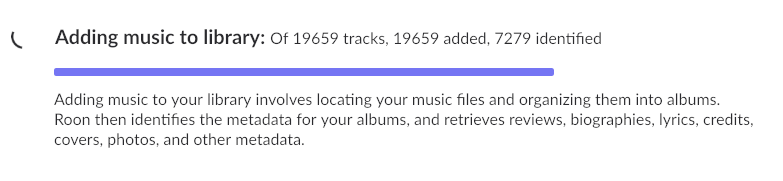
After weeks of “adding music to library” on the _S and _T directories, here’s where we are:
No, data are not removed from the database when a storage location is disabled or not present. Likewise, if the files in a storage location change, Roon will process those changes.
It would seem that @paultaylor has already explained why you have issues (in Roon and Song Kong).
Wow! That finished quite quickly. Support files now being created. (That is taking quite some time.)
Unfortunately, Roon has never seen the files to which Paul Taylor is referring. Those files are in a directory which has been disabled in Roon for months. I am working with Paul Taylor on backup files - not messing with what Roon has been doing.
That was explaining why SongKong failed to match Mozart boxset, it wasnt reason for Roon issues.
Okay, it’s a long thread. 
Have the backup files of those visible to Roon been updated by Song Kong, and do these files contain metadata that Roon can process?
Best answered by Paul…
Yes, the backup has better metadata. So I suggested remove _T directory from Roon, so the folders and the processing for T is removed then replace your _T directory with the backup T dfirectory as that has already been processed by SongKong, and then try and re-add that to Roon.
Whilst I understand you may want to preserve the T processing already done because it has been running for a long time I dont think that is a good idea, because it is clearly causing problems, and it may have created links to all types of compilations that you don’t actually have. So if it was me I would want to remove all these and start again, this is analagous to how we deleted all the metadata previously added by SongKong/Jaikoz and started again.
Will do. The latest support files are now uploading, by the way.
I am running Song Kong now on the _T directory on the backup drive. I will do the same with the _S directory on the backup drive. I will delete the files from both of those directories on the Roon server and will replace them with the backup files. Meanwhile, I have stopped Roon server as all of this is taking place.
OK. All of the _S and _T directories on the Roon Server have been replaced with the corresponding directories and files from my backup drive (all of which have been freshly updated by the newest version of Song Kong).
I have restarted Roon server and, as always, I get this:
Roon seems to be recognizing more albums - they are slowly appearing now at the home page. (New albums had not shown for many days previously.) Fingers crossed.
1 Like
Okay, its confusing, it completed but the logs show that at the start of run that many of the songs were already matched to album even though in previous run no songs were modified.
In previous failed run 121 you ran against D:\Backups\Music\Various_WX\W. A. Mozart - The New Complete Edition
But in this run 122 you ran against D:\Backups\Music\Various# W. A. Mozart - The New Complete Edition into Jaikoz
So think maybe run against wrong folder, could you do again please against D:\Backups\Music\Various_WX\W. A. Mozart - The New Complete Edition