Yes, support works better if there is forum topic to link back to, of course usually this would be a topic on the songkong forums not the roon forums.
Okay thanks, so after running this preview and picking any random folder I can see the majority of albums are successfully matched but there is a sizeable minority (20%) where the folder remains matched to multiple albums or no albums. So in some cases the correct album now exists in MusicBrainz and could be rematched, in other cases the album is not in MusicBrainz so can only be manually edited.
There is no trivial way to fix this, if it was me I would start with the one not added to Roon yet and do the following.
Work on one folder at a time, e.g UV folder
- Run Fix Songs again on folder (not preview) because this new version of SongKong better than previous version
- Go to Browse by Folder and set MusicBrainz filter to Without full album match
Then for each of the album subfolders displayed:
- Load subfolder into Jaikoz (so it is only folder in Jaikoz)
- Try Action:Match to Album:Match Songs to one Musicbrainz Album
- If that doesn’t work have a look on Musicbrainz/Discogs to see if album exists, and if it does use Action:Match to Album:Match Songs to specified Musicbrainz Album
- If no album can be found, search alternative source such as Amazon
- Then fix/clear out the bad data as required
- Set Album from subfolder as described before,
- Set title from filename if has been changed to incorrect title
- Empty bad Disc No, Track No, MusicBrainz Release Id values
- Set Album Artist so consistent, usually should be Various Artists
With such a large music collection this is some job, so Im suggesting you just try it on the folders not already added to Roon.
Also, usually you want to have SongKong option For songs already matched set to Update metadata Only rather than Rematch so that any successfully matched albums cannot possibly be chnaged to another album.
Alternatively, since you still have original folder structure (which at least makes it easy for SongKong to group songs into the right potential groups for finding a matching album) the other method is to blitz all the existing metadata (using Metagrater) and rerun SongKong. But the trouble with this approach is that since these are all compilation albums the coverage in the online databases is not so great, and therefore many albums will not get matched, and so for these albums you will now have no metadata. So this is probably not a good approach but it would get rid of all the bad matches and there would be nothing to confuse roon so roon could hopefully match many of the albums that SongKong could not match.
Actually (thinking as I am writing), if you had disk space capacity to make a copy of Y:drive it would be worth then simply deleting all metadata from copy and rerunning SongKong to see what results you get.
I have two backups of the entire Y: drive and I can certainly do what you suggest. A couple thoughts:
A substantial majority of the files on the Y: drive were first obtained many years ago, when streaming audio was either non-existent or in its infancy. I can do without many of these filles - and it might be easier just to delete the “offending” tracks.
If I make everything “perfect” with Song Kong and Jaikoz, doesn’t Roon do its own search independently? If MusicBrainz doesn’t have it, won’t Roon continue to be confused?
Is there a way to mark all “offending” tracks (the 20% you mention) and just move them someplace else (away from the enabled Roon directories)?
How to do this?
I was going to say use Metagrater task in SongKong, but I have just realized it doesn’t allow you to delete a few fields such as MusicBrainz Release Id because usually needed for normal operation, but in this case we really want to remove them.
So instead you could load songs in Jaikoz, and then use Edit/Delete All Metadata and then Save
Roon is possibly confused because the folder structure indicates songs in one folder are in one album, but the metadata indicates they are in multiple different albums.
Roon can make use of Musicbrainz Ids added by SongKong, it can also try and identify an album based on the tracks lengths and track order of tracks of files in a folder, but this only works for complete albums. Roon makes uses of MusicBrainz but in a simpler way then SongKong, it doesnt make use of Discogs, but it does make use of Rovi that SongKong does not.
There are some albums that both can identify, good metadata added by SongKong will help Roon with this, bad metadata will hinder Roon
There are some albums that SongKong can identify that Roon cannot, in these cases Roon can still make use of the metadata added by SongKong to group as album link performers ectera
There are some albums that SongKong cannot identify but Roon can
No, whilst we can split non mb/mb tracks we cant split correct complete album matches and incorrect song matches that match right song but not right album (I should add a warning to make it harder for yo to deselect the option that allowed the osng only matching)
Is this possible? Every morning for the past 4 months (!) I wake up to find Roon still grinding, grinding, grinding away. I just want it to stop.
I think we should clear out the data and rerun, then if you want you can delete the albuns that SongKong does not match. But seems a bit premature to me as roon maybe able to identify, better to try readding the AB folder and see how it gets on.
Using that backup drive, all data removed using Jaikoz. Nearly done with Song Kong now, but this is a bit odd - more songs have been fingerprinted than have been loaded.
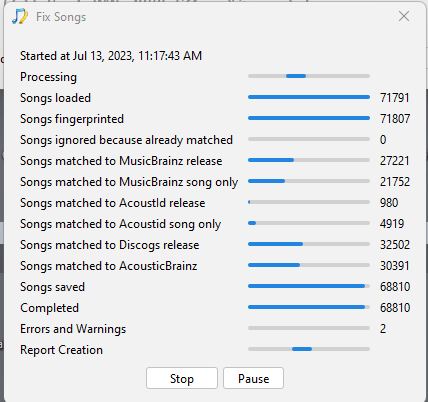
And now it appears that Song Kong has stopped responding at all. I pressed pause to see if it would come back to life, but thus far no luck.
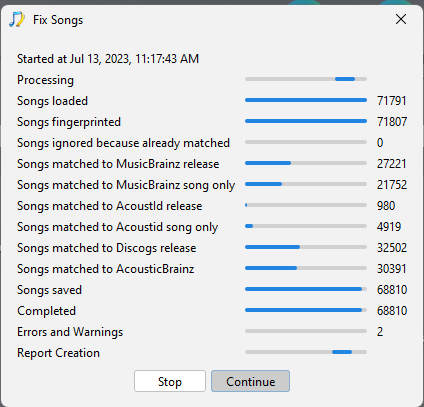
Paul, maybe I’m too impatient, but Song Kong was “stuck” and I’m sending the support files after forcing a stop. I’ll try running Song Kong again (once the support files have uploaded).
Hi Ron
So from that progress screenshot, you can see 27,221 have been matched to MusicBrainz release, and 32,503 have been matched to Discogs release.
An additional 21,752 have been matched MusicBrainz Song Only, this means we could identify the song okay but could not match the group of songs to an album. And another 4,919 have been matched Acoustid Song Only, this is similar - the Acoustid database is larger than the MusicBrainz database but only contains basic metadata.
Usually song only match count is much lower than album match count, but here it is similar because these are all compilation albums and coverage of compilation albums in the online databases is not as good as original albums. So for these SongKong will add basic song info such as Track title but not album info such as Album Name, Track No or Musicbrainz Release Id. These are the songs that are likely causing you problems because with previous configuration SongKong or Jaikoz was allowed to add album info even though could not match full group to album.
I have received your support files it looks SongKong was having a little bit of an issue completing processing of the Mozart box-set. I think because we had removed all existing metadata SongKong could not use that as basis for matching and went down the route of checking each acoustid for potential matches, but because the boxset has so many files and there is a limit on how often we can submit acoustid queries this was taking a long time. If you add the number of songs in the Mozart boxset to the Completed count you get to the Songs Loaded count.
Should be okay second time round, and you will probably get few matches as sometimes the basic SongKong only metadata is enough to find some more album matches on subsequent runs.
The slight mismatch between Songs loaded and Songs fingerprinted indicates a small bug in the reporting/counting logic.
I will wait for next support files
So I looked a bit more carefully at your logs and found a few issues that cause problems for your match of the Mozart box set without any metadata, and will probably cause it to fail again- [SONGKONG-2467] - jthink So I have made some improvements and re-released SongKong 9.3 for Windows.
So if you have not restarted Fix Songs, or if you have restarted and it has got stuck again please do the following
- Optional, If you no longer needs the reports previously created you can run Help:Delete Reports, that will then mean subsequent runs of Create Supports File will be much quicker, and you recover disk space.
- Uninstall SongKong (need to do this on Windows in order to reinstall replacement for same version)
- Download and Install SongKong
- Check have new version installed by going to About menu, build date should say now 14/Jul/2023
- Rerun Fix Songs
- Wait for it to finish
- If it doesn’t finish, then press Cancel once to stop task but allow the report to be created.
- Run Create Support Files
1 Like
I was about to tell you it did get stuck again:
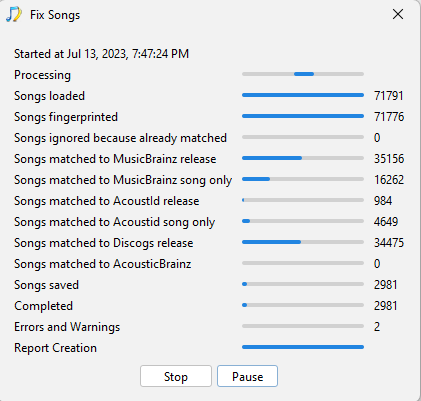
So close!
Someone at Roon apparently thinks the problem has been solved. Far from it. At least that’s what the message was when I started to write this. ROON SUPPORT - PLEASE HELP!
Paul, recall this is all being done on my backup files. Let me know when to switch to the “real” files.
Uninstalled and then reinstalled Song Kong. Before uninstalling I tried to delete the reports, but Song Kong stopped responding. So once I had Song Kong reinstalled I tried again - it still hangs on delete reports. Is there a way to delete the reports manually?
I am now re-running Song Kong (freshly reinstalled) on the backup files. If the Mozart box set is causing great difficulties, should I move it out to its own directory and disable that in Roon?
It got to the exact same spot as before and quit. I am creating and uploading the support files now (after canceling as you suggested).
You stopped it too soon
The Mozart album is in the W folder so its one of the last folders to be loaded and hence start processing, so everything else finsihes shortly after Mozart folder processing and looks like not doing anything. Then because Force Acoustic fingerprints even if already matched is set to Yes we have to generate 3000 Acoustids before we even start trying to match to albums
This doesnt stop the other folders being saved, so you could experiment with replacing T folder with new T Folder in Roon ectera.
But it would be good if you could run SongKong again on just the Mozart folder and leave it to run for several hours to see if it eventually works or not.
The W.A. Mozart folder is being run now. The _WX folder is not being seen by Roon yet, so there’s something else - in either the _S or _T folder - that is (or are) the culprit(s).
I did a dumb thing and forgot to stop the backup from the Roon Server to the drive we are now testing (my backup drive). Hope that doesn’t ruin the process…

