(Mac Mini M1 w/ ext HDD containing backups and local files on its own node)
no VPN
Connected Audio Devices
USB out to Schiit Bifrost 2/64
USB out to Schiit Loki DSD DAC
I also use remotes throughout the house, but these are the two that are directly connected to the core.
Number of Tracks in Library
111,151 tracks in library
Description of Issue
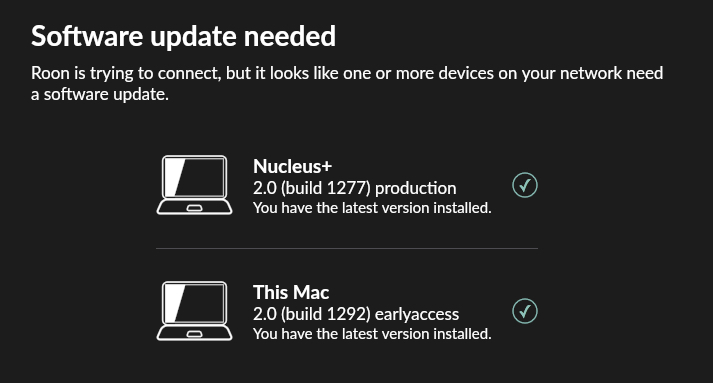
I cannot access my Nucleus+ library from my laptop or iMac remotes. When I start the Roon app on either of those laptops, it states that there is a software update needed, but both the “This Mac” and “Nucleus+” both show green checkmarks on both computers. I can access the Nucleus+ from my iPhone, but the local drive connected to the iMac and shared is no longer accessible after I updated the OS trying to get rid of that message. I have restarted everything multiple times but I get the same message. Using my iPhone is very difficult to navigate.
On top of this, ARC shows as “ready” in setup remote on my iPhone, but the app has become incredibly unstable and will not connect t to the Nucleus+ core even though the ARC app shows “online and ready.” it drops every few seconds even though I reset ARC.
I think these are my two cores, Jim. I have an early access on my iMac but only connect to that when my Nucleus+ goes down. I use my Nucleus+ every day with no issues (for the most part).
The only two screens I can access from the laptop and iMac remotes is the “choose your Roon Core” screen that shows my Nucleus+ as “ready”, so when I connect to that, the screen from my first screenshot pops up and only allows me to go back to the “Choose your Roon Core” screen. That’s it.
I can get into the configure Roon OS via IP address, so I know my Nucleus+ is up and running, I just can’t get to it from my two remotes and my ARC is on the Fritz.
Your Nucleus is running Roon 2.0 build 1277. Put your remotes on that version. You can leave your Mac on 1292, but if you do, you can’t use it as a remote for the Nucleus.