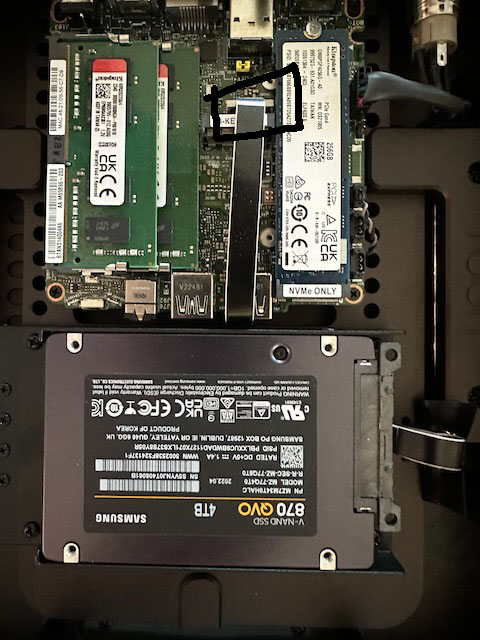
Can’t see anything wrong in the picture. I’d try re-seating the plug but if that doesn’t help I don’t know.
I moved the topic to Nucleus Support
Can’t see anything wrong in the picture. I’d try re-seating the plug but if that doesn’t help I don’t know.
I moved the topic to Nucleus Support
Put things back together drive still doesn’t on the Titan . Later or tomorrow I put the drive back in the Nucleus and see if it is still working and decide what to do from there.
Thanks for the help,
Dan
I moved the disk back to the Nucleus and it is working fine. So I guess it is a Titan problem.
How to I contact service to arrange for a replacement?
Thanks to everybody for the help,
Dan
Sounds like it  The first Titan on the forum
I already moved the topic to Nucleus Support, this is the right place. Roon staff will contact you here with next steps.
I was pretty excited about getting it…
Again, thanks for the help
Dan
Several potential problems…
Why is your Roon Server running for just a few seconds? Did you manually restart it? Or did it crash?
Why is your boot drive at 100 percent availability? That means you have no database. Did you not restore a backup?
AJ
Still wouldn’t really explain the missing disk though
The problem was with the added drive, Titan didn’t see it. The Titan wasn’t running for a few seconds and did not crash, it started up just fine and the Roon client saw it right away and worked as expected. The Titan web page didn’t see the drive. Other than that the Titan could stream via Qubuz. I don’t quite know what you mean by the boot drive availability.
Couple comments and some of this you may know but background for others. ROCK, the system running on Titan, is UNIX / Linux based. All UNIX systems mount drives on top of the directory structure. UNIX doesn’t deal with things like silly drive letters. 
Roon mounts its Settings → Storage as {driveName}/{directory} within the directory structure. Where driveName is the name of the drive and directory is the name of the directory (folder) you added in:
Settings → Storage
You can see this when connecting to ROCK via SMB as data/Storage/{driveName}/{directory}
There was some long debate about what Roon should do when someone puts a drive into ROCK and I can’t remember exactly what happens when ROCK says “I know there is good data here”. It may prevent you from formatting such a drive for your own good. I know it will let you format drives when it can’t see the data on the drive (like NTFS formatted drives).
Additionally, nothing will be at data/Storage until you add the drive under Settings → Storage because ROCK doesn’t automatically mount drives.
So, have you tried going to Settings → Storage and seeing if you can “+ Add Folder”?
All drives, that ROCK can read, should show-up there.
In storage I can in Settings “Add Folder” for, for example, Data but there the is nothing in it. (from memory, it maybe that I could add Data/InternalStorage but nothing was under that).
Also if I browse the Titan’s IP address it does not see an attached drive. The page has all the usual suspects except the div internalstoragearea where info about the drive plugged into the Titan lives.
Likewise when I connect to the Titian as a remote via smb://titannucleus/Data/Storage there is nothing under Storage.
I also powered off/on the Titan and did a reboot from the Titan’s web page.
BTW I moved the drive back to my original Nucleus and could see all the things you mention and it worked as expected, I could stream things from it.
So I’m pretty sure the drive is OK but there is some kind of issue with the Titan.
And, as a side issue, the Titan seemed to have a performance problem in that it couldn’t upscale to DSD256, something my original Nucleus can do. But it was a quick check and I didn’t pursue digging into it and I moved on to installing the disk drive.
Only other thing to try is hop in the BIOS and see if the drive is there.
The BIOS on the Titan? How do I get to that?
Duh, plug a keyboard and an HDMI monitor and F2…
It’s a NUC. Monitor and Keyboard time.
I’ll give that a try tomorrow. I have to move the disk back into the Titan. Not a big deal, just a lot of tiny screws… good thing I have a magnet sweeper 
I have an internal drive in Rock and it always shows the format button on the web admin page.
You can’t mount the internal drive in Settings > Storage. It is there automatically after you format a new drive from the web admin page
Check the connection at the motherboard of the black flat ribbon cable that goes from the drive tobtge motherboard.
I did push on the cable connector into the motherboard, but it was completely tight in its socket. Also it didn’t bring the drive to life.
You have to ve careful many/most motherboad ribbon connections have a lock the needs to be disengaged prior to removal or insertion.
Yes, there is what looks like a little white wedge that holds the ribbon into the connector. I didn’t pull it out… I didn’t want to introduce a problems  . I just pushed on it to make sure had not loosened up, and it hadn’t.
But that’s something that, IMHO, is an issue for Roon/Samsung/Contract Mfg to worry about, not me. But, I would have been quite happy if that made it work.