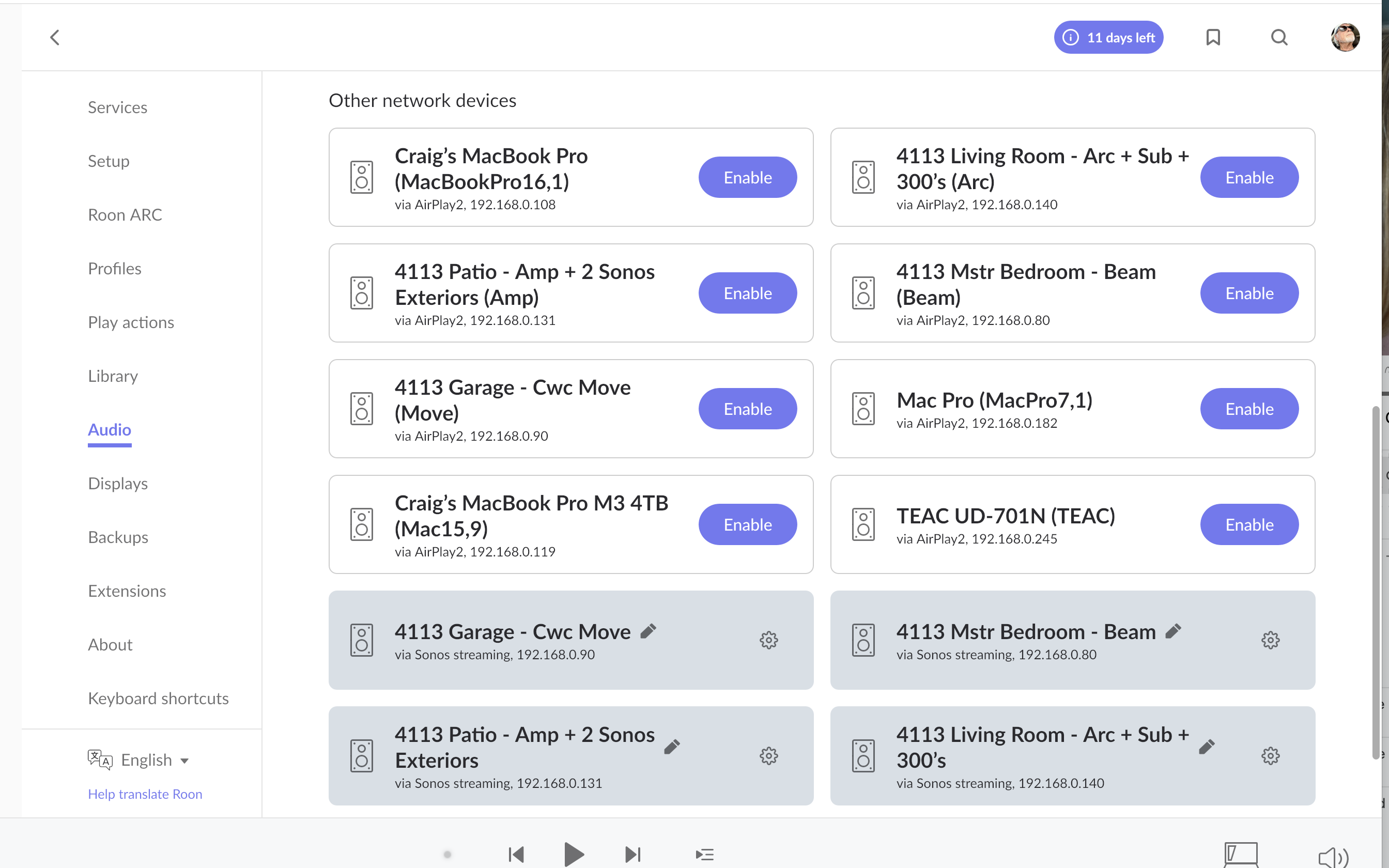
· Roon 2.57 on macOS Tahoe 26.0.1 on MacBook Pro 2019 Intel i9 64GB Ram + 4TB SSD / Loving Roon .. trying to connect Roon to my TEAC UD-701N (Roon Ready DAC) - under 'Audio' in Roon App - the TEAC only shows up as available via AirPlay2 - so signal is degraded. Trying to connect Roon to my TEAC DAC as Roon Ready therefore enjoying full resolution. I have screenshots if needed. Roon works great throughout my home with Full SONOS systems everywhere - but my Studio has a developed system and the TEAC DAC is integral. PLEASE HELP ... primary source is TIDAL (also Apple Music - but that doesn't seem to work? ... should it?) Thank you ... Craig.
Welcome to the forum! Can you please confirm if a reboot of the Roon Server, Networking Gear, or TEAC causes any cnange in behavior? This can potentially also be due to a MacOS security setting:
macOS Sequoia (version 15), has tighter (and more obfuscated) network security settings than preceding MacOS versions.
Can you please navigate to macOS System Settings > Privacy & Security > Local Network, and make sure Roon and Roon Server are allowed.
If it is already enabled, toggle it off and on again. Then reboot your Mac, and see if the same issue persists.
Thank you Noris … yes I saw that suggestion in another topic and did perform those actions - to no avail however. Is there a chance that the ‘Trial’ version of Roon will not support a Roon Ready TEAC UD-701N DAC? in terms of a high resolution connection and playback?
Thanks for the update! There shouldn’t be any restrictions for you while you’re on your trial - it’s an important time to see if Roon is the right fit!
Another area to review would be the firmware version on the UD - could you double-check to ensure you’re running the latest firmware on the device?
I’d also ensure you are connected via ethernet to your primary router for both the UD and your Roon Server. Even if temporarily, it’d be a great next step in testing.
It looks like the DAC’s network mode can only be set to roon/RAAT exclusively, disabling all other network functions. Or enabling the latter, without roon/RAAT.
Thanks for the follow up Connor … Looks like I have to do a firmware update on the TEAC UD-701N - but surprised as the Manual clearly indicates how to make the switch to RAAT - with the current firmware (supposedly) - but the option does not show up.
Plus I work in the Apple (MacBookPro and MacPro) domain and I cannot see how to execute the latest firmware update - seems very PC centric.
I have the TEAC latest Firmware file downloaded already - just not sure how to get it placed into the TEAC using a Mac … Confused as the TEAC clearly states ‘Roon Ready’ in the materials and Manual - right from when I purchased it - late 2024.
Any ideas - I really like Roon and the TEAC is my KEY DAC in my KEY System.
We wanted to reach back out since we don’t yet see a Roon Ready device matching this hardware in diagnostics associated with your account.
As a separate consideration from the TEAC firmware:
How specifically are you connected the TEAC and the Mac? Do they share a mesh node in your Eero setup, or are they connected to separate extenders?
RAAT and Airplay rely on separate device discovery protocols, so we want to make sure that the device announcements are forwarding across this mesh network properly.
Thanks for the follow-up! @maddib is spot on with the proper next steps - let us know if you were able to go through the above, and if it gets you up and connected properly.
Thanks for checking back Connor. In short, no. Have tried a cable to cable update - but I now feel that my MacBookPro OS version is way ahead of the TEAC firmware updater. Just doesn’t show up - tried so many ways. Now I think my only choice is to purchase a New Streamer Transport - one that will WORK WITH ROON WITHOUT DOUBT. Looking at the Eversolo T-8 or Eversolo DMP-A8 or Matrix Audio TT-1. I would so much appreciate your (Roon’s) experience and success (or non success) with these models. I sure don’t want to make the same mistake! Thanks Connor, Craig.
Thanks for the follow-up! It’s good to note that you can very likely reach out to TEAC directly to get help with updating the firmware, just in case that might be something of interest.
All three are Roon Ready, so that’s an awesome start! For more feedback and opinions on gear, I’d check in over on our Roon Software category on the community - I’m sure there are many who could share hands-on feedback. Here’s a link for you:
I fully understand your frustration. Indeed, TEAC only offers a Windows-based updater app and a smartphone app to do the job.
There’s no way to update the unit e.g. with a firmware file on a USB drive connected to the unit or directly from the unit via internet. This is pretty bad.
But, did you already try to do the update with their official smartphone app “TEAC HR Streamer”? It’s available for Android and Apple.
Take a look here… https://teac.jp/int/product/ud-701n/download. Should be pretty easy.
In case this is not feasible for you, just go to a dealer and have it done. Should need just a few minutes.