@RBM @jussi_laako you guys are right, it was the lossless switcher in combination with Apple Music. Everything runs smooth now on DSD256.
1 Like
Found a script from @RBM and modified it to auto start and auto play.
#!/bin/bash
This script will start HQPlayer and begin playback
Start HQPlayer
#open -a HQPlayer5Desktop
Use hqp5-control to select the input transport and start playback
Replace ‘audio:default/44100’ with your actual audio URI
/Applications/hqp5-control/Contents/MacOS/hqp5-control localhost --set-transport 1 ‘audio:BlackHole 2ch/0/2’
/Applications/hqp5-control/Contents/MacOS/hqp5-control localhost —play
Getting the following error message:
plusacht_music@Music-MBP /applications % sh autostart.sh
autostart.sh: line 11: /Applications/hqp5-control/Contents/MacOS/hqp5-control: No such file or directory
autostart.sh: line 12: /Applications/hqp5-control/Contents/MacOS/hqp5-control: No such file or directory
HQ5-control is inside applications folder. Any idea what I am doing wrong here ?
Use /Applications/hqp5-control.app/etc… – the ‘.app’ is part of the path.
1 Like
This fixed the problem but the player is not starting. Maybe the script is wrong?
/Applications/hqp5-control.app/Contents/MacOS/hqp5-control localhost --set-transport 1 ‘audio:BlackHole 2ch/0/2’
/Applications/hqp5-control.app/Contents/MacOS/hqp5-control localhost --play


**Maybe to step back and explain the 2 scenarios I am trying to address:
- MacBook Pro is starting up - using automator to run script:
Script:
#!/bin/bash
open -a HQPlayer5Desktop
Sleep 8
/Applications/hqp5-control.app/Contents/MacOS/hqp5-control localhost --set-transport 1 ‘audio:BlackHole 2ch/0/2’
/Applications/hqp5-control.app/Contents/MacOS/hqp5-control localhost --play
In the best case scenario - I just have to press play in Apple Music and everything works.
- MacBook Pro lid is closed (sleep) and T+A DAC is switched off - opening lid and switching on T+A DAC
Script:
Now I need a script which triggers “PLAY” when my DAC is connected (powered on) and HQPlayer is open and not yet “PLAY” activated.
Again, in the best case scenario just press play in Apple Music and everything works.
Just to be clear, this is simply for my non technical wife - I want to make this thing idiot proof 
EDIT FOR OTHERS - THIS is the final script I am using and fully working:
#!/bin/bash
open -a HQPlayer5Desktop
Sleep 8
/Applications/hqp5-control.app/Contents/MacOS/hqp5-control localhost --set-transport 5 ‘audio:default/0/2’
/Applications/hqp5-control.app/Contents/MacOS/hqp5-control localhost --play
thanks
Transport is loaded with 5, not 1:
/Applications/hqp5-control.app/Contents/MacOS/hqp5-control localhost --set-transport 5 ‘audio:BlackHole 2ch/0/2’
1 Like
This worked - so scenario 1 is solved.
Would you have an advise for me to solve scenario 2:
2. T+A DAC is switched off → switching on T+A DAC
Script:
Now I need a script which triggers “PLAY” when my DAC is powered on and HQPlayer is already open (if not open then I can simply use script 1) and “PLAY” not yet activated.
EDIT: Of course, if this is not possible could simply kill HQPlayer before the computer is going to sleep and run script 1 after wake up.
thanks
You can see a draft video of the current state of my rooMax implementation that integrates Quick Keys into rooExtend. Hopefully I will be able to release it within the next four weeks 
Best DrCWO
Did anyone mange to tame routing audio stream from video via HQPlayer in sync with video, lipsynced that is.
Use case - playing youtube video (for example) on a tablet streaming via airplay. On my “anysource” setup, which is Bluesound Node (receiving airplay) and connected to USBStreamer (which is connected to HQP server, classical setup) I get a very nasty delay with video even with minimal buffer setting trying to get to SDM@256 with either gauss-long or mqa/mp3-mp, on 5th order EC modulator.
Another use case a bit more sophisticated - for DVD, I have audio and video (obviously) going to TV with HDMI (source is PS3, but that really does not matter). TV outputs audio via Toslink that is going directly into MAY DAC. Sounds nice, but I thought to try routing this to HifiBerry (remote NAA, that is, like I recently did for CD Transport) and I assume I’m gonna face lipsync issues again.
I wonder how can I delay video to get sync, or what is the HQP “video mode” settings if such is possible?
1 Like
gauss-long definitely won’t work since it is linear phase
mqa/mp3-mp should work
Did you change input side buffer? Not just output
Always try light CPU load first, try non-EC modulator
You have any matrix profiles active? Are they min phase?
1 Like
@dabassgoesboomboom , merci! but, nope, with light settings is the same.
“light setting” = empty PCM passthrough, buffer minimal, other is 10ms, no upsampling, no filters, no matrix, no speakers distance, no convolution… virgine barebone player via NAA. there’s still visible video delay.
Probably related to Airplay.
Try on your Mac with Blackhole as HQP input - no Airplay
This has no visible lip sync for me, even with min phase 65k tap FIR room correction filters in HQP
Also CoreAudio output for me
2 Likes
yeah, there’s definatelly smth on the way that would do the audio buffering. I don’t have MAC. But for PC, AFAIK, there are some video buffering or lipsync utilities. Bigger question is how to make it without PC in the chain. Some type of video processor with delay option, I wonder ? It would definatelly be no use for gaming for sure, but for BR’s or DVD’s certainly yes.
Anecdotically in the internet search most if not all links speak about shortening Audio delay, instead of lengthening Video delay. As if no one does audio DSP for home cinemas ?? (which is hard to beleive) I wonder…
I will tinker with my hifiberry to see if such a path can do magic (this will cross out AirPlay from the chain at least)…
Yes audio delay is common.
Much less common is video delay which is what we need.
From memory on LG TVs used to have this , not sure if they still do. But it was always mentioned in user manual so you can check newer model manuals.
As you can imagine buffering lots of 4K video needs more memory than just simple audio
And even how much the TV can delay (is it enough for HQP?) I can’t recall but I remember seeing comment in user manual for LG TVs
Buffering control will be the key for lip syncing if there’s no video delay option in the path. In my past experience you might try one or all:
- Add a video selector / switcher in the video path, it can add some delay for video (add extra buffer for video);
- Using AoIP to minimize the audio latency between source and HQPlayer (AoIP’s latency can down to 1ms or less).
**I’ve tested Arvus H2-4D Atmos decoder with PS5 for gaming.
H2-4D <Dante/AES67> HQPlayer embedded → NAA <Ravenna/AES67> Merging DACs
- Acquire an AppleTV 4K to handle the AirPlay
2 Likes
You will certainly have a bunch of delay from AirPlay alone…
On HQPlayer side, you have three “short buffer” options for both input and output. The low delay option being least delay, but also most prone to drop-outs. You also need NAA v5 for lowest delays.
1 Like
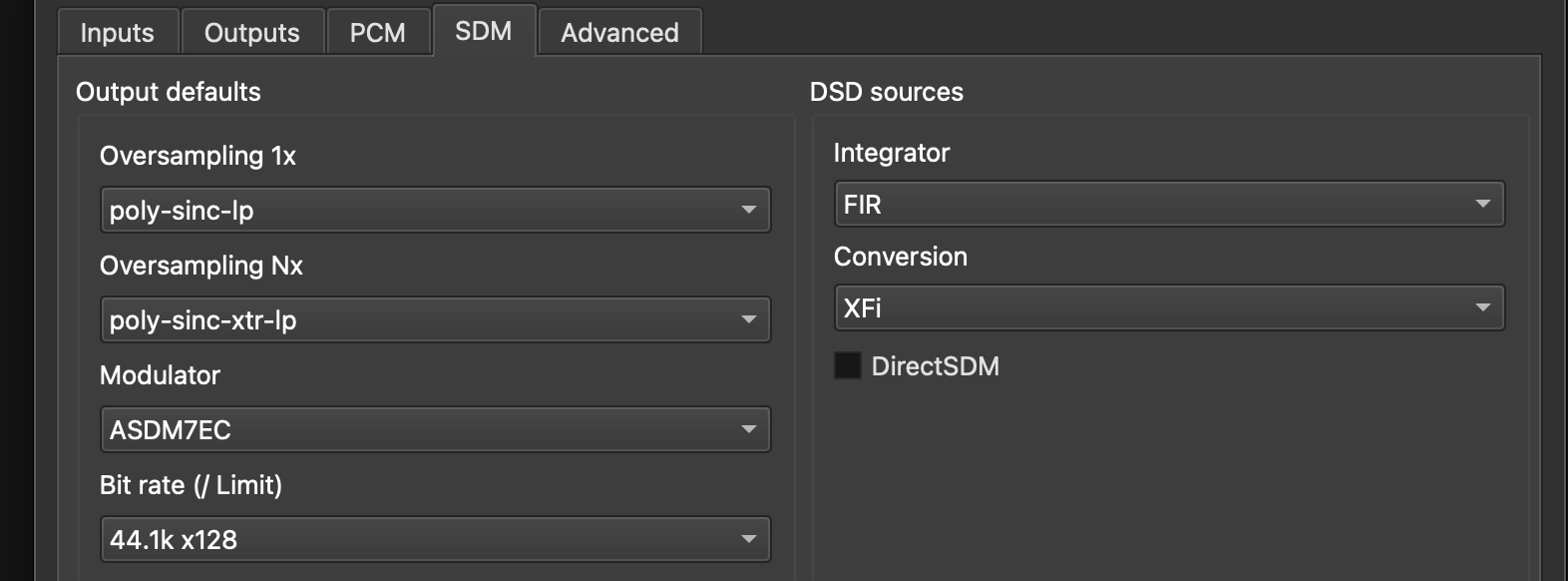
I on lt put hisopic as an example of the settin gs I have tried. This is the new HQP5.
I seem to find a settin g that doesn’t cause me problems. Either I get no sound, a horrid elertical sound like out off tune radio, or I get what I have been geting recently which is the music sounds okay then it ‘wobbles’ for a second or two, enough for friends to notice.
I like a clear non bassy sound. I am using a MacBook Pro M3 MAX with a 4tb disc yet if I try using anything of the Last few SINC filters(?) they don 'tplay.
I’d like a suggestion as to what to set please. I’d be gratefule. Thank you kindly. It’s waste of money to n it use the program.(Yes no such problems with ROON)
Thankj you kindly
Which are the other settings (Outputs and Advanced tabs)?
Which dac are you using?
Are you using NAA?
1 Like
Thank you @Chunhao_Lee indeed the strategy would look like “reducing lattency + introduce buffering management”. I can see your suggestion, but it is complete ecosystem change for me, I guess when I pull a trigger on multichannel setup that would be right way to go!
Yeah, I’ve been thinking about this. iPad to WiFi Router to Ethernet Switch to another Ethernet Switch to Bluesound Node to USB Streamer to HQP Server to Ethernet Switch to another Ethernet Switch to RPi4 NAA to DAC via USB. Even if HQP has 0 lattency this “normal” path is just not optimal for real time transfers…
PC: it looks like videoprocessors are the answer…
I’d suggest to use “-2s” variant of those filters, if you like those ones.
Also ASDM7EC-super would be newer modulator, although the one you have already is fine too.
I did just as you suggested but still had non smooth playing-occasional drops, distortion sounds better than drops. It certaibnly doesn’t likke XTR. To be frank there was no need for me to upgrade from 4 as I can’t do anyting different as all the new ones don’t work for me. I use an M3 Max so don’t believe it is lack of power as NOTHING else runs on this computer but ROON and HQP.