I’ve been using Roon with Quboz for about a day now and am persistently running into the “waiting for your Roon server” problem. My firewall is off, but my Roon server is the same MacBook that I’m playing music from so I don’t think it’s a connectivity issue anyway. I’m new to Roon and am currently on a free trial. I’m hopeful this is something easy enough to fix so that I can continue to trial the product and decide if I want to become a paying customer. thanks!
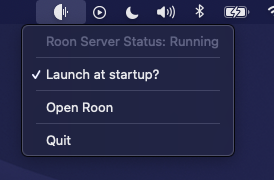
I think it may be fixed. I had previously unchecked “launch at startup” and subsequently re-checked it, but didn’t reboot after re-checking that box. After re-checking the box and rebooting the computer, I have now listened to 13 uninterrupted minutes of music so I’m optimistic I’m good to go. Thank you!
Well, spoke too soon. The problem is back. Doesn’t seem to be happening quite as frequently (maybe every 15-20 min instead of everey 3-4 min), but it’s still happening.
Hm, a pity. Maybe RoonLabs support will need to look at your logs, but that can take a few days until you reach the head of their queue. In the meantime, some ideas FWIW:
What happens if you use a Roon remote on another device such as a phone? Does that work or same issue?
What are you using as the output device, the DragonFly? Did you try without it, just using the Mac’s system output?
Are you using any kind of VPN or other non-standard network stuff? Can you try without?
It seems to be working fine when connecting via the Roon ARC app and listening on my phone.
I am using the DragonFly. I tried plugging my speakers directly into the headphone jack on my computer but the problem persists. Eliminating the DAC would kind of defeat the purpose of paying for an HD music service anyway.
No VPN or other non-standard network stuff that I’m aware, although I am connected to a university’s internet and I can’t speak to what sort of elements they might have in place. I’d be surprised if this is the issue, though, with the served being located on the same machine I’m using to play.
Yes, although this wasn’t initially the case. I added Roon to the list of apps with full disk access, but the problem has persisted despite that.
I still have the problem when playing tracks that are stored on my hard drive, i.e. without Qobuz.
There were no tracks to clean up in the library.
I’m not sure where to look for traffic other than Activity Monitor. I’m watching network activity using Activity Monitor. I see RoonAppliance, Roon, and RoonServer processes. RoonAppliance and Roon are both sending/receiving data, but RoonServer is not. I watched the monitor while listening to music and the send/receive data for RoonAppliance drops to zero when the “waiting for your Roon server” error occurs.
All other internet activities are operating normally.
I didn’t mean ARC, this uses a very different mechanism to connect. I meant the regular Roon Remote app on the phone.
OK, so DAC is ruled out
It was just meant to isolate the problem. If you have a complex system with many parts that fails for unknown reasons, you simplify it until the problem goes away.
Probably not the university net, but there are security tools that create a local VPN directly on the machine, like AdGuard, for instance, which may or may not affect stuff. I can’t know what you have without asking
I’m on a company computer and they use Sophos Endpoint to guard against malware. That’s the only thing I can think of that might fit what I think you’re describing. I double checked the list of apps that have full disk access to see if I was missing anything, but that’s it.
Btw, apologies if my comment about eliminating the DAC didn’t land well. I understood what you were doing (isolating variables), but, re-reading what I wrote, I could see how it could come across as snarky, which isn’t how I mean it. I very genuinely appreciate your time & attention here to help me figure out what the hell is going on.
It is very weird. At the job, I have to unfortunately constantly deal with security tools like Sophos and others on customer machines that I know nothing about, of which there are many types and even more configurations. So based on this, I wouldn’t rule it out (I never do), although it does not seem very likely. If they interfere, they usually do so all the time, not intermittently. But stranger things have happened, I can tell you
I don’t know that much about Roon Server on Mac or Windows, but I would also think that communication between Roon and Roon Server on the same machine isn’t subject to firewall rules. (Though don’t take my word for it).
I am out of ideas, I’m afraid. At work, I would at this point probably ask the customer to contact IT and ask to temporarily turn off the Sophos, to see if it makes a difference, but I realize that this is often difficult and more so for private entertainment software. (In the work case, they want to run our stuff for business reasons, which makes it a reasonable request).
Let’s hope someone else has better ideas, or @support can pick it up soon.
Thank you for your patience in awaiting a staff response and thank you to those members of the Community who have so far assisted.
We’ve activated diagnostics mode to generate an automatic log report that your RoonServer instance uploads to our servers. We can see that your account has acknowledged the report, but so far logs have failed to reach our server.
This may be due to the same underlying network failure or security apparatus that’s causing your Remotes to lose sight of RoonServer.
If you have a second to upload logs manually by following the directions found here, zipping up, and adding to our File Uploader, the tech support team will gain a more granular understanding of why RoonServer can’t see the other devices.
Thanks!
If you need additional time to try Roon once we’re done troubleshooting, we can contact our accounts team to extend your trial.
 I hope it will go smooth from now on, enjoy!
 ) the message occurs again, please launch Activity Monitor and see if there are any (other) processes which could be causing this.