Pre-ringing is a backwards echo and has been described as “a strange sucking sound”. It is more apparent with isolated transients, like rim shots. Some people hear it on solo piano.
If you want the most accurate transient reproduction, then minimum phase is preferred (this is not universally agreed). Linear phase preserves more spatial cues (soundstage).
Personally I find ext2 an excellent compromise. It is linear phase with good transient reproduction (to my ears at least).
I’ve been playing with HQPlayer again and the Hugo 2. Definitely interesting results. However my 2012 iMac doesn’t have the power for the poly-sinc-long-lp filter – it just maxes the cpus for ages (I haven’t been bothered to find out how long, but over 5 minutes at least).
My question is: What kind of computer are people running the “long” filters on? Are you simply using something like an i9 cpu, or do you have a good graphics card in there as well to offload some of the processing?
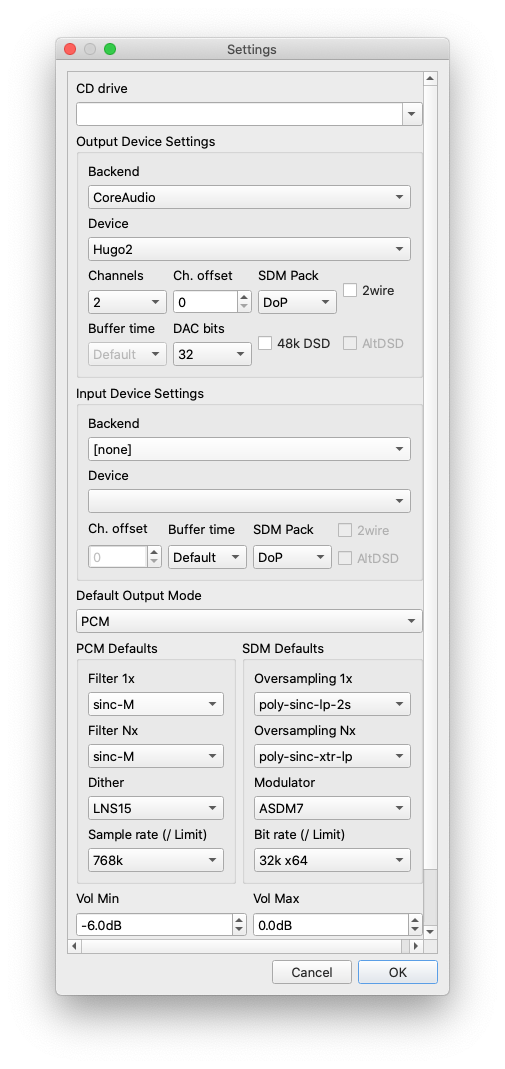
If you use PCM even a i3 is sufficient. Definitely, for Hugo2 make sure PCM is setup and select 768khz, adaptive, sinc-M and LNS-15 for a WTA1 sonic signature.
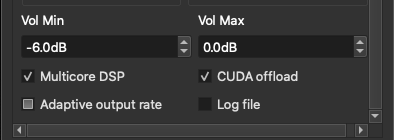
Make sure you have adaptive rate checked, otherwise hqp will not do a power-of-2 upsampling. This then takes forever per song as hqp resamples(like from 48khz to 44.1khz)
Thanks for attempting to answer, but you didn’t answer my question. If you have a moment, please read it again and let me know about YOUR system, as there is a filter I want to try which i cannot use because my system is not powerful enough.
sinc-M with LNS15 Dither to 768k PCM works.
poly-sinc-long with any dither setting to 768k PCM (32 bit) just results in 800% CPU (multi-core here) for minutes on end and I give up and force-quit the program.
I would really like to know someone who is using a similar setting and gets music out fairly quickly and what they are using, hardware wise.
@andybob I can’t use a 2s variant as I’m not converting to DSD.
You need a checkbox in Adaptive output rate, or some filters will perform a length pre-calculation. Its one of these less fortunate features in HQPlayer.
It plays now after I checked that. I had thought that it was checked before. I don’t know what that pre-calculation is that you were referring to or why it exists.
It has something to do with how filters work and non-integer multiplicative up-sample. If you have adaptive output rate, it will up-sample to nearest integer. @jussi_laako can explain it better.
I also had this problem when I started with HQPlayer, I thought some filters where buggy and just calculated in some infinite loop. There should be some warning popup or something that tells that HQPlayer will need to to a lengthy calculation when you select those filters and don’s have adjust sample rate checked.