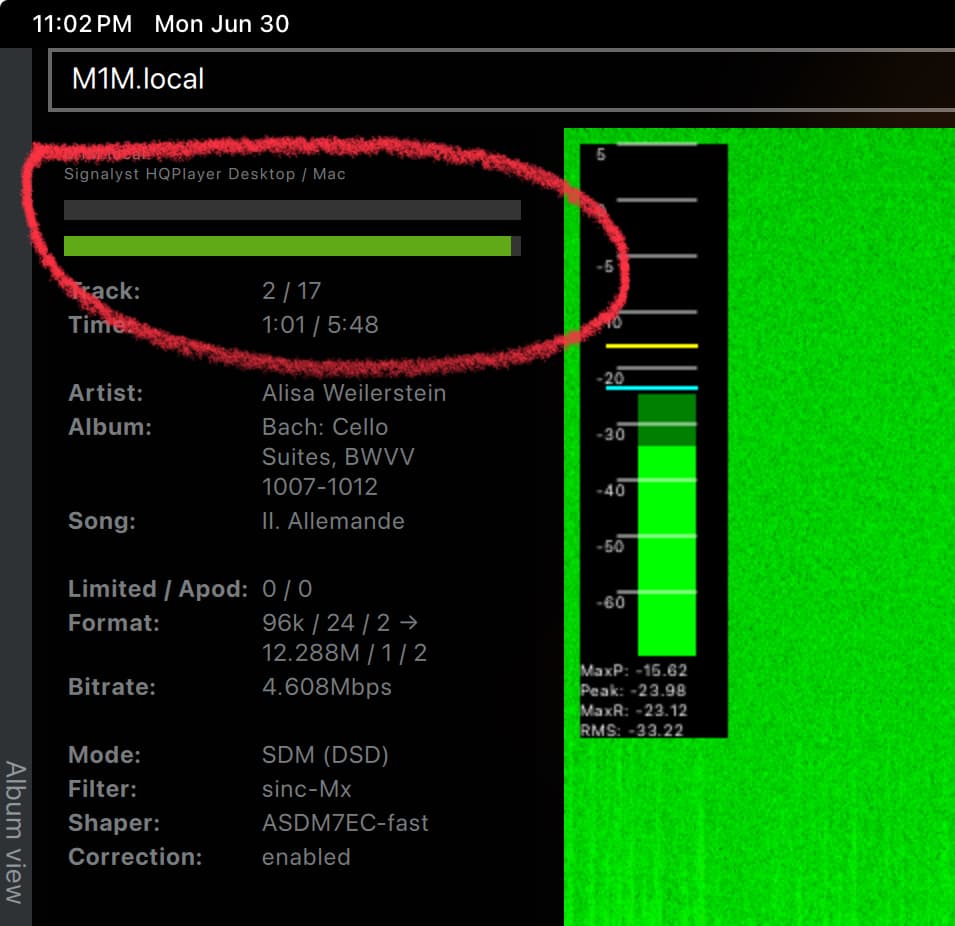
For most cases, ASDM7EC-fast is a good choice. DAC correction is pretty important part, and DSD256 gives very good quality. Whether DSD512 is objectively better or worse depends on the overall system, so I’d recommend trying which one you prefer.
As I don’t have these to test with, I cannot tell. Maybe someone with 14 core can help. I have four Macs in use. 27" iMac with i9-9900K, MacBook Pro with M1Max 32GB, Mac Mini M1 16GB and the Mac Mini M4 16GB.
Generally the number of Performance cores matter for most cases, apart from few modulator choices for higher DSD output rates. Amount of RAM affects memory bandwidth in particular with M1, but also to some extent on newer models. Higher amount of memory usually populates more memory channels increasing memory bandwidth. This has some amount of performance impact.
But I don’t have clear figures how much each aspect has impact on particular setting combination. There are huge number of possible hardware + setting combinations!
For example sinc-Mx is rather heavy on memory bandwidth, and performs best on Nvidia GPUs. When running on CPUs, it takes minimum 8 P-cores for full performance (for stereo). While poly-sinc is more in level and performs particularly nicely on Apple M silicon.
call it static clicks pops, tic-tics, I’m referring to the noises between tracks, when a tracks stops, when another begins. I’ve read many posts reporting those noises and thought we all had learned to live with those tiny annoyances. Issue with AHM7EC8B @1024 is that they occur anywhere in a track.
As of convolution hypothesis, I tried the heavier save mode and it seems I have a lower number of “tics”. heavy massaging like with ps halfband s also seem to reduce tic noises. But since it’s erratic and more or less apparent depending on the program, can’t be 100% sure. BTW I saw people complaining about initialisation time but for once done it sticks if you don’t close HQP : no more an issue than waiting 5 minutes once
Whilst I’m narrowing down my choices I’m still circling a few combinations. I would like to be every so slightly less restricted by the Mac so I’ll return this one and try the 14 core model (despite reading that mysteriously its single core performance is identical to the 12 core) and will double the RAM. If that doesn’t do much I’ll stop messing around and just enjoy the music.
It was interesting looking at the memory performance, not just CPU, and as you say Sinc Mx really maxes out the memory.
I’ll leave DAC correction on, and build the optimum settings I can from there.
Thanks - this got me looking at CPU and memory loads for different filters and modulators, which actually helps me understand what’s driving the computer to stutter or stop, and therefore makes it easier to formulate different combinations
My network is a bit complicated. Incoming internet (fiber optics) by Fritzbox modem. From there utp cable to my living room where my Rhein Z1 plus Roon server is located. The Holo Red is connected directly to Rhein Z1 plus (it has 2 ethernet connections). HQ desktop is running on a Mac mini that is located at the second floor of my house. For the data to get from the Roon server to the Mac mini it has to go through two switches. Entire cable is around 20 meters or so.
Today I have made the setup less complicated by moving the Mac min to the living room. The incoming internet signal is now going to a gigabit switch. I have connected both the Mac mini and Rhein Roon server to this switch. The Holo Audio is still connected directly to The Rhein Roon server. This way it is working an am able to listen to DSD 1024 in all combinations of sample rate and bit depth I have
Another way is to use Hqplayer5Client. It’ll help you understand why some configurations dropout more often than others. You can change settings on the fly too.
Make sure in “Settings > Advanced” tab the “Multicore DSP” is greyed out. Try also:
“DSP Pipelines: Default”
“Blocks per Cycle: 4”
Eventually you can increase the “hardware buffer time” progressively from Default up to 250ms under “Outputs” tab. My base mac mini m4 can indeed run AHM7EC8B at 1024x48 with dac correction too.
Also make sure your NAA client is running on a GbE connection since the bandwith required is around 100 mbit/s so you can’t stick to FE.
Yes Limited counter is staying 0.
I tried a Belkin pro USB cable instead of the Holo : nothing fancy ; I tried MBAir as another NAA. No luck
What is left to try ? Does it mean HOlo May L2’s USB is faulty ?
How about Mr Kappa’s recommendation about Ethernet ?
Thank you ffk.
Presumably the green bar means CPU load or something?
I’ll have a play using the client to find the right filter combinations.
I’ve also ordered a Mac mini with the extra two cores and double the memory. Not sure it’ll perform much differently but I’ll try and return one of them!
My ISP provided box has 4 10/100/1000 ethernet ports so should not be an issue, neither the cat 6 ethernet cables nor Holo Red. Nevertheless I plugged all ethernet cables to my Apple Time Capsule (1 Gb ethernet ports). The only bottle neck could have been for Qobuz since the TC is linked to the World via the box. But no issue there. Strange thing is that I got dropouts with settings that worked just fine with the box as switch, mainly Multicore DSP has to be greyed not checked. So as if there was more work. And for a while I thought issue was solved, DSD64 source OK, 96 OK 192 OK and vlam ! “static” with 44, then static with 96 192. It’s still only with DSD64 that occurrences are consistently at a bearable low level.
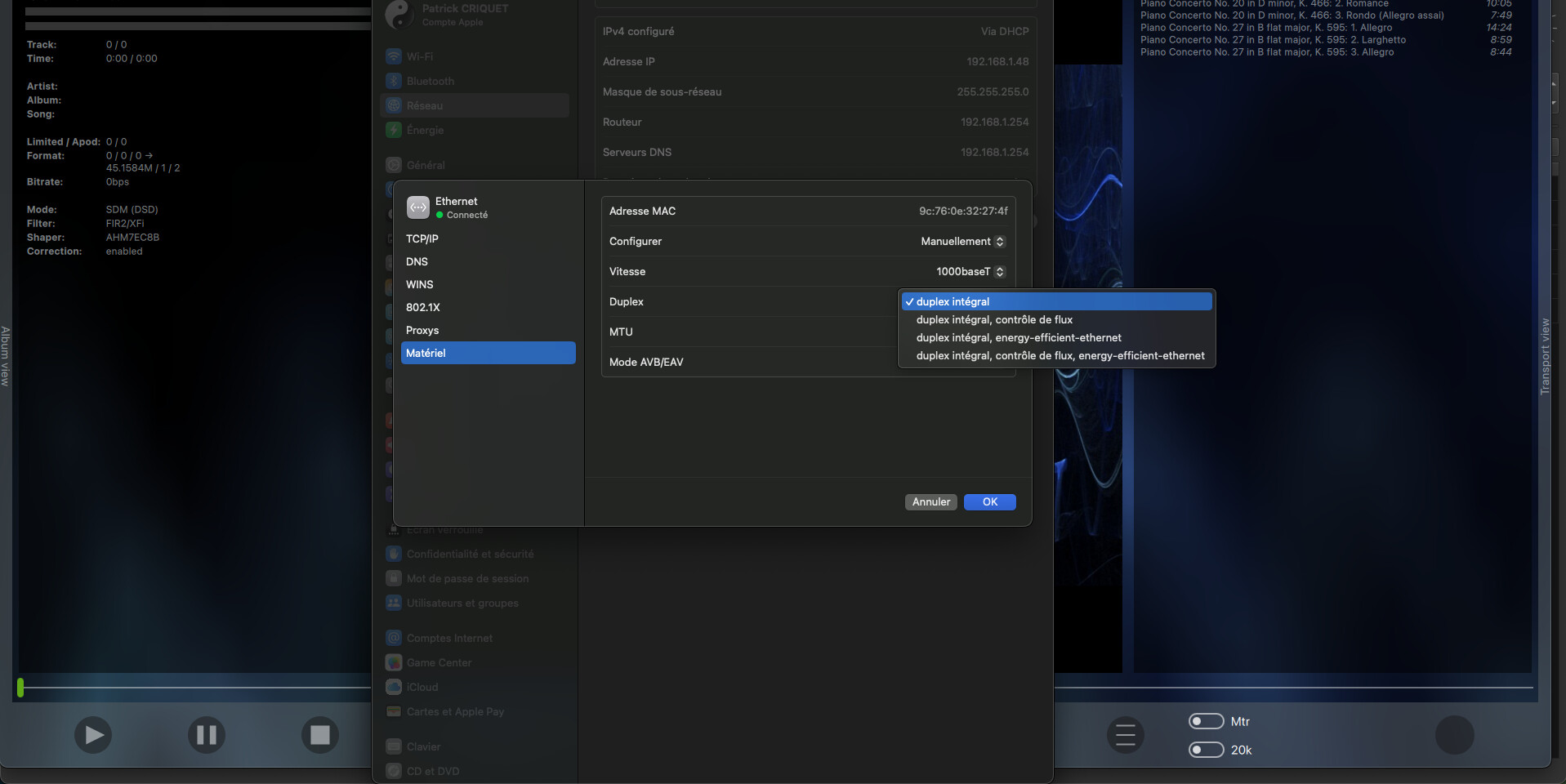
There’s one interesting glitch anyway (with either box or TC ethernet connections): if I try to ensure 802.3x hardware network settings they always revert to full duplex, it is impossible to get an option with flux control and/or energy efficiency to stick (picture is in French but shouldn’t be difficult to decypher.
Thank you for your help
BTW I rediscovered ext2 as a new old favorite, timbrally it beats gauss long here. And I rediscovered SAVE option for convolution, seems eQ inprint is better and the extra load is not the reson for “static”
The last option should be the correct and recommended one. But if the combo doesn’t work, just flow control is also OK (more important).
But these are features negotiated with your switch. If your switch refuses these, then it may be reflected in the GUI as well (I have not checked if macOS does that).
Thank you Jussi, thank you ffk. I spent some time with my ISP provider hot lin (poor guys can only help absolute beginners) and 1.30 hour with a very nice dedicated level 2 at Apple. To reach the conclusion that I should get a modem only box from my provider (doesn’t exist). In the end, I set a static address to my Time Capsule in the box interface and in AirPort utility I set DHCP range above it so the TC runs as router (I suspect the ISP box functions as a mere bridge as the TC was initially configured).
So now I know for sure (?) I have a switch in router mode not a mere bridge. But the TC seems to be IPV4 only (though in HQP Preferences I can and do select IPV6 to reach the Red) and Apple could not confirm or infirm 802.3x support (then probably it does not does it ?). Connecting to the TC brought occasional dropouts. I Thought they disappeared with NAA 515 but it was probably just the pause.
Still can’t get flow control to hold if set manually but ifconfig en0 | grep media in Terminal seems to say it’s OK. I’m puzzled by netstat -I en0 : number of packets in and out differ but 0 error.
But since I still get static so I guess that after all those efforts I‘m going back to plug ethernet cables to the ISP box, check if I get rid of dropouts
Should I acquire a router with 802.3 x guaranteed or it’s not the issue per netstat -I en0 ?
A suggestion of a switch/router that could be acquired cheap on second hand market ?
If back to the loss of USB packets hypothesis, where to look ? (I tried a Belkin supposingly certified cable and a Jussi’s NAA image booted old MB Air in lieu of the Red)…
What I can tell you is that my Roon Server (mac mini m4) runs its ethernet NIC on “automatically - full duplex 1000baseT” and I don’t have any flow control enabled, neither there or on any switch on the chain, and I’ve never experienced any dropout anyway. I used to, but it was due to a cheap ethernet cable I was using.
Silly question, have you tried disabling any convolution or PEQ in the matrix pipeline?
Can you try connecting the DAC to HQP desktop directly via USB and see if bypassing the whole ethernet layer you experience the same issue? I know it might be DSD via DoP if it’s a mac, but it’s just to start excluding some possibliites such as a faulty USB port/cable
My router is a raspberry pi 4 running wulfy23’s version of openwrt. The pi Ethernet is my wan and a tplink UE300 is my lan. That goes to trendnet 8 port 2.5G unmanaged switch and there a TP-Link TL-SX1008 10G unmanaged switch in there too. I also have a small 2.5G switch where the naa is to accommodate some streaming devices for tv.
Definitely a cheap router. No WiFi though. I have another box for WiFi upstairs.
The router also has https dns proxy, Adblock, and sqm to fix bufferbloat.
The pi really looks like a joke, it’s not even in a case. Best router I’ve had.