they are certainly much bigger than the speakers they replaced! they sound great at lower levels too, so i think they work well in the room 
Thanks a lot for sharing your knowledge with us
I’ve been applying your guide with both my desktop setup which have cheap Neumi ■■5 + Kanto Sub6 as speakers and Sub which is amplified by a Aiyima A07 + MiniDSP Flex. And with my living room which has a better gear, pair of Polk R700 powered by a Marantz amp and a MiniDSP SHD as pre-amp.
On both rooms the convolution filters loaded to Roon did improved the response more notoriously on the desktop setup of course (love what DRC does to affordable setups). But I do note that Roon is clipping a bit, with HR managment about -3dB and clipping indicator on, I think this is related to the fact that we are amplifing the signal by about 5dB in some cases, please correct me if I wrong.
OTH in your guide there is the point of inverting the result of L/Target:
- TA / A: ”L Inversion” / “1/A” / “Regularisation %: 8.0” / “Target level: 3.6 (Auto – see updates at…)
What does mean a Target Level of 3.6 and on which version do you have to use Auto ? I’m on 5.20.13 now. I ask because maybe in these step is where the amplification ocurrs. I’m thinking on playing with these to avoid clipping on most cases with minimal headroom.
Many thanks in advance !
3.6dB was determined for version 5.20.13 and it should work fine. Version 5.20.14 is an early access version at the moment and is still in continous development. The latest early access versions will work best with target level at “auto”.
5dB headroom is expected with most convolution filters for tracks that tend to clip (these are usually masters with some noise in the inaudible frequencies). Upsampling to DSD might increase this headroom some more. It’s hard to say if that’s directly related to the 5dB boost limit applied during inversion. I have seen similar headroom requirement with just phase correction filters with no frequency boost.
Thanks for your reply.
BTW reading this thread I can say I’m a Mac user too and I do note that delays aren’t the most precise when captured with my Umik-1, I’ll get a Windows PC sometime and a analog mic to see if that setup is more precise with the delays.
Thanks for sharing this with us!
I’ve had good luck creating PEQ-style convolution filters from REW (i.e., just letting REW calculate PEQ settings and exporting them as WAV files for use in Roon), but this technique promises to achieve much finer-grained results.
Unfortunately, I’m obviously doing something wrong  because despite following your instructions religiously (twice now), I keep getting filters that create a very hollow / echo-y sound in the room. Not all that noticeable until you play back a human voice, where the distortion (not clipping, just echoing) is clearly audible.
Any thoughts about where I’m going wrong? Happy to provide my MDAT file along with the filters created.
You’re probably forgetting to generate the “minimum phase” versions of 1/A divisions. It’s these MP versions which should ve exported as wav files.
No, I was doing that
However, I went ahead and started with a fresh set of measurements and walked through end-to-end again, and this time I think I have a halfway-decent set of filters - at least, don’t have the really echo-y / flange-y sound I had before.
At some point, I’m going to work through the new, four-step process you posted, starting with VBA … but my bass is already pretty well-controlled (already have two subwoofers, no big bumps / dips in response), so that will be a project for a rainy day 
I will say one thing has very obviously changed: the sense of “phantom center” is now so strong, I keep feeling I need to check my center speaker to see if sound is coming from there instead of from my Left / Right speakers I’m assuming this is because LR are now more closely-matched and balanced, so that sound appears to be coming from dead-center.
What you describe sounds like a pre-echo/ringing which would be a certain result with sharp phase corrections in the bass frequencies. If even minimum phase filters are causing pre-ringing, I can only assume you’re having to apply extremely large bass filters. Are you measuring/correcting with the subs active?
Very possible - I was looking at the curve from 10-20,000, which looked pretty darned smooth.
Zooming in JUST on 15-500, though, I see some pretty jagged traces (this is LR Average overlaid on the target curve):
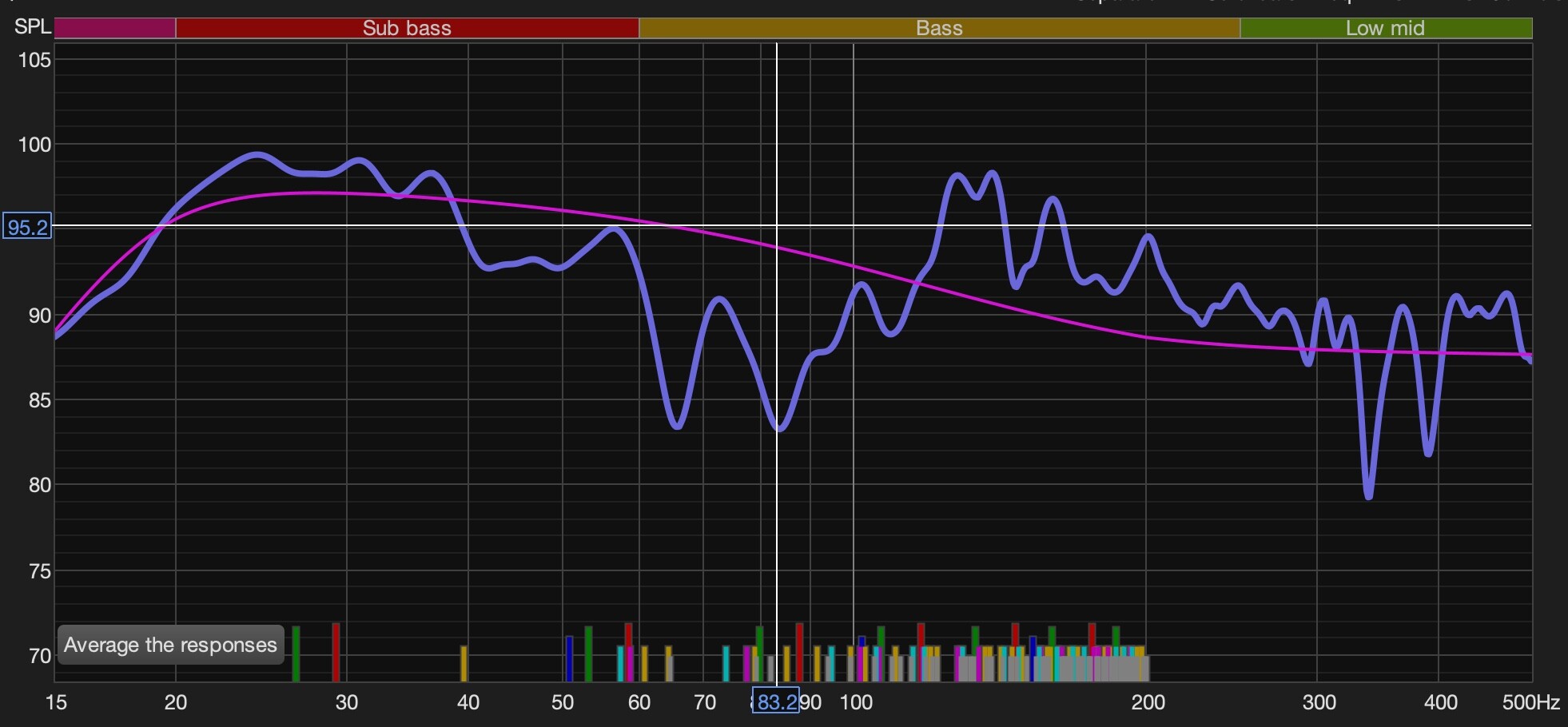
And, yes, this is measured with subs engaged, because that’s how I listen. The curves are only applied to the L / R channels, and the AVR should handle crossover (at 40hz for these Revel F208s); i.e., any corrected sounds <40Hz should wind up in the subs.
As I noted earlier, this sounds pretty good now (LR result overlaid on the target curve):

but what would you do differently? Love learning this stuff!
The required corrections don’t seem abnormal to me.
What could be done differently?
You’ve crossed them over at 40Hz. The ASR test of your speakers shows around 60Hz to be the right crossover frequency?
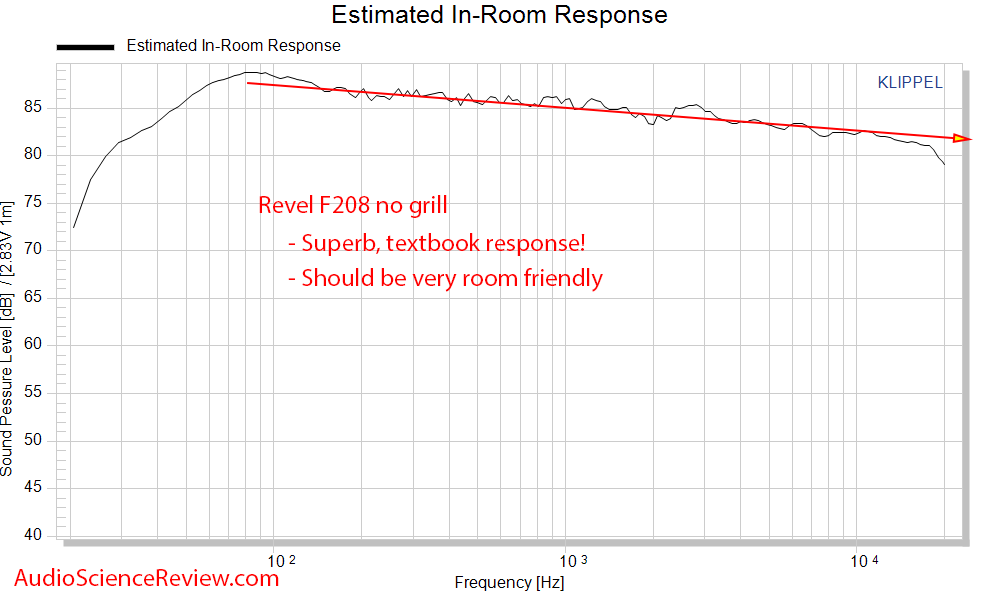
How did you phase align your speakers and the sub(s)? Very small timing differences could make major dips and peaks around the XO area.
Once the sub/speaker integration is optimized, your method to correct them altogether is robust. Lately I use varying degrees of correction in the frequency band for better accuracy than inversion but the concept is similar.
Once I changed the crossover to 60 and re-measured, the resulting filters are satisfactory; i.e., they sound natural but corrected in the frequency domain.
I haven’t much messed with phase (because I don’t understand it very well), but I have time-aligned the speakers based on the REW measurements, and I’ll revisit the topic of phase after I have a bit more time to digest
Is there a way to run a sweep as a file from within Roon? I’d like to test how effective the convolution filters are by measuring the sweep while they are applied.
In REW signal generator, select to save the test signal to a file, not forgetting to tick the option to include a timing blip.
Paste that into a Roon watched folder, and bada bing bada boom, there you go!
Just mute the output on your PC when you play back the tones in REW - it will still try to play the tones locally, but it will “hear” the tones coming from Roon (i.e., your main system).
I got this part, my confusion is, how to take a measurement. The only options in the measurement window are for REW to play a tone that it generates or from a file.
I think @jhwalker just solved this part. - Thanks, this seems obvious now that you say it.
I’m surprised this isn’t an option, and that the solution seems to be a workaround.
Thank you both!
Not correct, I’ve done it hundreds of times.
You should be able to read up on it in REW’s help, since I’m not at home to give you the rundown…
Open REW’s help with F1 then search for “Measuring with a timing reference”, read and continue through “Measuring with file playback” - says it all.
Step by step quick guide:
Click “Measure” to open measurement window.
Select “SPL” and enter data corresponding to your previously exported measurement file.
Select “Timing: Use acoustic timing reference”.
Click “Start”, start Roon playback of measurement signal, and away you measure.
1 Like
Again: if you’re measuring from a laptop or whatever, the test tones will playback locally on the laptop, and there doesn’t appear to be an option to tell REW the tone will be coming from another source. So you do need to MUTE the local output so it will “hear” the timing reference coming from your main system (e.g., from Roon via your server), not from your laptop.
I’ve got a separate Roon server PC and the timing blip and sweep don’t additionally play on my remote/REW laptop, if I proceed as posted/described in the help file.
What REW version are you using?
5.20.14 here, but can’t remember it ever being different before.
THANK YOU.
I tried it again (same REW version), and I must have been doing something wrong before, because this time it worked exactly the way you described
So you select the playback “From File” option, choose the file you are going to play back (had to drag / drop from my Roon server share, because it wouldn’t let me navigate directly to a network share), then start the measurement in REW, then switch back to Roon and select the same file for playback. REW does NOT play the file locally, it just listens for the input (in this case, from Roon) and compares what it hears to the file loaded.
Thank you for sticking with us and letting us learn something from you!
1 Like