Creating convolution files for Roon in the new Room EQ Wizard (REW) with Inversion

Huge thanks to OCA for the newest video about updates on the VBA-filter. I think this is version 3 now? I’ve been using the VBA-filter for the past six months and it has worked great. But I used the earliest version where I used the -4dB boost for the correction impulse, instead of the +4dB boost described in the v2 video. +dB caused too much boost on the low bass/infra bass in my system, making the sound slightly muddy overall.

Now from the new video I got the idea of using the low shelf of -6dB in combination with the v2 VBA-filter and was able to lower the low end boost to gain clarity to sound and still filling up the null around 45-60hz nicely and knocking down the biggest problem in my room, which is the mode peak at ~36,5hz. Now I use the v2 filter with +3dB boost and it sounds great.

1 Like

My Impulse Graph does not look correct. I do not see the acoustic reference peak.
I am using Windows 10 on a Surface computer attached by USB to a Denafrips Ares II DAC.

I’m trialling Roon running Roon Server on a late 2012 Mac Mini quad-core i7, 16Gb RAM SSD HD. The Mac Mini is connected to an ASUS RT-AX86U wireless router by ethernet and I’m using an M1 iPad as Roon Remote. I’m using Roon to facilitate streaming local files (Synology NAS) and Qobuz via Wifi to an Auralic Altair G1. All good. Everything works well and I like what Roon brings to the table, especially since it can run convolution filters, which Lightning DS (Auralic’s app) can not accomodate.

I’ve used OCR’s video “Digital Room & Speaker Correction Workshop Part II - All New FIR filters” on YouTube to create Left Right Frequency Domain EQ filters and Phase Inversion filters as per the video (I think) and the combined convolution filter will play nicely (and sound great) via Audirvana running on my M1 MacBook Air (streaming to the G1) but Roon on the older Mac Mini is having problems.

Roon loads the zip file okay and the seems happy with it, the progress bar of a song starts and moves along but there is no sound coming out of the speakers, even if I wait a couple of minutes for latency :roll_eyes:

I’ve made sure the IR windows are as small as possible and even tried exporting as 1K files, all to no avail.

If I just produce Frequency Domain EQ filters without the Phase Inversion filters added in, it works fine via the Roon/Mac Mini combination, and sounds very good. But just not quite as good as both filters…

I know the filter works (via Audirvana Studio on an M1 MacBook Air), so I suppose my (possibly redundant) question is whether the 2012 i7 Mac Mini just isn’t up to the task? And never will be?

BTW - Thanks so much to OCR for producing the videos and all the assistance he has provided people on this site, and others. Much appreciated.

Kind regards, Peter.

So, it turns out I missed a step right near the end of the DIGITAL ROOM CORECTION WORKSHOP II video :frowning:

Even though I used the L & R window tabs in the Impulse response graph of my filters to drag them in to a shorter “trimmed” left/right window time that didn’t affect the shape of the filter graph, I didn’t take the final step and go to Overlay>Measurement Actions and click “Trim IR to windows”.

When I did this the Impulse Length of each left and right filter went from 4194307 samples, 87.38s to 8192 samples, 0.17s and the filters work seamlessly on the i7 Mac Mini :slight_smile:

It obviously pays to triple check all the steps involved…

Thanks, again OCR. Sounds fantastic!

image

1 Like

Very very interesting discussion.
How can I use rePhase with Mac Os?
And if I use rephase on windows can I then apply the results in Roon for Mac?
Thanks

You‘d need to install a virtual machine to do that, since it‘s windows only afaik.

Of course, since you’re using the resulting .wav impulse file.

1 Like

Thank you very much

HI there, i’m trying this method for the first time. I’ve completed all steps but when i try to export, i get this error: “Impulse response is different lengths , export halted” . What am i doing wrong?

Add images


image

My guess is that you‘d need to check/redo the procedure, making sure to have entered the same values for both channels when applying windowing.

Many thanks to everyone who contributes to this thread. Newbie here and I ran into an issue at the last hurdle, exporting to WAV. I am getting the error “The selected measurements have impulse responses with different lengths, export halted” . Any clue where I went wrong, or how many places :slight_smile:
Edit… I went back and did step 20 again and set the IR Window to 85.3 MS, which seems to be where my impulses start, but I was originally able to set the (L) Left width to 125 as directed, When I tried to do (R), it would not let me go before 85.3… I exported resulting 85.3 inversions to wav, but when I applied it to Roon, the levels dropped and it sounded like I had Treble turned way up.
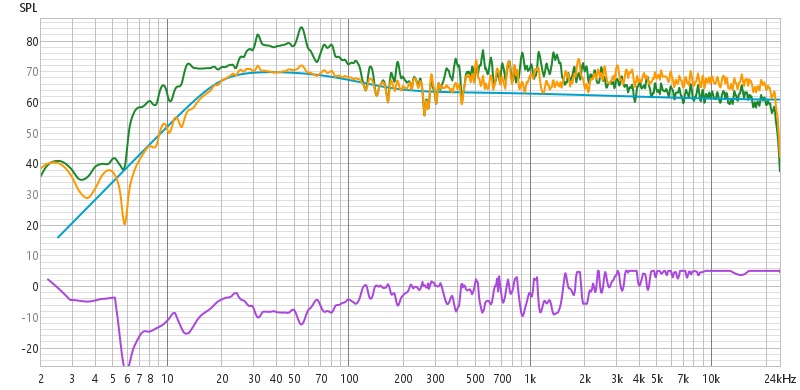
I went on to “view” the resulting inversions applied to my original captures and sure enough they don’t look correct. The image shows green(original R), purple(R inverted), orange(R corrected). Clearly the inversion reduced frequencies below 200hz and increased above 500hz. I must have messed up somewhere. Its also not “flat”
Comments?

Excellent thread, and thank you @OCA for your videos. Is there a way to show my appreciation that does not give youtube 30% of that appreciation?

So I have a two questions for anyone that can answer them:

Setup:
REW 5.31.3
My room is 20.5’ x 20 x 7’11" treated with diffusion on front and back wall and some absorption in the back right corner.

My speakers are an open baffle 4 way full range system (GR Research NX-Tremes with Triple Threat open baffle subs) controlled by dsp (Danville dspNexus).

Measurements are taken at 192kHz (native resolution of the dspNexus).

I am able to load FIR and PEQs filters (plus a myriad of other FIR decimators and interpolators and crazy audio engineering stuff I do not yet understand) to the dsp using a program called AudioWeaver.

I currently am running your VBA filter with around 5000 taps per channel into a long FIR module with a little CPU left for PEQs, if I decide to add them.

The biggest advantage of this is that my analog sources benefit from some room correction and (as you said in your video) “…makes the next filter’s job easier”.

After loading that, I built another VBA filter (F1) and inversion filter (F2) that I loaded into Roon.

Disclaimer:
My technical knowledge can be equated to that of a monkey with a mixing board. So if at any point it sounds like I know what I am talking about, it is purely by coincidence.

Results of following @OCA 's process:
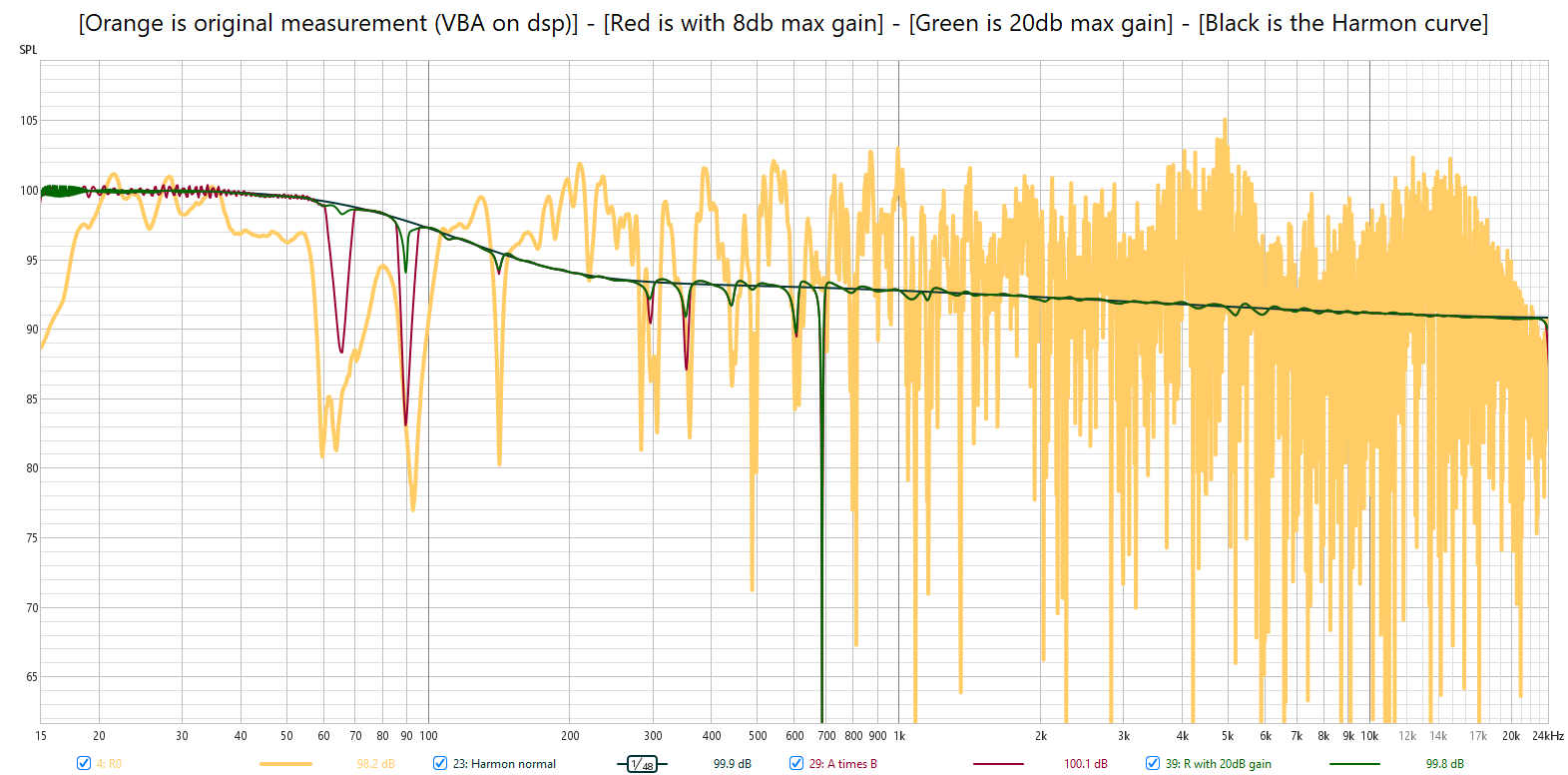
I managed to take care of my massive dips, but still had a serious gap (9.5Hz) between 60Hz and 70Hz and another 8Hz hole at 90db. I found that if the max boost (formerly known as “regularization”) was bumped up to 20dB from 8dB when creating the 1/A I was able to really flatten it out.

Question 1:
Is that 20dB boost bad? I have not melted any drivers yet, but I do know in IIR such shenanigans should be avoided.

Question 2:
Is there an effective way to to create a low tap filter (max 6000) that can target those dips more directly? Maybe exporting the IR response at a lower sampling rate like 44.1kHz, re-importing it and saving the coefficients to a text file?

Question 3:
Should I be worried about those fuzzy traces between 18Hz and 40Hz?

Thank you!

Big notches in the bass are usually caused by cancellations due to room modes, reflections and L/R speaker interaction.

Before addressing a single channel, have a look at the mono plot with both L&R channels playing. It may be much less of an issue and you may be able to address it more easily in the opposite channel.

If it’s a cancellation, you can’t just EQ your way out of it by adding gain - it’s like trying to fill a bucket with a hole in the bottom. 20 dB is A LOT of extra amplifier power (x 10!) and you risk burning a driver coil or an amplifier’s output stage.

Cancellations can also sometimes be ameliorated by playing with individual speaker/driver phase. I’m not sufficiently well-versed in REW to know if it can be done in REW (I’ve done it in Acourate, with help). Perhaps @OCA can shed some light?

That would require the use of another application called Rephase …

I’ve tinkered with REW/Rephase on passive x-over systems, but don’t know the limits of their capabilities in this scenario. I’m using Acourate on fully active setups now, so phase control can be applied at the individual driver level without the hindrance of a passive crossover network which can introduce complex phase changes over a fairly narrow frequency range.

I am using the virtual bass array filter to try and cancel the room modes. My understanding is that there is no magnitude data in the FIR, so I feel less worried about melting drivers, unless of course I am totally wrong about that and should be worried.

I do have an overall -3dB set in the DSP to help compensate any crazy 8dB PEQ boosts I may have added, and I tend to lower my target curve a few dB to limit the actual boosting of frequencies in the FIR filters I build. How much that matters in the FIR world, I do not know. Maybe someone on this thread could shed some light on the subject.

The combination of the 5000 tap Virtual Bass Array and a few PEQs I added to the DSP is working well with my sources (video, vinyl, R2R) that can not take advantage of the convolution filters in Roon, but when I add in the OCA convolution filters, the sound stage expands significantly in all dimensions.

At this point, I am just trying to get the best sound out of my analog sources through the DSP and not start my speakers or amp on fire trying to perfect the convolution filters in Roon.

VBA filter is just magical, I’ve used VBA for years on my setup. Many thanks to OCA for the tutorial. I did try to fix the whole frequency spectrum also but it sounded unnatural to my ears. I’ve tuned the VBA to my liking and there’s pretty much endless possibilities with it. The default settings were too much but I found the best settings by experimenting and carefully learning the process.

@Graeme_Finlayson
Could you please comment on both the measured and subjective improvement this active crossover brought to your system? Would you recommend something different if doing this again? Sorry if I missed this elsewhere.

Hi Henry, I gave some subjective impressions over on my build thread:

Soundstage and clarity improvements are immense compared to passive.

With a passive crossover setup, you can only really apply fairly broad corrections to an individual driver’s response and phase response is at the mercy of the combination of the crossover and driver. Crossover slopes are limited too. Steeper slopes require many more components and additional notch circuits may be required to compensate for non-linearities in a driver.

With an active crossover, you can fully linearise each individual driver in both amplitude and phase. You can precisely time align the drivers too by delaying an individual driver’s filter relative to the others. This means that any signal which is split between drivers will have perfect amplitude, time and phase coherence. Crossover slopes can be made very steep to avoid non-linearities e.g. resonances/cone break-ups etc.

The additional benefit with my setup is that the filters are all linear phase

I won’t ever build another passive speaker. Actives are so much better in every respect. Yes, you need more amplifier channels, but you need less power per channel, so overall cost isn’t that much different IME. No need for expensive crossover components either.

Changing a crossover is simple too. Once you have the individual driver responses measured, it’s easy to make changes to the filters. A few more measurements and you can have an entirely new crossover designed, measured and implemented in just a couple of hours.

In my setup, I can also seamlessly switch between filter sets to compare them.

1 Like

I could not agree more regarding active vs passive crossovers. Getting the timing right really opens up the sound stage putting instruments where they are supposed to be.
With the amount of high quality amps out there at very reasonable prices, powering the speakers is not expensive at all. With my setup I can use different amplifiers for woofers, mids and tweeters by adjusting the amplifier gains in the dsp so they match up and work as one. When I started on this adventure, I was using a Macintosh for the tweeters, a Rotel (and not a very good one) for mids and a Topping for the woofers and of course the servo subs have their own plate amps. It sounded incredible. I have since moved to all topping PA5+ connected directly at the speakers which enabled me to get rid of the speaker cables all together. Granted, my speakers are open baffle making that connection a lot easier.
As pointed out, you can improve on the crossover implementation. Not to mention a lot of “high end” speakers on the market do not use the best of crossover components limiting a lot of the speakers potential.

1 Like

Interestingly, trying to time align drivers physically by playing with baffle layout can be an exercise in futility. The acoustic centre of a driver rarely matches its physical centre - you need to find the Zero Delay Plane (ZDP), which is a relatively trivial process trivial in Acourate.

I’m running amps that are all the same, albeit the gain settings are a little different to account for different driver sensitivities. It makes the overall gain loss lower in the active crossover.

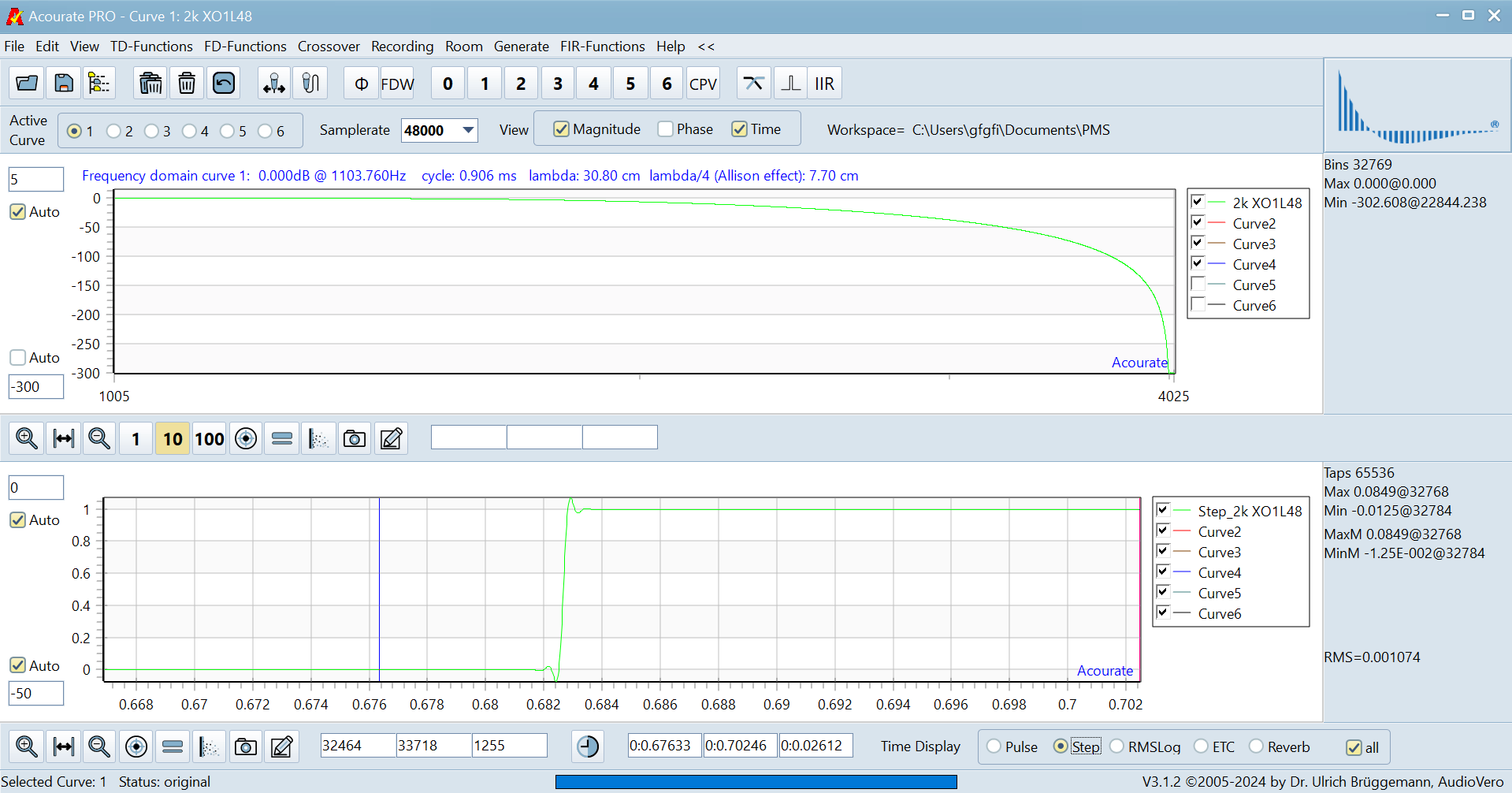
The filters I’m using are Uli Brüggemann’s proprietary UB11jPol filters - 300 dB per octave with almost no ringing:

1 Like