No Audio for Some FLAC Files

I hope this is an appropriate location for this thread…I decided to rip all of my CDs to disk and I’ve been using dbPowerAmp CDRipper to rip them in FLAC format (I haven’t added them to Roon yet). I’ve discovered by chance that some of the files have no audio. It seems kind of random. From what I’ve seen it usually seems to be all the files for a CD rip, but not always. Sometimes it’s just a few songs from the rip. The logs from the rip process aren’t showing any errors, the files are sizes that I would expect, and I’ve tried playing them using in different programs (i.e., Foobar2000, MusicBee, VLC), but there is no audio for any of the identified files. I’ve run AccurateRip against my library and it’s not showing any issues for the affected files. When I try to play the files I don’t get any errors, I just don’t have any audio. The settings for the rip and the playback are consistent, which is why I say that it seems random.

Has anyone run into such an issue before? It would make more sense if it were all of the files, but it seems to be a select few. That’s the other problem. This ripping process is a huge undertaking and I have no idea how many files have actually been affected. My next issue will be to see if there is someway to identify all of the affected files. I’m stumped and it seems that those on the dbPowerAmp forums have no idea either. Any suggestions would be greatly appreciated.

Thank you.

I’ve not encountered this with dbpoweramp before.

If you rip an affected CD again does it do the same, same tracks with no audio?

Try ripping to a different lossless format and see what happens.

Try ripping an affected CD via another software, what happens?

I’d uninstall dbpoweramp and then perform a fresh install.

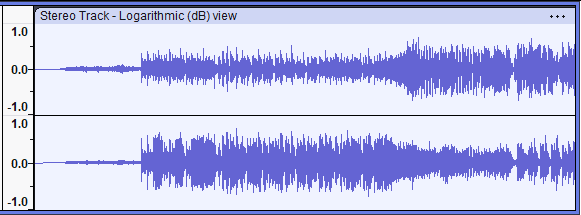
If you open a file with Audacity, is music data inside?

1 Like

have you tried playing them on different computers?

I haven’t tried Audacity or different computers. I did try ripping to ALAC, but that was through iTunes and not through dbPowerAmp.

It’s not clear to me how anther format helps, as I don’t intend to switch formats at this point. However, I will try the second computer as well as Audacity, though I know nothing about it. I will also try re-ripping to FLAC using dbPowerAmp as well as Exact Audio Copy. (EAC). Hopefully resolving the problem is as simple as re-ripping the files, but I’d also like to know why I ended up with no audio and yet no errors in the logs or in playback. If there is something that I can do differently then I’d like to know. I’d also like to know if the files that are producing no audio can be repaired, and if so, how.

Knowledge is king. It’s much better to know why you’re doing something and knowing that it will work than to just try something different and hoping that you get a different outcome. It’s my software engineering brain. I can’t turn it off. I always want to know why. :blush:

@Suedkiez On the subject of Audacity, since I have no knowledge of the software, what exactly am I looking for? You mentioned “music data”, but what exactly does that mean?

Thank you all for your comments and suggestions.

Normally after opening the file there should be a wave form:

Just wondering if it’s there.

1 Like

Thanks. That helps.

I tried to play one of the FLAC files in Audacity to see if is showed the music wave form when played. I know the assumption was that if there is no wave form then there is no music data. There was no wave form, but I opened the file in a text editor. Of course most of it is binary converted to ASCII, so you can’t really read much, but I was able to make out what I assumed what the FLAC header, showing the song name, song number in the CD, number of tracks, number of discs, etc., so I wouldn’t go as far as saying there was no music data. The track just doesn’t play. I never finished setting up another program to rip CDs, but it did re-rip the disc using dbPowerAmp again. This time the ripped version plays

It’s still driving me crazy not knowing what the problem is with some files not playing. It also still bothers me that after all of my efforts to create the FLAC library thus far that I don’t know how many bad rips I have that won’t play. Since there were no errors in the rip, I’m not even sure that I could create some sort of software workflow to identify the bad files, as I don’t know what to look for.

If anyone has an further ideas on how to identify the bad files or to fix them, please let me know.

1 Like

Try a different CD drive

To me this seems like dbpoweramp having an off-day, but that doesn’t help you find the ‘bad’ rips. However… could you give a bit more detail (eg are you ripping to a local drive, copying to a network drive, settings… ) about your workflow?

I use EAC (mostly because I’m familiar with it… ) which rips a cd to wav before repacking to flac. I’m speculating that dbpoweramp does something similar, and that something (eg copying a file before the write is complete) about your workflow is breaking the process.

Someone on the dBPoweramp forum had this issue and seemed to resolve it:

2 Likes

Seemed to, yes. Not clear why changing that setting fixed it though. It sounds like something that should work, even if it’s a bit pointless. And OP only has the problem with some files… :man_shrugging:

I can only assume it is a bug in that version of dBpoweramp especially if the logs look OK and Accurip matches (don’t know if this was confirmed by OP?).

Poking around on the dbpoweramp forum - there are a few similar reports, but nothing conclusive that I’ve found. Hmm.

This may do the trick. Do the song titles or album names contain question marks ? biggest problem is ? but there may be other symbols. I’m guessing that the individual songs missing end in a ? and the blank albums are because the album title (or maybe band name) contains or ends in a?

If this is the case, Manually delete the ? as you set up import and then check your import or rip settings to rename ? to nothing. I also change # to no (abbreviation for number)

Good Luck,
Gordon

Might be obvious, but have you checked all the rip srttings in dbPowerAmp? Ive been using it for years and some time back discovered that the default settings are for middle level error detection and speed not accuracy, they are fine a lot of the time, but for an old CD, they need to be tuned to ensure you are getting an accurate Rip

If you set it up as a roon library then Roon will highlight corrupt files. It does for me anyway.

@mcraghead - Is this a correct summary?

CD is recognised by dbpoweramp
Metadata is fetched from online sources
CD is read and a file is created
File is the correct size and contains the correct metadata
All samples in file are zero…

ie it all works, but the sample data read from the CD is not finding its way into the final flac file…

Were you able to try re-ripping one of the ‘failed’ CDs?

Just out of interest, are you ripping CD’s to Level 5 encoding?

Sorry I’ve been absent this week. My apologies.

Let my try to address all of the suggestions presented…

I’ve been using multiple CD drives throughout the ripping process. However, I don’t really know if the problem occurs with both drives or not. I use one drive more than the other.

I did try Audacity to see if there was any wave form information when I tried to play the FLAC rip. There wasn’t. However, I opened the file in a text editor and while most of it is binary and can’t be read in the traditional sense I can make out what I assume if the FLAC header with some information about the CD title, track title, number of tracks, and the track number of the track in the file. So I wouldn’t go as far as saying that there is no music data, only that for some reason it is not successfully read.

I did try to play a “bad” file on another computer and was unsuccessful.

I did re-rip one of the CDs and that new file plays fine. So re-ripping is an option.

Workflow. Hmmm…My workflow is putting the CD in the drive and pressing the Rip button, but I guess the setting that I use would count as workflow:

  • I’m ripping to uncompressed FLAC which is saved to a local hard drive.
  • It’s set to do a secure rip, which means that it tries to recover from any errors.
  • On the first pass it verifies the results via AccurateRip, which, from my understanding, compares the data against other rips in their database to see if they match.
  • I do not limit the drive speed on subsequent passes.
  • I have Ultra Secure Rip enabled, which tries to get a clean rip multiple times.
  • The minimum number of passes is 3 and the max is 6, though it will stop after 2 successful passes.
  • The speed is set to vary for each pass.
  • For bad frames it will try to reread that frame up to 34 times.
  • For bad frames the speed is set to maximum.
  • The read cache is set to 1024.
  • The read cache is set to clear with FUA (I don’t know what that means).
  • It’s set not to abort that rip.
  • It’s also set to write the most detailed logs for each rip.
  • That’s it.

I downloaded EAC, but didn’t get around to configuring it after I discovered that re-ripping seemed to resolve the issue. From what I can tell from documentation and the logs dbPowerAmp doesn’t use a intermediary file format like WAV or anything else.

I saw the post from the guy on the dbPowerAmp forum that had a similar issue, though it’s not the same. He didn’t have audio on any of his rips. There was a bit count setting that he changed that seemed to resolve the issue, but again, his issue is different than mine. I did reach out to him though, as I don’t know where that setting can be found. I saw a bit count setting, but it was for DSD, so that wouldn’t be applicable, as FLAC uses PCM. Hopefully he will respond.

Yes, I get nothing of note from AccurateRip. Everything looks good.

Question marks don’t seem to be an issue in the titles or album names.

I was holding off on setting up Roon until I finished creating my library, but maybe Roon will identify those files with no audio. That would be great. I’m guessing that I’m about 1,500 CDs into the process with about another 1,000 to go. Ugh!!!

The CD is recognized by dbPowerAmp. I wouldn’t have the FLAC file otherwise.
I don’t know much about the metadata process. At least some of it is collected from online sources, but I don’t know what, if anything, is retrieved from the CD itself.
The FLAC files are of a legitimate size. I don’t know if they are “correct”. They aren’t really small sizes if that is what you mean.
What do you mean by “samples” in the file are zero? I’m not ripping to a single file. There is a folder for the artist, then a folder for the CD, and in the CD folder there is a separate FLAC file for each track. Each of those tracks seem to be of a legitimate size. In that CD folder there is also a Folder.jpg file for the album artwork and a log file for the rip. I have the most detailed option for the log data. I shared it with the moderators on the dbPowerAmp forum months ago, but there was nothing of note.

I’m ripping with zero compression, so compression shouldn’t be an issue unless they are mishandling zero compression. If they are, whatever they are doing isn’t wrong all of the time.

I hope I didn’t miss anything or anyone. I appreciate all of the suggestions thus far.

I suspect that the team that has created dbPowerAmp has either possibly interpreted something in the FLAC spec that causes the file that they have produced to sometimes not be able to be read by any of the programs that I’ve used thus far not to produce audio in some cases, or there is actually a bug of some sort that only makes itself know sometimes. If the latter, then I suspect that it could be some sort of timing issue somewhere in their file creation/encoding process. Again, it doesn’t happen all of the time which makes this frustrating.

Since I seem to be able to get “good” files if I re-rip the CD, my main goal at this point is understanding and knowledge about what happened. However, at the same time I think at this time I would have to dig into the FLAC specification to get anywhere with that or find someone who has intimate knowledge of the FLAC specification. The likelihood of either is slim. I have written software for over 20 years and reading specifications is a talent that I don’t have. It’s like reading a bedtime story. I might as well get a pillow and a blanket.

Thanks again to everyone.

2 Likes