What happens if you press the "Select a different Roon Server" button?
· I don't see Roon Server.
Please try to restart your network setup by unplugging, waiting 30 seconds and then replugging in your networking gear.
· No, the issue remains the same
Please select how you've connected your Roon Server to the internet
· Roon Server is connected by *Ethernet*
Have you checked your firewall settings to ensure that Roon is allowed through?
· Roon still won't connect even after checking this aspect
Have you verified that Roon Server is on the same subnet as your Remotes?
· My Remotes and Server are on the same subnet and I still can't connect
Sometimes the issues can be resolved with a reinstall of your Roon Remote app. Let's try to perform a reinstall and see if it helps.
· I've reinstalled the Roon Remote but it did not help
What is the operating system of your Roon Server host machine?
· Roon on a *NAS* (Synology, QNAP, ASUSTOR)
Select any of the following components that are present in your local network setup
· None of the above
Describe the issue
After last update yesterday Roon Server can no longer be found. Looking into the Synology Server I see next to the Roon app the message that Roon is not compatible with Synlolgy DSM. What needs to be done to fix this?
The Roon Server package no longer works on older DSM versions. Please update to a current DSM version or switch to the official Docker image to run Roon Server on your NAS. See also:
The Synology package itself is the issue here. Roon Server on NAS is no longer supported on older DSM versions, and DSM 7.0.1-42218 Update 7 is one of the versions that can trigger this incompatibility.
The path forward is to either update the Synology to a current DSM release that supports the package, or move to the Docker-based install. Our Installing RoonServer on Synology with Docker guide walks through the supported container setup for Synology and is the best place to start if you want to keep Roon running on that NAS.
If you can, let us know whether you’d prefer to stay on the NAS and use Docker, or whether updating DSM is an option for you. That will let us point you to the right next step.
Many thanks @noris and @BlackJack for your immediate reply. I meanwhile updated to DSM 7.3.2 on my DS918+. According to a quick research it should be compatible with the roon server. Unfortunately I still have the same unchanged status: Roon Server stopped, even after server restart. Do I miss anything what else needs to be updated or restarted?
Forgive the miscommunication. Long-term, Roon will only be supported in Docker on NAS machines. Migrating to the database to a new, docker-based server would be the correct procedure here:
Many thanks for your support so far. I now have some time for switching to Docker. I quickly studied the above instruction and have some questions before starting:
The instruction says I should create a back-up of my library. Currently the roon server cannot start, since not compatible with the DSM Version. This means I cannot access Roon and create a back-up.
How would I create a back-up before switching to the docker version? Is there any work-around?
How should I proceed in order not to loose the library?
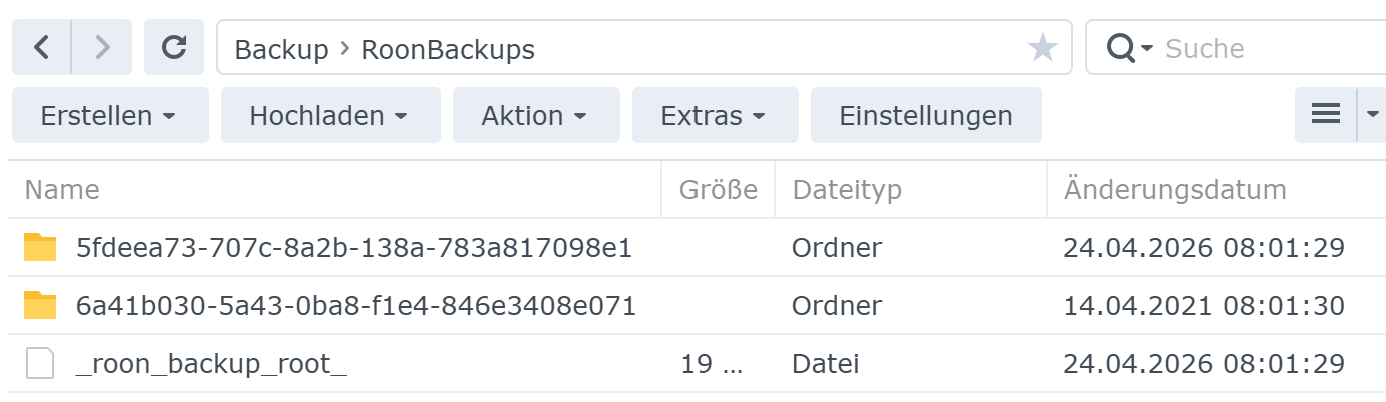
I checked my Back-up folder. Would this be the right back-up folders I could use? They contain lots of subfolders (with two characters each). The first folder seems to be pretty much up to date.

DDPS is spot on! Those folders with the long strings of characters (like b5f396f7...) are exactly what Roon’s automated database backups look like. Because you already had scheduled backups running, you do not need to worry about accessing the old native app to create a new manual one. Your library history, playlists, and edits are safe inside that most recent folder.
When you are configuring your Docker container (whether using the Synology Container Manager UI or a Docker Compose YAML file), you need to ensure the container has “read” access to this specific backup folder.
Map the parent folder that contains these backup strings to a directory inside the container.
For example, in your volume mappings, link your NAS path (e.g., /volume1/YourBackupShare/RoonBackups) to /RoonBackups inside the Docker environment.
Follow the migration guide to map an entirely new, empty folder for your new Roon Server database (usually mapped to /Roon or /app/data inside the container). Do not point the new container’s database path directly at the old native app’s database folder. You want the container to start with a clean slate before importing the backup.
Once your Docker container is up and running, open the Roon Remote app on your phone, tablet, or PC.
Select your newly discovered Docker-based Roon Server.
On the initial setup screen (before you start adding music folders or logging in), look for the Restore a Backup option. It is typically located near the bottom of the screen.
When prompted for the location, browse to the /RoonBackups folder you mapped in Step 1.
Roon will read the directory and present you with a list of available backup dates. Select the most recent one.
Once the restore process finishes, Roon will restart the container. When you reconnect, your entire library, metadata edits, and settings will be exactly as you left them!
Many thanks for your support! I just successfully migrated to Roon on Docker. All the instructions worked well.
The only thing which is different: my local music albums now have an Added Date per today. Since my album sorting usually is by added date, they all appear first, followed by the qobuz albums according to their original correct added date. If there is any remedy, please let me know.
I am thrilled to hear that the migration to Docker went smoothly overall! However, I completely understand how frustrating it is to have your “Added Date” sorting thrown into chaos.
This happens because the internal “address” of your music files changed. To your old DSM application, the files lived at a specific Synology system path. To Docker, they default to living in the /Music folder. Because the path changed, Roon assumes your old files were deleted and that you added a massive batch of brand-new files today.
We can get your original dates back by restoring the backup one more time, but we have to use a folder mounting workaround to prevent Roon from automatically scanning the files as “new” before we can link them properly.
Here is the exact process:
1. Adjust Docker Mounts
In your Synology Docker/Container Station settings, you need to adjust your volume mappings using your specific Synology paths (usually starting with /volume1/):
The Default /Music Path: Mount this path to a completely empty folder on your NAS. (For example, map host path /volume1/docker/RoonEmpty to container path /Music). This ensures Roon finds nothing when it first starts up.
The Additional Mount: Create a new volume mount for your actual files. Point this to your real NAS music folder on the host side, and mount it to a new path inside the container. (For example, map host path /volume1/Music to container path /MyMusic).
2. Restore the Backup
Open your Roon Remote, go to the setup screen, and choose Restore a backup. Because the default /Music folder is empty, Roon will load your database but won’t be able to scan any music automatically. This preserves your original “Added Dates.”
3. The Crucial “Edit” (Do Not Click Add!)
Once the restore is complete and you are in the Roon interface:
Go immediately to Settings > Storage.
You will see your old Synology music path listed, but it will be marked in red as “Offline” or “Unavailable”.
Do not click “Add Folder”. 4. Click the three dots (⋮) next to that Unavailable path and select Edit.
In the file browser, navigate to and select the /MyMusic folder (your additional mount with the real files).
By using the Edit function, you are basically giving Roon a forwarding address for the old database entry. Roon will instantly re-link the files, perfectly preserving your original Added Dates, playlists, and play history.
Let us know if this gets your library sorting back to exactly how it was!
Many thanks @vadim for these detailled instructions. Much appreciated. As a quick workaround I currently use a focus filter on storage location (qobuz library vs music folder). This might be even a better way for me to navigate my library. In this case the AddDate wouldn’t matter. In case I don’t get along with this approach I will follow your instructions. Thanks!