Ok, did completely fresh installation and now all seems good, thanks.
rooScreen works, i can access License Manager settings and license for rooWatch works ok.
Was not enabling RoonCommand this time (now that i think of it, i might’ve done that last time).
1 Like
Hi! I have exactly the same issue. Did You manage to Work it out?
This is my configuration
Estado del sistema rooExtend release: v3.5.3
Aparato: Raspberry Pi 3 Model B Rev 1.2
Número de serie: 00000000474874a7
Memory usage: 521Mb
Número IP:192.168.1.77
Conexión a internet: Si
Interfaz de audio USB: Behringer UFO202, Multi-Channel
Lector de CD: –
Pantalla de TV: DWE-HDM
RoonCommandLine: Unpaired
Tiempo de funcionamiento: 22 min
Temperatura: 56.4’C
Autoupdate: 2026/02/14 02:45:00
Repository: rooextend-prod-Pl
Dear @DrCWO,
RooScreen also doesn’t work in my Setup. I tried several reboots in different orders, nothing changed.
I’m running Roon R.O.C.K. on a Intel NUC 8th Generation, Modell: BOXNUC8i5BEK2
Systemzustand
rooExtend release: v3.5.3
Gerät: Raspberry Pi 4 Model B Rev 1.4 Seriennummer: 0000000000000000000
Memory usage: 588Mb
IP-Nummer: XXX.XXX.XXX.XXX
Internetverbindung: Ja
USB Audio-Interface: RME ADI-2 DAC (00000000), Multi-Channel
CD-Laufwerk: –
TV-Bildschirm: GSM-LG_T
RoonCommandLine: Unpaired
Betriebsdauer: 6 min Temperatur: 38.4’C
Autoupdate: 2026/02/15 02:24:00
Repository: rooextend-prod-Pl
The Clock is displayed, but when I play a song only “Roon” is shown. And in the Extension-Setup I see rooScreen, but no “Display/TV” appears in Display-Setup.
Thanks for your work and your support!
Best wishes
Aaron
Hi Aron,
I have an other user with this issue. Also a ROCK user. Seems to have something to do with the operating system of the Core. Please jump in here
So we can bundle all comments and suggestions regarding this issue in this tread.
Until now I can’t reproduce. I will enable my ROCK and see what’s happening.
Best DrCWO
 New Application Video available
As you probably know, you can playback your turntable by Roon and its DSPs with my Roon extension, rooPlay.
You might also know that you can record vinyl playback to a USB drive with rooPlay.
In my new application video, I’ll show you how to use this digitization feature to record a Clearaudio CA-TRS-1007 test record and obtain a frequency response graph that also displays crosstalk and distortion.
In the end, you will get a diagram like the one shown below, recorded with my Shure V15 Type V-MR and a new NOS stylus.
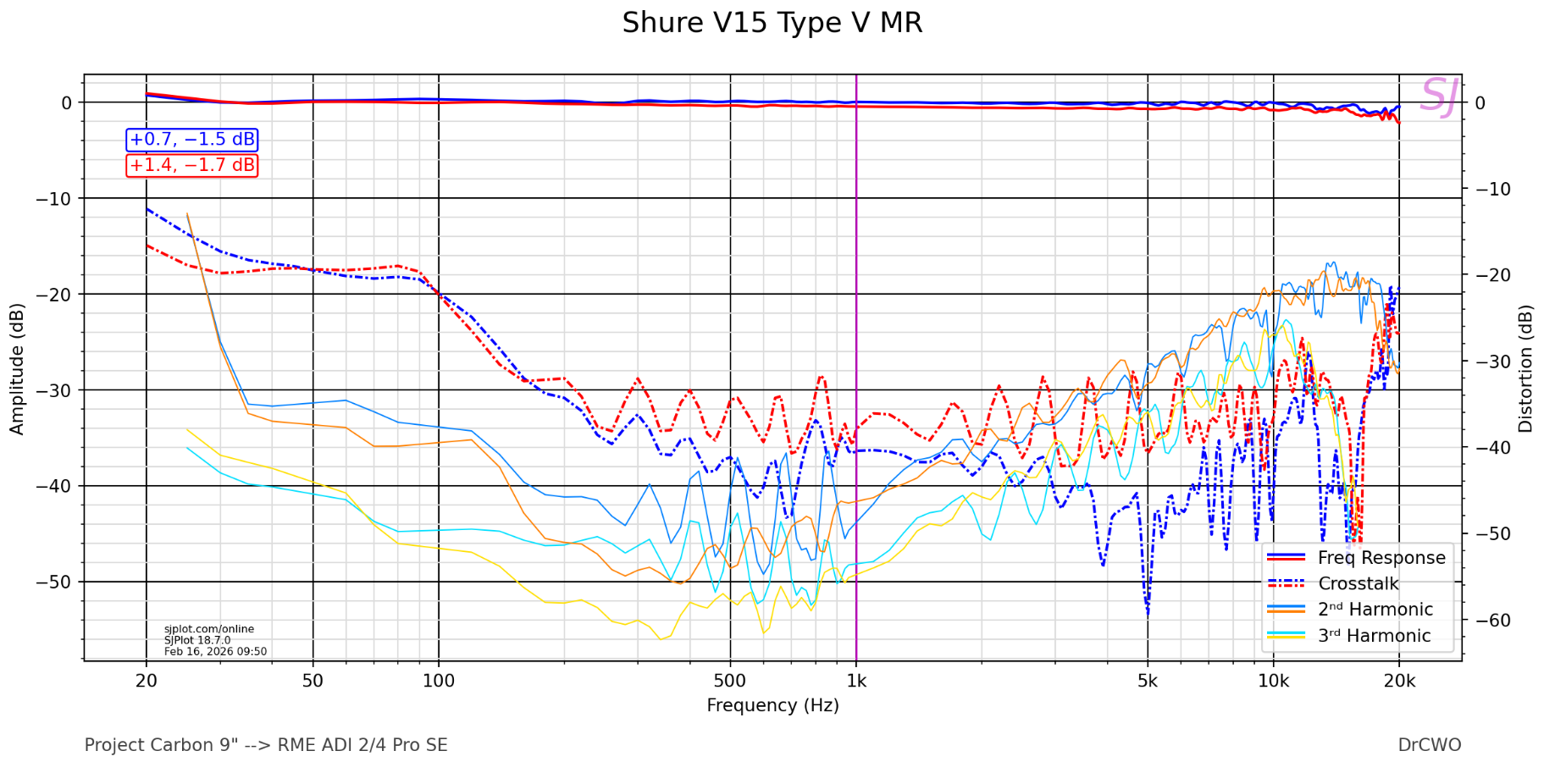
More information about the App used to create the graph you can find here. There is also a library with a lot of other measurements and explanations you can find here. You also can find an index of all measured phono cartridges if you click to “Spoiler: INDEX” at the beginning of this page.
Have fun
DrCWO
1 Like
Hey @DrCWO, I was thinking about RoonRelay that came out pretty recently. Have you heard of it? https://www.reddit.com/r/roonlabs/s/z3v88kKOLV
I’d pay good money to have it running on my RooExtend box. It would be so cool to have a simple solution to remote roon finally. What do you think?
Looks interesting and no, did not hear about it until now.
I ask myself if I may implement this scenario:
At home:
Roon Core plus one rooExtend Box
At second Home:
rooExtend-Box ONLY connected to a USB DAC.
iPad running Roon UI
Running Roon on the iPad I can sream to the USB DAC.
This is a Use Case that seems to be interesting to me.
Any idea if RoonBroadcastRelay will allow that 
Best DrCWO
I imagine it would. The Roon at home would be on the same network as the rooextend box with roonrelay.
Then you just need the iPad to connect to the same network. In theory this solves this kinda scenario!
This can’t be done using R.O.C.K. So a second rooExtend with the relay installed will be necessary.
I don’t understand why not? As far as I can see it would simply sit on the rooextend box and forward the packets?
I haven’t dived deep in this but you can’t install anything inside R.O.C.K. so I think you need two rooExtend, one at home one remote.
You don’t need that. Just connect the iPad to the same network. For example using Tailscale or a home von. Then it’ll be on the same network and talk to roon relay
I wonder why all this is necessary. I used Zerotier in iPhone and iPad and it worked for me and others too…
ZeroTier for remotely connecting to Roon - #17 by Occamsrazor
Fair question. Roon isnt broadcasting the packets correctly and is very picky about the kind of network/vpn it’s on. Roon Relay fixes that. Would be super convenient to have it included!
1 Like
Hallo DrCWO,
I have connected my cd player with the help of HiFime. In the settings of rooPlay I can choose Audio Interface and I can play a cd to Roon. Perfect.
But the option “Audio Interface” sometimes disappears and then I have to restart rooExtend to get it shown again. Is there a way to avoid the disappearing?
Regards Nico
It disappears if the Audio interface is no more recognized or shows it is not ready. This also may caused by missing digital input.
If you encounter it the next time please click the button
and e-mail me what you get there to info@definiteAudio.de
Please also send this after a reboot when you the it in the settings.
Best DrCWO
DrCWO,
Just started playing a cd, cd started, but after about 2 minutes there was no sound to the rooExtend. I look at the extensions and rooExtens was gone. So no possibility to click a button.
Do I have to start Roon again on the nuc to get the extensions visible?
Best Nico
Restart of Roon on the nuc, still no extensions visible. Powered rooExtend off and on again. Extensions appear again in Roon. rooPlay setting on Audio Interface again and cd is playing again through Roon.
After some minutes, again loses rooExtend the connection, in Roon the extension isn’t visible anymore. So I have to unpower the rooExtend again to get it fixed. But that is not the way to listen to cd’s. How do I get a stable connection between rooExtend and Roon?
Best Nico
Do you use ethernet cable or WiFi. WiFi did not work reliable transferring audio. Nevertheless even if rooExtend crashes it should recover automatically.
So please get the IP number and open the Service Page to get the system log. You can do this before it crashes just to see that it works.
After the crashes you can retry opening the Service page after some time. If this is impossible We have to debug with SSH. I will support you with this.
But please first try to get the system log after the crash.
There’s no need to boot the Roon Core.
Best DrCWO
DrCWO,
I use the ethernet connection. I have downloaded the system.log made yesterday after the crash at 15:17:02 hour. I saved the log and now have a html file and a folder with files: rooExtend_500.jpg, site.css and site.js. What is the file you need?
I tried to play a cd this morning and it doesn’t work. I check the setting in rooPlay and again there is no option “Audio Interface”.
I did the channel check and that works perfect, but the Audio Interface won’t appear. I know from the past that repowering the rooExtend wil get Audio Interface back again. Do I have to do that again?