As always: a huge thank you. Your guide makes RoPieee complete.
Thanks!
(and we should definitely start thinking about those beers  )
)
As always: a huge thank you. Your guide makes RoPieee complete.
Thanks!
(and we should definitely start thinking about those beers )
I’ve always wanted the guide to explain how RoPieee got its name.
It’s such a stupid story that I think it would not pass the audit
Those are the best kind. Not stupid! 
Ok consolation prize. How do YOU pronounce RoPieee?
It’s all about a bird iirc 
2024-05-12
Maintenance update.
2024-05-31
Extensive but minor edits for consistency regarding the 8g minimum size and the Pi5, among other things. There is a lot of repetition in the document which I glossed over when making recent updates, so this is an attempt to fix that.Let me know if I missed anything.
For clarity, I created a new FAQ section which includes the recent WPA3 announcement by Harry @spockfish:
2024-06-30
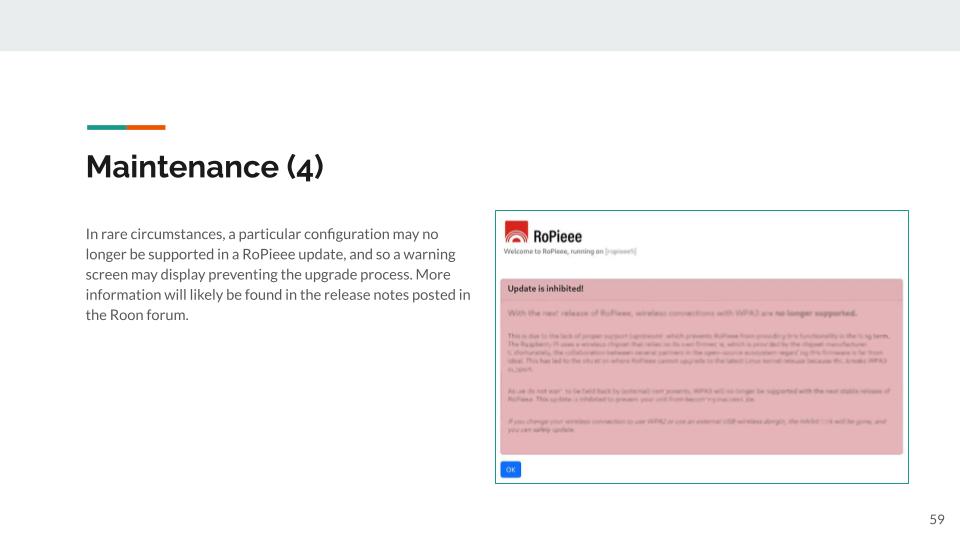
Updated FAQ regarding potential upgrade blocks due to unsupported configuration (as of 2024-06 release).
2024-12-17
Minor corrections, with thanks to @Frank_M .
2025-04-22
Explicitly state support for the Raspberry Display 2 based on Harry’s recent release (Release 2025.04).
@Nathan_Wilkes
Thank you Nathan for keeping the Installation Guide up-to-date.
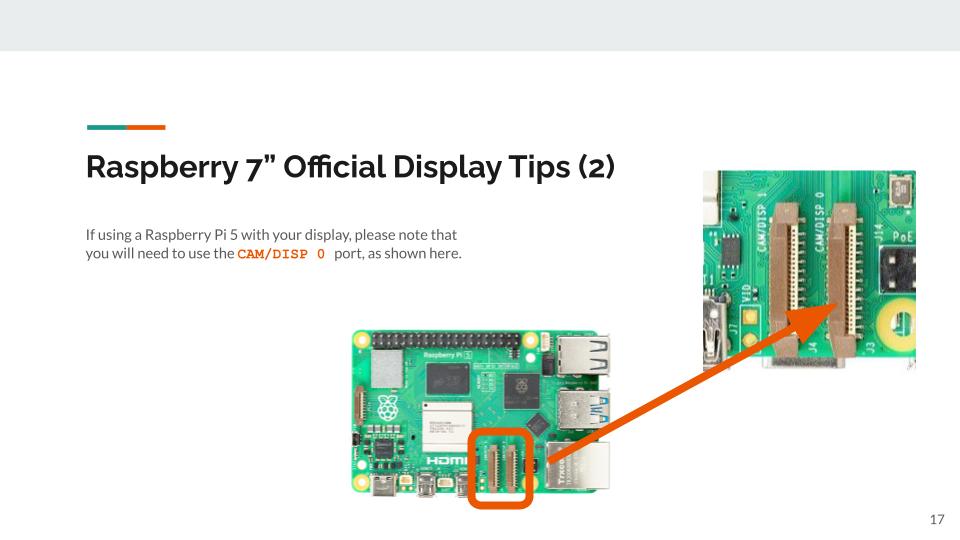
Is it possible to add the information that, on a RPI5, the display have to be connected on the ‘cam / disp 0 ’ connector. This is rather an important detail as otherwhise the display is not going to be detected by RoPieee.
Kind regards, Frank.
For the extra information:

spockfishHarry ten BergeRoPieee Author
Oh, one more thing for the Pi5 users… until this release RoPieee was not that critical on which display connector you use: it autodetected where the screen was connected to.
However, with the last build this changes: it must be connected to the ‘cam / disp 0’ connector.
As always, a huge thanks for your work.
The Install Guide is a crucial part of RoPieee’s goal to make things as easily as possible for users that ‘just want to listen to some music’, without being system administrator.
Much Appreciated!
Regards Harry
Good catch @Frank_M – I missed this information (and I do not have a Pi 5 to have experienced it myself). Will this be sufficient, do you think?
Perfect. Thank you!
2025-08-08
With @spockfish 's release of the new RoPieee online documentation announced earlier today, this will be the final version of the RoPieee Install Guide.
My profound thanks to all of the people that contributed to each iteration of the RoPieee Beginner’s Guide (introduced back in January 2018) and the RoPieee Install Guide, helping me make the guides easier to understand and (hopefully) more efficient to follow. I am excited by the improved documentation that Harry has created, and I hope that it helps more people enjoy music through RoPieee.
Just wanted to say thanks so much for your guide.
I’m a tech guy, but I still found your manual really helpful, valuable and enjoyable.
Thanks so much for this - I’m sure I’m not alone in finding this a very valuable part of the Ropieee experience!
Ditto, thanks Nathan. When I got into Roon some yeats ago it was your install guide that helped me repurpose some of my raspberry pi’s and get off an inconsistent chromecast experience. Thanks so much for all your hard work!