Hi! What’s not quite right with Roon?
· None of the above quite fits
None of the above quite fits
· None of these quite match
Tell us what's going on
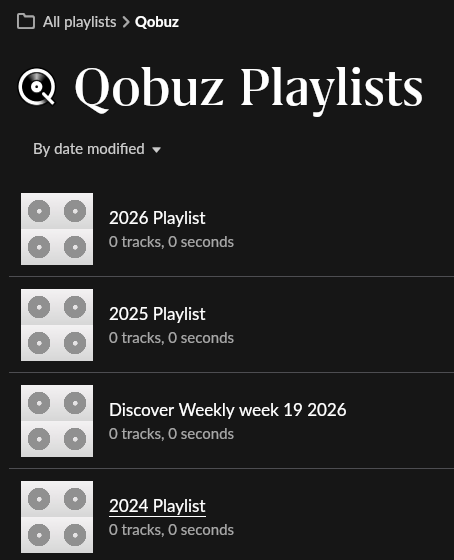
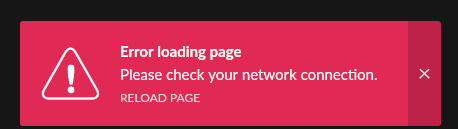
· Hi, I just found out that I can’t see my Qobuz playlist in Roon. Instead I get the message: "Error loading page. Please check your network connection"
It seems that similar issues occurred in the past with Qobuz and Tidal as well. The playlist are available in the Qobuz app. So it seems to be something with loading the personal data from Qobuz into Roon. It affects all personal Qobuz menus's in Roon (New releases, Playlists, and My Qobuz). In previous cases (last topic about similar issue in october last year) it hapenned after Qubuz changed something.
I'm using Roon Rock as a Roon server on a mini PC. The issue applies to Roon remote on PC and mobile app (Android). I rebooted the server but this did not change anything.
Tell us about your home network
· Fritz!Box5530, everything wired, no active VPN
Qobuz has a global outage. Has nothing to do with Roon.
I don’t think so. When I use the Qobuz app outside Roon everything works fine. It shows my playlists and I can play them.
Your issue was definitely due to the outage. Some pages in de Qobuz app seemed to work, but lots m did not. Anyway, the service appears to be up again. Problem solved 
Hi Mike. The problem still exists here. Playlists are all empty…
my guess is the service is getting back online. Give it some time. Since when do you have this issue? If your issue doesn’t go away it might not be related to the outage after all, and I have been talking out my … 
Same today… Today I logged out from Qobuz in Roon services, closed Roon desktop, rebooted Roon server, started Roon desktop and signed in again into Qobuz. I see the same playlists screen as shown above unfortunately. No issues with Qobuz webplayer and app. Sorry Mike 
I think I solved the problem. Apparently something went corrupted in my Roon Core (Rock). I solved it by deleting all files in the cache folder following the procedure in “Step 3” below.
Step 1: Force a Manual Library Sync
Before trying anything invasive, force Roon to actively scan your Qobuz account: [1, 2]
-
Open your Roon Remote app.
-
Go to Settings → Services.
-
Click Edit next to Qobuz.
-
Click Sync library now (or Sync Now).
-
Go back to your Playlists tab to check if they have populated. [1, 2, 3, 4]
Step 2: Clear the Authentication Token (If Sync Fails)
If a manual sync doesn’t pull them down, Roon’s current cloud token might be stuck. Logging out completely severs the link and forces Roon to fetch your full Qobuz profile from scratch upon logging back in: [1, 2]
-
Go back to Settings → Services. [1, 2]
-
Click Edit next to Qobuz and select Sign Out. [1, 2, 3]
-
Reboot your ROCK machine: Go to Settings → Setup → Find your Core (or access the ROCK Web UI via your browser) and select Restart Roon Server. [1]
-
Once ROCK comes back online, open Roon, return to Services, and Sign In with your Qobuz credentials. Your playlists will begin downloading instantly. [1]
Step 3: Clear the ROCK Server Cache (The “Nuclear” Option)
If playlists are still missing due to a corrupted local cache database on your ROCK drive, you can wipe the temporary cache folder safely. [1]
-
Open the ROCK Web Interface by typing your ROCK’s IP address into a web browser.
-
Click Stop next to Roon Server Software.
-
On a Mac or Windows PC connected to the same network, open your file explorer and access your ROCK network share (Type \\ROCK\ in Windows Explorer or smb://rock.local in Mac Finder).
-
Navigate to the Data/RoonServer/Cache folder.
-
Delete everything inside the Cache folder (Do not delete the parent folder itself).
-
Return to the ROCK Web Interface and click Start next to Roon Server Software. [1, 2, 3]
When Roon reboots, it will connect to Qobuz fresh, completely bypassing any old local data blocks, and re-import all your playlists cleanly. [1, 2]
Hey @Marco_Demon,
That’s great news, and thanks for circling back with the fix. We’re glad clearing the ROCK cache got Qobuz loading properly again, even if something had gotten tangled up locally. Enjoy the music!